

Version5.0.0
Introduction to MIDI
What Is MIDI?
MIDI stands for Musical Instrument Digital Interface. Despite the technical name, the idea behind it is very simple: MIDI is a way for musical devices to communicate with each other.
Instead of transmitting sound, MIDI devices send instructions that describe musical intent - playing a note, changing a sound, moving a knob, or starting a song. The receiving device then decides how to translate those instructions into sound or some other kind of action. You can think of MIDI as a language for machines. It carries musical intent, not audio.
The first public demonstration of MIDI took place in January 1983 at the NAMM show. The historic moment occurred when a Sequential Circuits Prophet 600 was connected to a Roland Jupiter 6 using an early MIDI implementation. When a key was pressed on the Prophet 600, the Jupiter 6 responded by playing the note - proving that instruments from different manufacturers could finally communicate with one another.
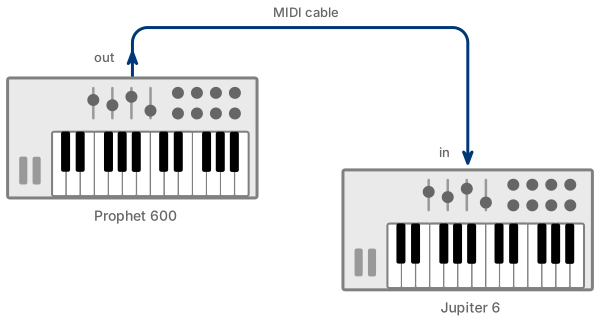
This milestone was not the result of a single company's effort. In the early 1980s, many major manufacturers were developing their own digital communication systems. Each solution worked, but only within its own ecosystem. Instead of continuing down separate paths, companies such as Sequential Circuits, Roland, Yamaha, Korg, and others chose to cooperate and merge their ideas into a shared standard. That collaboration ultimately gave birth to MIDI.
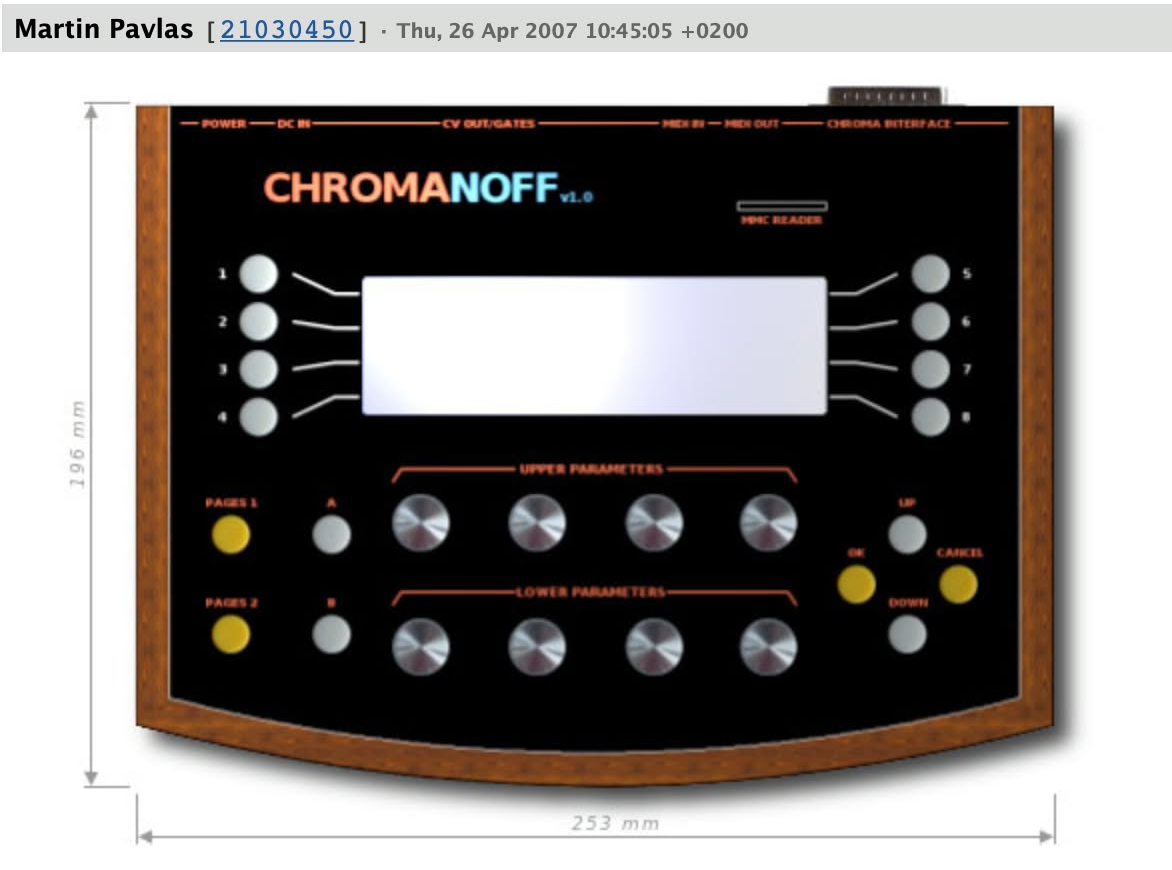
One example is particularly relevant to the Electra One story. The mighty Rhodes Chroma, introduced in early 1982, featured Chromaface - a hardware interface and proprietary protocol that allowed two Chromas to be interconnected or for patches to be programmed from a computer. Systems like this demonstrated that the need for digital communication already existed, but they were limited to specific instruments and manufacturers. MIDI resolved that limitation once and for all by introducing a universal, manufacturer-independent standard.
The Electra One project itself originally evolved from a hardware programmer built for the Chroma via Chromaface. In its earliest form, it was designed exclusively for the Rhodes Chroma before eventually expanding into a universal MIDI controller.
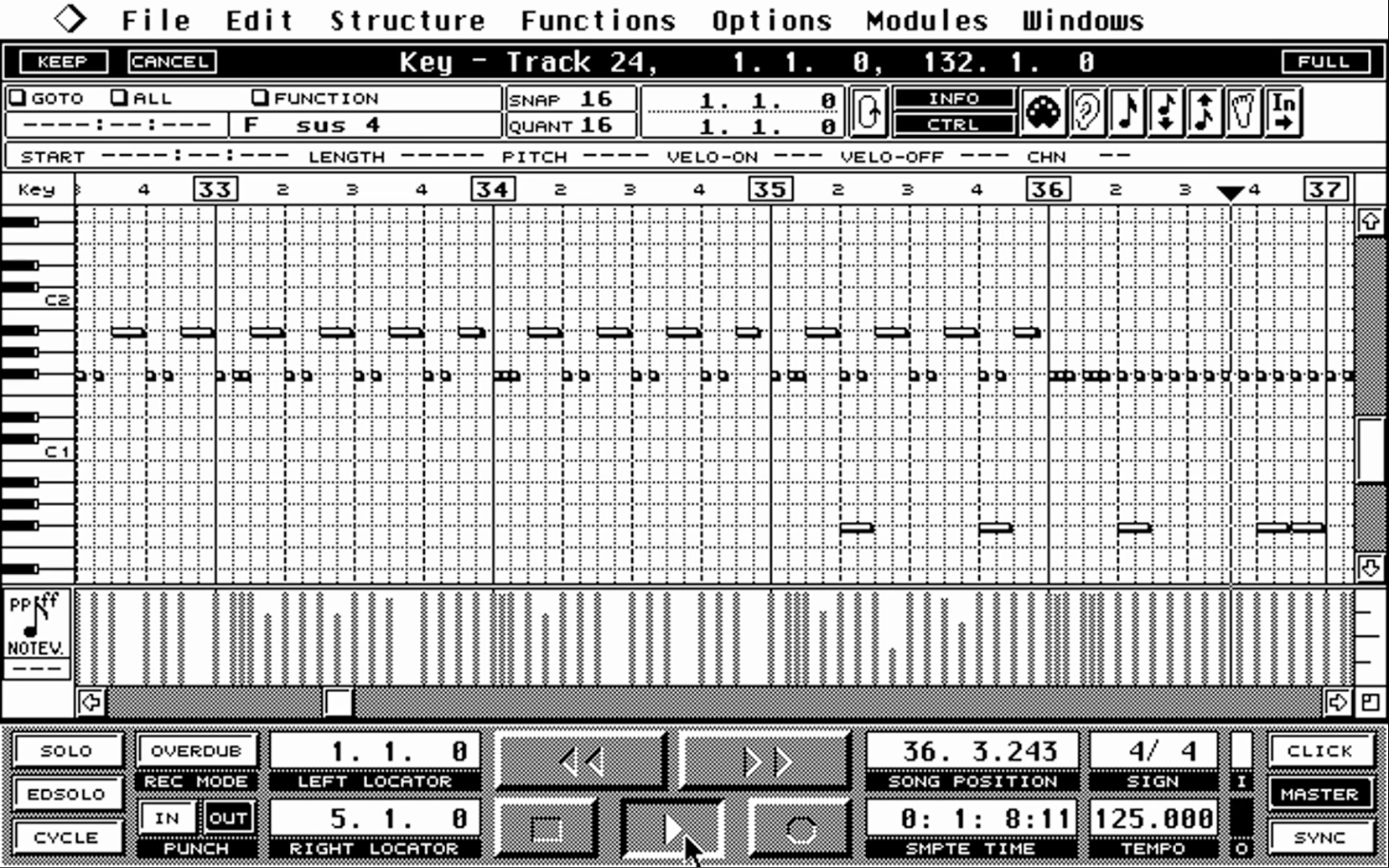
Another important milestone came in 1985, when the Atari ST computers were released with built-in MIDI ports. This brought MIDI to a much broader audience of musicians and producers. For the first time, a computer could be connected directly to synthesizers without the need for additional hardware interfaces and at relatively affordable price.
The Atari ST laid the true foundation for computer based music production and for the development of audio software and DAWs as we know them today. Sequencing, editing, arranging, and automation, all core elements of modern workflows, were already present in those early systems. Surprisingly, despite the immense technological progress since then, many of the concepts introduced by early Atari ST MIDI sequencers still feel remarkably familiar:
What MIDI Is Used For
Nowdays, MIDI is used in a wide range of audio and video production environments. From small home studios to large stage setups, it serves as the backbone of communication between musical devices and computers.
Some typical examples include:
- A controller keyboard playing multiple rackmount synthesizers
- A controller adjusting sound parameters during a live performance
- A sequencer recording a musical performance and allowing detailed edits afterward
- Multiple instruments staying perfectly in time with one another
- Multiple software applications exchanging musical data while running on the same computer
In each of these cases, MIDI allows one device - for example, a master keyboard - to control others, such as rackmount synthesizers, by exchanging MIDI data between them. Traditionally, this communication happens over MIDI cables, but over the time the communication over the USB or even wireless connections has become common.
At its core, MIDI communication consists of only two basic situations: a device sends instructions, and another device either performs an action or sends MIDI data back, usually to the device that initiated the communication.
How this works at the technical level will be explained in the next chapter, where we take a closer look at MIDI messages.
Connections
to-be-written. Describe all types of connecting the MIDI devices...
MIDI Channels
MIDI uses the concept of channels to organize communication. The device that sends a MIDI message and the device that is expected to respond must be set to the same channel.
The idea is similar to radio broadcasting: you only hear a radio station when your receiver is tuned to the same channel on which the station is transmitting.
In MIDI, however, channels are not frequencies measured in Hertz. They are simply identified by numbers.
On a single MIDI port, up to 16 channels are available. You can think of each channel as a separate musical “lane,” allowing one MIDI connection to carry instructions for multiple instruments at the same time.
For example:
- Channel 1: Synth
- Channel 2: Sampler
- Channel 10: Drum machine
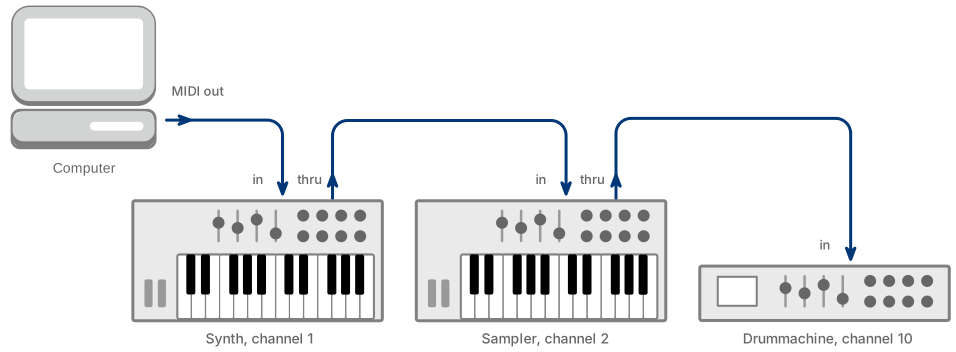
In this setup, the computer sends MIDI messages intended for all three devices over a single MIDI connection. Each device receives the entire stream of MIDI messages, but it processes only those messages that match its assigned MIDI channel. All other channel messages are simply ignored.
If the devices are connected in a daisy-chain configuration, the MIDI Thru port forwards the incoming MIDI data unchanged to the next device in the chain. In other words, whatever arrives at the MIDI In port is retransmitted at the MIDI Thru port. This allows multiple instruments to share the same MIDI output while still responding independently based on their channel assignments.
Most MIDI devices allow you to select which channel or channels they transmit on and which channel(s) they listen to in their MIDI settings.
To make things slightly more complicated, not all MIDI instructions are transmitted on specific MIDI channels. Some instructions are sent to - and received by - all devices connected to a given MIDI port, regardless of channel.
There is a good reason for this. While you may want certain notes to be played only by a particular synthesizer - by sending play notes instructions on a specific MIDI channel - other types of instructions, such as Start Playback, are intended for all connected devices at once. In situations like this, it would be inconvenient to send the same instruction separately on all 16 channels.
So far, we have used the term MIDI instruction. The word instruction naturally suggests that one device tells another device to do something. However, this is not the official terminology. In MIDI, these instructions are called MIDI messages. From this point forward, we will use the correct term: MIDI messages.
With that clarification, MIDI messages can be divided into two main groups:
- Channel messages
- Messages not tied to a MIDI channel
Let’s now look at these message types in more detail.
Channel Messages
As mentioned earlier, channel messages are transmitted on a specific MIDI channel. It is the sending device that chooses which channel to use. The channel information is embedded directly in the message itself, along with the message type and any additional data.
Once a message is sent, it physically reaches all devices connected to the same MIDI port. Each receiving device first determines whether the message is a channel message by examining its type information. It then checks whether the channel number matches the channel it is configured to receive.
If the channel matches, the device processes the message. If it does not, the message is simply ignored.
It is perfectly valid to have multiple MIDI devices configured to the same channel. In that case, they will all process the message simultaneously. This is often used intentionally, for example, to layer two synthesizers so that they play together.
It is also common for messages to be transmitted on channels that no device is currently listening to. In such cases, nothing happens. These situations can sometimes lead to confusing “why isn’t this working?” moments...
Channel messages are often referred to as voice messages because they control the sound-generating voices within a MIDI instrument.
The channel messages are:
Note Messages
Note messages are probably the most well-known MIDI messages. After all, they are the ones that make the sound happen.
Note messages instruct the receiving device which note to play and how it should be played. The sending device, whether it is a keyboard, a computer, or a sequencer, generates and transmits these messages.
In fact, two different MIDI message types are involved in playing a note: Note On and Note Off.
Together, they describe:
- which note was pressed
- how strongly it was pressed (velocity)
- when the note was released
- how quickly it was released (release velocity, if supported)
A Note On message tells the receiving device to start playing a specific note, along with a velocity value that usually reflects how hard the key was pressed. A Note Off message tells the device to stop playing that note. Some instruments also use a velocity value in the Note Off message to indicate how quickly the key was released.
Sometimes you may encounter a Note On message with the velocity set to zero. According to the MIDI specification, this should be treated as a Note Off message. Afterall, it simply means: be quiet!
Control Change Messages
Control Change messages describe changes to sound parameters and device settings. They allow up to 128 different parameters to be controlled, and each parameter can carry a value between 0 and 127, giving up to 128 distinct steps.
Control Change messages are commonly referred to by their parameter number, and the term Control Change is often shortened to CC. For example, when you see something like CC 10 in MIDI documentation, it refers to a Control Change message carrying data for parameter (controller) number 10.
When MIDI was originally created, many Control Change numbers were assigned standardized meanings. For example:
  0 = Bank Select (MSB)
  1 = Modulation Wheel
  2 = Breath controller
  3 = Undefined
  4 = Foot Pedal (MSB)
  5 = Portamento Time (MSB)
  6 = Data Entry (MSB)
  7 = Volume (MSB)
  8 = Balance (MSB
  9 = Undefined
 10 = Pan position (MSB)
 11 = Expression (MSB) (Expression is a percentage of volume CC7)
 12 = Effect Control 1 (MSB)
 13 = Effect Control 2 (MSB)
 14 = Undefined
 15 = Undefined
 16 = Ribbon Controller or General Purpose Slider 1
 ...
Over time, however, manufacturers began using Control Change messages more freely. While the MIDI specification provides mechanisms for handling non-standard parameters, Control Change messages proved simple and convenient. As a result, many devices started assigning their own meanings to certain CC numbers.
Today, some standardized controllers - such as Bank Select, Modulation Wheel, and Volume - remain widely used and respected. Others are often repurposed to control device-specific parameters.
In modern setups, Control Change messages are commonly used for:
- knobs and sliders controlling sound engine parameters, such as filter cutoff
- pedals
- switches
- expressive performance controls
Control Change messages allow sounds to be shaped and modified in real time. That flexibility is precisely why they remain one of the most frequently used and versatile message types in MIDI.
As mentioned earlier, a Control Change message carries a value between 0 and 127. While this resolution is sufficient for many parameters, such as LFO speed or effect depth, it can be limiting for others. For example, when controlling a filter cutoff, the discrete 128 steps may result in audible jumps between values. This phenomenon is commonly referred to as stepping.
To address this limitation, MIDI provides several mechanisms for increasing resolution and achieving much finer control. We will explore these methods in greater detail in the following chapters.
Program Change Messages
Another important building block of MIDI communication is the Program Change message.
Unless you are working with a very old synthesizer or a very modern fully analog or modular instrument, the device will almost certainly provide a way to save and recall sounds. These stored sounds are commonly referred to as presets or patches, and well, back in the early MIDI days, programs. Although, the term program was probably used intentionally to be somewhat more general.
A Program Change message tells the receiving device to switch to a different program. Depending on the device, this could mean selecting a new sound, recalling a stored configuration, or even loading a sequence.
A Program Change message always carries a program number. This number ranges from 0 to 127. How that number is interpreted depends entirely on the receiving device. In its simplest form, this allows a device to switch between 128 different programs.
In the early 1980s, 128 programs seemed like a generous amount. However, the creators of MIDI anticipated that this might eventually become limiting. And therefore they invented a Bank Select to extend the number of available programs. the Bank Select mechanism was introduced as part of the standard Control Change messages. By combining Bank Select with Program Change, devices can access 128 banks of 128 programs or even up to 16,384 banks when high resolution Bank Select is used. We will explore Bank Select in greater detail in the next chapter.
Pitch Bend Messages
Pitch Bend messages are used to change the relative pitch of all currently sounding notes on a given MIDI channel.
While that description may sound technical, you already know what this means in practice: it is what the pitch bend wheel on a keyboard does. It allows you to create pitch slides, bends, and vibrato effects while playing, making your performance more expressive.
However, Pitch Bend has an important limitation. The message affects all notes currently playing on the same MIDI channel. Applying vibrato to a single sustained note works beautifully. But when you play a chord, the pitch bend is applied uniformly to all notes in that chord. Because all notes are bent by exactly the same amount, the result may sometimes sound less natural than intended.
This limitation was later addressed with the introduction of MIDI Polyphonic Expression (MPE), which allows different pitch bend values, and other expressive controls, to be applied independently to each note.
The human ear is extremely sensitive to changes in pitch. To prevent audible stepping, Pitch Bend was designed from the very beginning as a high-resolution MIDI message. Unlike standard Control Change messages, which use the range of 128 value steps, Pitch Bend uses high-resolution, providing 16,384 distinct steps. This allows for smooth and precise pitch transitions.
Similar to Program Change and their Bank Select messages, Pitch Bend also has a standardized way to configure its behavior. The pitch bend range, usually expressed in semitones, is set using a mechanism called Registered Parameter Number (RPN). Specifically, RPN 0,0, known as Pitch Bend Sensitivity, defines how far the pitch will bend when the wheel is moved to its maximum position. The RPN messages will be described later in this chaper.
Aftertouch Messages
Aftertouch messages do exactly what their name suggests: they affect what happens after a note has been struck.
On a transmitting MIDI device, typically a keyboard, aftertouch measures the pressure applied to a key while it is being held down. As you continue pressing the key, the device sends a stream of Aftertouch messages, each carrying a value that represents the current pressure.
Receiving devices usually interpret Aftertouch as a modulation source. The pressure value can be routed to control various sound parameters, such as vibrato depth, filter cutoff, or volume, adding expressiveness to a sustained note.
Unlike Pitch Bend that is always applied on all notes, the MIDI standard defines two variants of Aftertouch:
- Channel Aftertouch (also called Channel Pressure)
- Polyphonic Aftertouch (also called Polyphonic Key Pressure)
Channel Aftertouch applies a single pressure value to all notes currently sounding on a given MIDI channel.
Polyphonic Aftertouch, on the other hand, tracks pressure individually for each note. This allows much greater expressive control, since each note in a chord can be modulated independently.
Keyboards and controllers that implement Channel Aftertouch typically transmit the highest detected pressure among all currently held keys. For example, if you are holding three notes, the device usually sends the pressure value of the key that is pressed most firmly. That single value is then applied to the entire channel.
In practice, Aftertouch often provides somewhat limited control. The pressure response on many traditional keyboards can feel imprecise or difficult to control accurately. Aftertouch uses a range of 128 values, but it often feels close to impossible to use that range effectively.
However, newer expressive controllers and advanced keyboard designs have significantly improved pressure sensing technology. These modern instruments offer smoother and more responsive Aftertouch implementation, making it a far more practical and expressive.
Messages That Are Not Tied to Channels
Not all MIDI messages belong to a specific MIDI channel. Some messages are sent to all devices connected to a MIDI port. Any device that understands the message will respond to it.
These messages are called System messages because they affect the entire MIDI system rather than a single instrument voice, like channel messages do.
System messages are divided into three groups:
- System Common messages
- System Real-Time messages
- System Exclusive messages
Let’s look at each group.
System Common Messages
System Common messages provide general coordination and communication between devices. They are not tied to any MIDI channel, and they are intended for the entire system.
The System Common messages defined in MIDI 1.0 are:
- MIDI Time Code Quarter Frame – Used for precise time synchronization in audio and video applications.
- Song Position Pointer – Tells a device where playback should begin within a song.
- Song Select – Selects which song or sequence should be played.
- Tune Request – Asks analog synthesizers to retune themselves.
- End of Exclusive (EOX) – Marks the end of a System Exclusive message.
These messages help devices stay coordinated and organized during playback or data exchange.
System Real-Time Messages
System Real-Time messages are responsible for timing and transport control. They are extremely short and are processed immediately to maintain accurate synchronization.
The System Real-Time messages are:
- Clock – Sent repeatedly to keep devices in sync.
- Start – Starts playback from the beginning.
- Continue – Resumes playback from the current position.
- Stop – Stops playback.
- Active Sensing – Confirms that a connection between devices is still active.
- System Reset – Resets devices to their default power-up state.
Because timing is critical, these messages can even appear in the middle of other MIDI message streams and must be handled without delay.
System Exclusive (SysEx)
System Exclusive messages, often abbreviated as SysEx, are used for device specific communication.
SysEx messages do not follow a standardized content format. Instead, each manufacturer defines its own structure and meaning. This gives manufacturers great flexibility to design communication tailored to the specific features and needs of their MIDI devices.
Common uses of SysEx messages include:
- Accessing advanced or device-specific features
- Changing internal parameters that are not available via standard MIDI messages
- Configuring device settings or switching operating modes
- Transferring presets, patches, configurations, and system data
- Performing firmware updates
Every SysEx message begins with a manufacturer identification number. This ensures that only devices from the intended manufacturer respond to the message. Devices that recognize their manufacturer ID interpret the remaining data and determine what action to take. Devices from other manufacturers simply ignore the message.
SysEx messages also differ from other MIDI message types in their length. While other MIDI messages are only a few bytes long and have fixed length, SysEx messages have variable length. They can be short, but they can also become quite long, especially when transferring large amounts of data such as sound banks or firmware.
Electra One controllers are specifically designed to compose and process SysEx messages efficiently. Later in this book, we will dedicate an entire chapter to working with SysEx in practice.
What Comes Next
By now, you should have a solid understanding of the basic principles behind MIDI and the different types of messages it uses. For some of you, this may have been a quick refresher. For others, it may have introduced ideas that were previously hidden and unknown.
Either way, you now have the vocabulary and conceptual foundation we need to move forward.
In the next chapter, we will go a little deeper. To fully unlock the potential of Electra One's advanced MIDI features, and later, Lua scripting, it helps to understand how MIDI works at a lower level.
Before we move on to more advanced topics, we will take a short detour into the world of bits and bytes, and numeric systems. This may sound too technical at first, but do not worry. The concepts are simpler than they appear, and once understood, they make everything else much clearer.
Think of it as learning the alphabet before writing sentences. Once you understand the building blocks, the rest becomes much easier.