

Version5.0.0
More Bits and Bytes
The Bits & Bytes chapter taught you to read a byte: eight bits, a value from 0 to 255, written in binary or hexadecimal. This chapter is about taking bytes apart and putting them together, which MIDI makes you do more often than you would expect. The reason is the one rule we keep coming back to. A data byte may only use seven of its eight bits, so anything larger than 127 has to travel in pieces, and anything smaller than a byte may be sharing one with its neighbours.
Three operations cover all of it. You have, in fact, already done two of them with ordinary arithmetic. This chapter puts names to them, shows what they look like in binary, and then shows where the Electra One does the work for you.
Shifting
A 14-bit value does not fit a MIDI data byte, so it goes as two: the 14-bit Control Change chapter divided by 128 to get the MSB and kept the remainder as the LSB. Let's look at the value 1,000 in binary to see what that division really did:
1000 =  00000111 1101000
          MSB      LSB
        7 bits    7 bits
Dividing by 128 moved every bit seven places to the right and let the lowest seven fall off the end. What was left, 0000111, is 7. In the binary world this is called a right shift, written >>: shifting right by one place halves a number, by seven places divides it by 128, and the bits that fall off are gone.
Going the other way is a left shift, <<, and it multiplies: shifting the MSB left by seven places puts its bits back where they came from, with seven empty zeros under them, ready for the LSB to fill. 7 << 7 is 896, and 896 + 104 is 1,000 again.
So the arithmetic and the binary are the same thing in two notations. Dividing by 128 is shifting right by seven; multiplying by 128 is shifting left by seven. A manual that says shift right by 7 is telling you to divide by 128, and if the arithmetic feels more natural to you, use it.
Masking
The second operation keeps some bits and throws the rest away. The remainder after dividing by 128 did exactly that: it kept the lowest seven bits of 1,000 and discarded everything above them. In binary this is done with a mask, a pattern of ones over the bits to keep and zeros over the bits to drop, combined with the value using AND, written &:
    00000011 11101000    1000
AND 00000000 01111111    the mask, 0x7F
  = 00000000 01101000    104
AND keeps a bit only where both numbers have a one. Under the ones of the mask the value shows through; under the zeros it is wiped. The mask 0x7F is seven ones, and it appears in every SysEx description ever written, because it is how you guarantee that a byte is a legal MIDI data byte: whatever the value, value & 0x7F is below 128.
The companion of AND is OR, written |, which sets a bit where either number has a one. It is how the two halves are joined again:
    00000011 10000000    7 << 7
OR  00000000 01101000    104
  = 00000011 11101000    1000
Because the two halves never overlap, OR and plain addition give the same answer here, which is why the previous chapters could get away with MSB × 128 + LSB.
The DX7 parameter number
Here is the same idea with a different split. A DX7 voice parameter is numbered from 0 to 155, which needs eight bits, one too many. Yamaha's message gives the number two bytes, but not seven and seven: the first byte carries the parameter's top bit alone, and the second carries its low seven. Parameter 134, the algorithm, becomes:
134 = 10000110
      1  0000110
      ↑    ↑
    0x01  0x06
134 >> 7 is 1, and 134 & 0x7F is 6. That is the 0x01 0x06 in the message from the System Exclusive chapter, and it is why the Device SysEx Messages tutorial has a rule for each byte: bit 7 of the parameter into one byte, bits 0 to 6 into the next.
Several values in one byte
The reverse case is just as common. A switch needs one bit, and a byte has seven to offer, so manufacturers pack several switches, or a switch and a small number, into a single byte and describe it bit by bit in the manual. The DX7 does this with its six operator on/off switches, which share one byte:
bit:   6   5   4   3   2   1   0
       -  OP1 OP2 OP3 OP4 OP5 OP6
Reading one switch out of the byte is a shift and a mask: shift right so that the bit you want is at the bottom, then mask with 1. Writing is a shift the other way and an OR. The Sending SysEx Messages tutorial builds exactly this byte, and the editor shows the packing as a picture rather than as arithmetic:
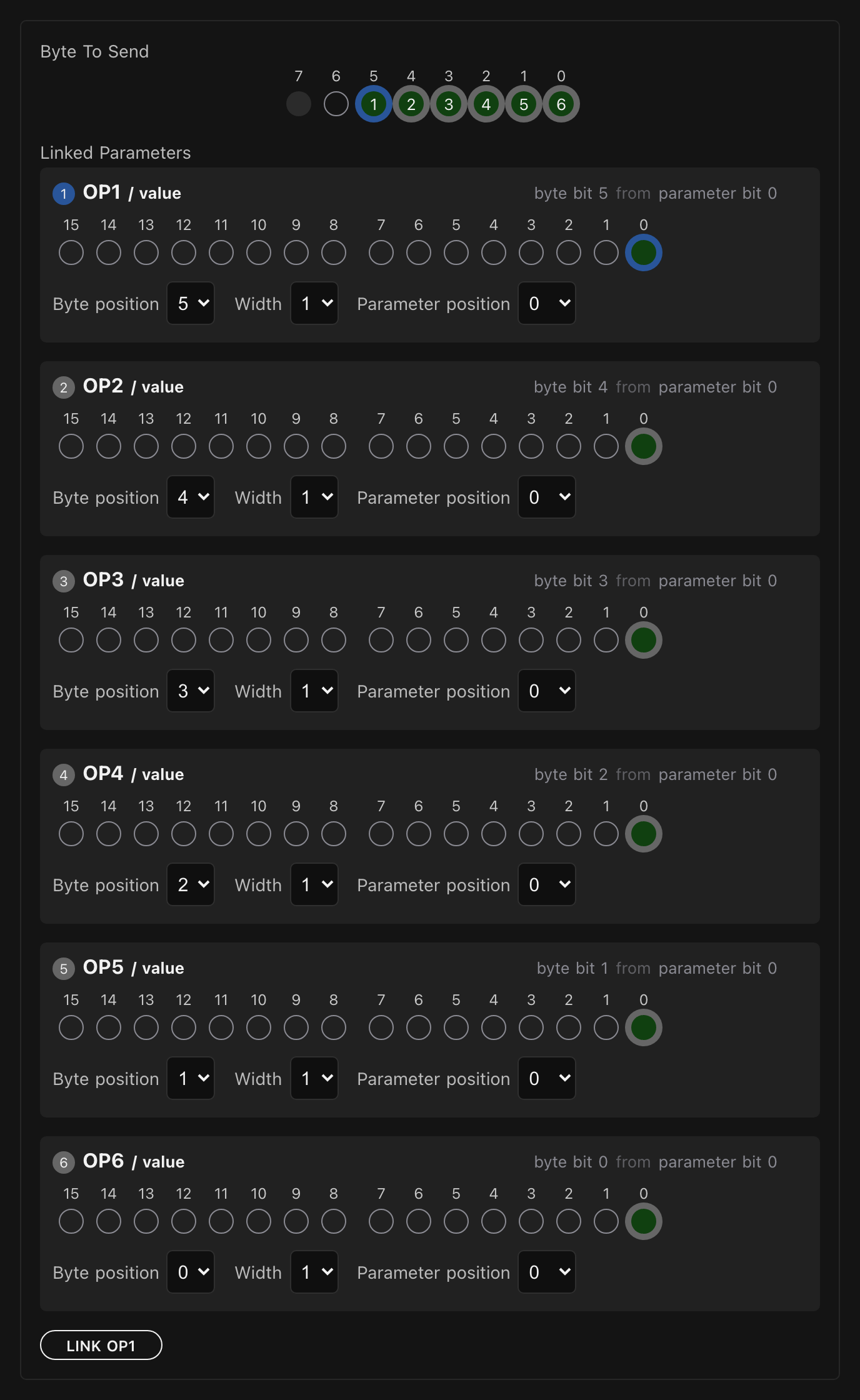
The other common packing is two nibbles in a byte, the four high bits for one value and the four low bits for another. byte >> 4 gives the high nibble, byte & 0x0F the low one, and (high << 4) | low puts them back. You met nibbles in the Bits & Bytes chapter as a way of reading binary; here they are a way of storing two small numbers in the space of one.
Where the Electra One does it for you
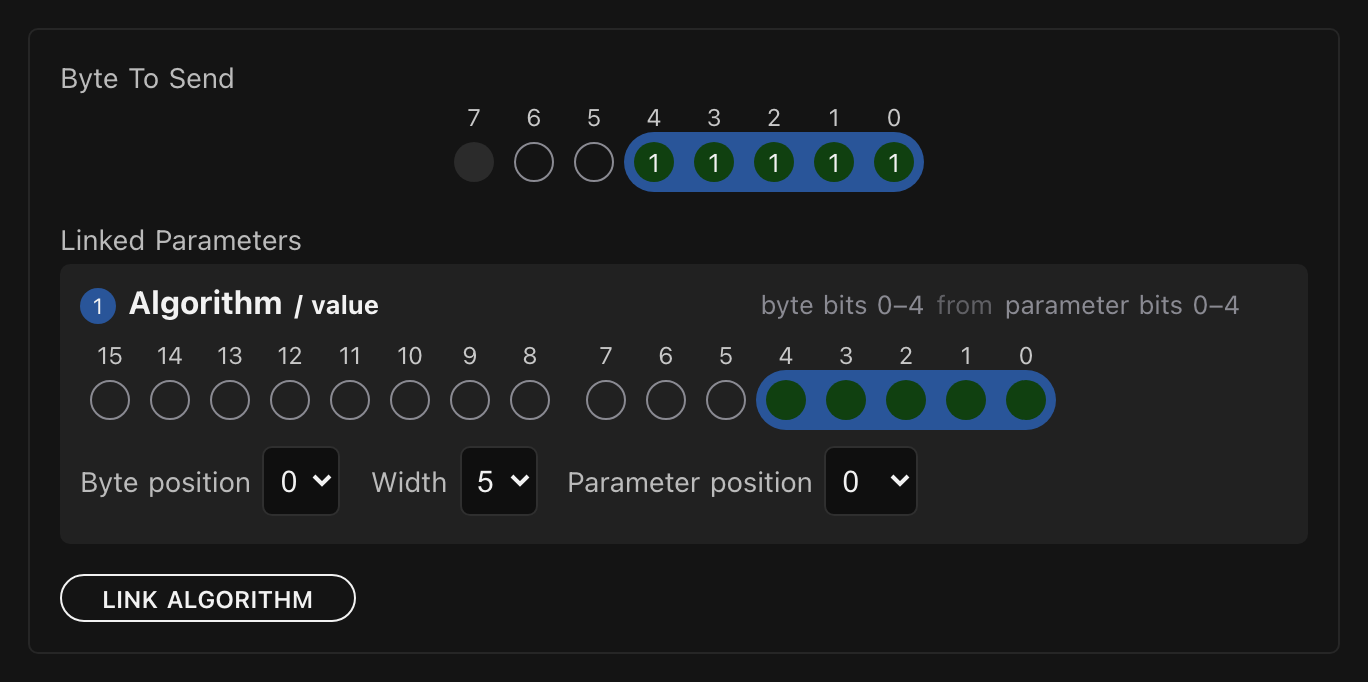
Most of the time you will not write any of this. A SysEx template in the editor has rules, and a rule says bits 0 to 4 of this byte come from bits 0 to 4 of the parameter, or bit 5 of this byte is this switch. The controller does the shifting and masking as the message goes out, and does it in reverse as a dump comes in. The picture above is such a set of rules.
The other place is Lua, which the second part of this book introduces. You do not need to know any of it yet; I only want to show you that everything from this chapter is waiting there. Lua writes the shifts and masks the way this chapter did, and it also has two arithmetic operators that do the same job under other names: // divides and drops the remainder, and % keeps it. The five lines below give the five answers we worked out by hand:
lua
local value = 1000

print(value >> 7)              -- 7, the MSB
print(value & 0x7F)            -- 104, the LSB
print((7 << 7) | 104)          -- 1000 again

print(134 >> 7)                -- 1, the DX7 group byte
print(134 & 0x7F)              -- 6, the DX7 parameter byte
How to run a few lines like these on the controller is the first thing the Lua part explains, so come back to this snippet then. Which notation you use is a matter of taste and of what the manual in front of you uses. I tend to write shifts and masks when I am transcribing a SysEx format, because the code then reads like the manual, and plain division when I am doing arithmetic on values.
What comes next
This is the end of the MIDI part of the book. You can read a byte, name every message, follow running status, assemble a 14-bit value, select an NRPN, read a SysEx dump against a manual and take its bytes apart. That is more than most people who use MIDI every day ever learn about it, and it is exactly what the Electra One asks of you when you build an editor for an instrument.
The second part introduces Lua, the small language the controller runs, and from the first chapter on you will find the bytes from this part turning up in the examples.