

Version5.0.0
Functions
The controller never runs your script as a whole. It runs it once from the top when the preset loads, and after that it calls into it: a formatter when a value changes, patch.onResponse when a dump arrives, timer.onTick when the timer fires. Each of those is a function, and a script for Electra One is mostly a collection of them. Understanding functions, then, is understanding how your code and the controller meet.
The shape of a function
A function has a name, something it takes in, something it gives back, and the lines in between:
lua
function double(number)
    return number * 2
end

print(double(21))
function starts it. double is its name. (number) is the parameter, a name you choose for whatever will be handed in. return is the answer, and it also ends the function on the spot. end closes the whole thing. Defining a function does nothing by itself; the last line calls it, and 42 appears in the log.
A function can take several parameters and give back several answers. This is the splitting of a value into two MIDI data bytes from the Values and Variables chapter, packaged so that you never have to think about it again:
lua
function splitValue(value)
    return value // 128, value % 128
end

local msb, lsb = splitValue(1000)
print(msb .. " " .. lsb)
The log reads 7 104. Two values out, two variables to catch them.
The function the controller calls
Here is the contract that makes a formatter work. The controller calls the function with two things: the value object, which most formatters ignore, and the display value as a number. Whatever the function returns is drawn on the control instead of the number:
lua
function formatPercent(valueObject, value)
    return string.format("%d %%", value)
end
To see it, put a fader on the page, open its Value card, type formatPercent into the Formatter field, and send to Electra. The controller shows 72 % where it showed 72. The editor's own picture of the page keeps showing the number, because formatters run on the controller.
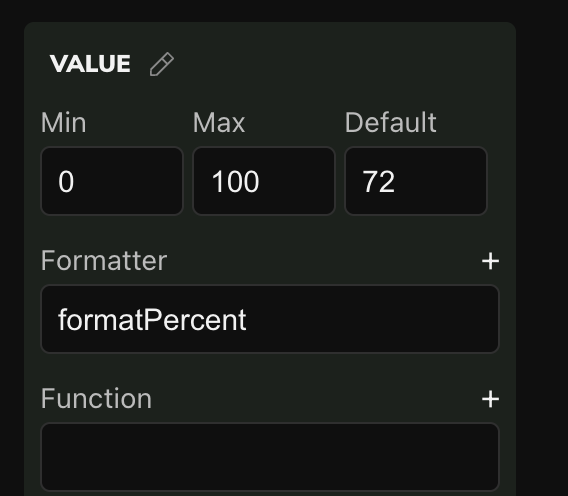
Two rules come with the contract, and both bite quietly. A formatter must return something on every path through it; if an if branch forgets to, the control keeps the text it had, which looks like a knob that stopped working. And a formatter must only format: no sending MIDI, no moving other controls. The Function field next to it is for a function that acts.
Global and local functions
The controller found formatPercent by its name, and that is only possible because the function is global. The same applies to patch.onResponse, midi.onNoteOn, timer.onTick and every other function the firmware calls: define them at the top level, without local.
Functions that only your own script calls are a different matter. Give them local, for the same reason as variables: the name then belongs to your script and cannot collide with anything else. The custom control tutorial is built from such helpers, each knowing one thing:
lua
local CELL_W, CELL_H = 27, 26
local originX, originY = 10, 4

local function boxLeft(column)
    return originX + column * CELL_W
end

local function boxTop(row)
    return originY + row * CELL_H
end

print(boxLeft(3) .. ", " .. boxTop(2))
Notice the order. A local function must be defined above the place that calls it, because Lua reads the script from the top and does not know the name before it reaches the definition. Global functions can be called from anywhere once the script has loaded, which is what makes callbacks work.
A function that uses what it is given
The channel byte of a DX7 parameter change is 0x10 plus the channel, counted from zero. The Device SysEx Messages tutorial puts that arithmetic into a function that takes the device, so that the channel always follows the device's settings and is never typed twice:
lua
function getChannelByte(device)
    return 0x10 + (device:getChannel() - 1)
end
The device:getChannel() call is the subject of the chapter on objects. The point here is the parameter: the function does not know which device it will be asked about, and it does not need to. It works for any of them.
Functions as values
Lua treats a function like any other value. It can be stored in a variable, kept in a table, and, most usefully on the controller, handed to another function to be called later. You did this in the chapter on loops without a second thought:
lua
schedule.after(1000, function()
    print("one second later")
end)
The second argument is a function with no name, written right where it is used. schedule.after keeps it and calls it when the time comes. The same pattern gives a custom control its drawing and its knob: you hand setPaintCallback and setPotCallback a function each, and the controller calls them when it needs to paint or when the knob turns.
What comes next
Every function we have called that came from the controller had a dot in its name: string.format, math.floor, midi.sendNoteOn, schedule.after. That dot is a module, and the next chapter explains it, together with how to make modules of your own.