

Version5.0.0 beta
SysEx Templates
Many instruments are edited with System Exclusive (SysEx) messages: long messages whose format each manufacturer defines. A control can send and receive SysEx through a template: a message built from fixed bytes and from bytes Electra One fills in with the control's value when the message is sent.
This page uses the Yamaha DX7 as the example. The DX7 changes a voice parameter with this message:
F0 43 1n gg pp dd F7| Byte | Meaning |
|---|---|
F0 | start of SysEx |
43 | Yamaha |
1n | parameter change, n = MIDI channel − 1 (10 for channel 1) |
gg | the parameter group, with the highest bit of the parameter number |
pp | the parameter number, lower 7 bits |
dd | the value |
F7 | end of SysEx |
The DX7's Algorithm is parameter 134. To set algorithm 6, the DX7 expects F0 43 10 01 06 05 F7. The rest of this page builds that message.
Opening the SysEx editor
Set a value's Message Type to Sysex. The value card then shows:
- Sysex Data, shown when the device has messages: Local Sysex message, a template of this value only, or one of the device's messages, shared by many controls.
- EDIT SYSEX DATA, for a local message: opens the editor. The arrow next to it offers Edit sysex data, over the whole window, and, where split view is available, Edit in selected, beside the grid in the other view of split view. Picking one opens the editor there, and the button keeps that choice.
- Direction: Send only, Send and receive or Receive only. See Receiving SysEx.
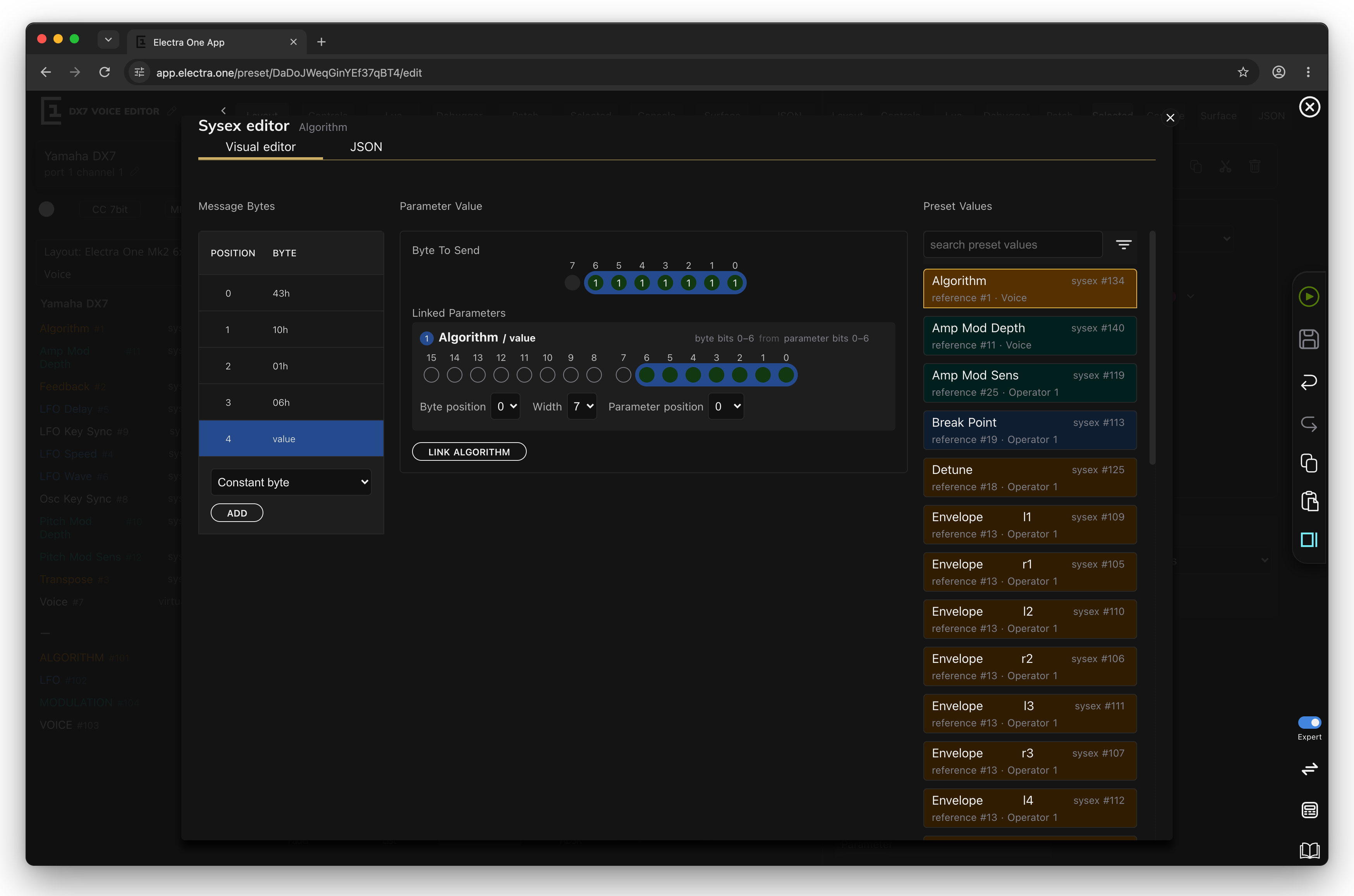
The editor has two tabs, Visual editor and JSON. Changes take effect at once; there is no OK button. Close the editor with the cross, or with Close, and go back when it is open beside the grid.
An empty template offers Duplicate from the last message you edited, adjusted to this control's parameter, to start from a similar message.
On the left, Message Bytes lists the bytes in order. Click a byte to edit it on the right. To add a byte, choose its type under the list and click ADD; drag a byte by its handle to move it, and click the bin to remove it.
F0 and F7 are not part of the template. Electra One adds them when it sends the message, and leaves out any F0 or F7 typed into the template. A message can be up to 512 bytes long.
Byte types
| Type | What the byte is |
|---|---|
| Constant byte | a fixed number |
| Parameter value | bits of a control's value |
| Parameter number | bits of the parameter number, for device messages |
| Lua function | a byte computed by a Lua function |
| Checksum | a checksum of other bytes of the message |
| Any byte | matches any byte when receiving; cannot be sent |
Constant byte
A fixed number, typed in Hex or Dec, or set by clicking its Bits. The Algorithm template has four: 43, 10, 01 and 06.
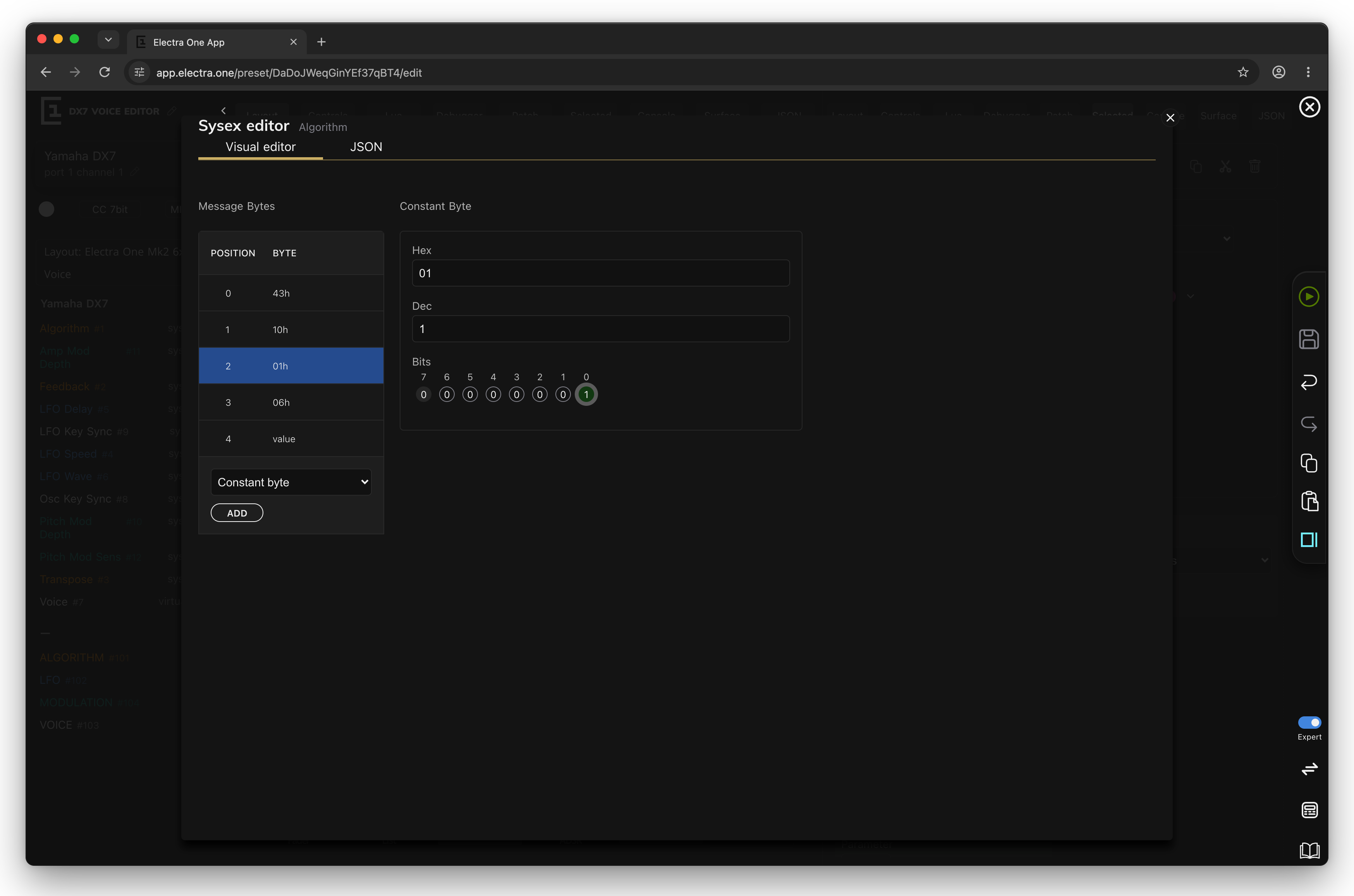
A data byte in a SysEx message has 7 bits. The editor warns if bit 7 is set, because such a byte would be read as the start of another message.
Parameter value
This is where the control's value enters the message. A Parameter value byte takes bits of a value and places them in the byte. In the simplest case, and in most templates, the byte is the value: all 7 bits of it, in bits 0 to 6.
The form shows:
- Byte To Send: the 7 bits of the byte, with the number of the rule each bit comes from.
- Linked Parameters: one card per rule. Each rule copies Width bits, starting at Parameter position in the value, into the byte at Byte position. Click the bits of the parameter word to choose them, Shift-click to extend the selection.
- Preset Values: the values of the control's device. Select one and click LINK name to add a rule for it; the rule goes into the free bits of the byte. By default a new byte is linked to the control's own value. In a device message, a Parameter value byte always carries the value of the control that uses the message, and this column is not shown.
Byte To Send warns when two rules claim the same bit and when a rule runs past bit 6.
Why rules and not simply "the value"? Because instruments pack their data. Some store two parameters in one byte, such as a waveform in bits 0 to 2 and an octave in bits 4 to 6. Others spread a 14-bit value over two bytes. With rules, one byte can carry bits of several parameters, and one parameter can fill several bytes:
| Byte position | Width | Parameter position | Meaning |
|---|---|---|---|
| 0 | 7 | 0 | the whole 7-bit value |
| 0 | 4 | 0 | the lowest 4 bits of the value, in bits 0 to 3 |
| 4 | 3 | 0 | the lowest 3 bits of the value, in bits 4 to 6 |
| 0 | 7 | 7 | the upper 7 bits of a 14-bit value (its MSB) |
The value sent is the MIDI value of the control, after the display range has been mapped to the MIDI range. See Values: display and MIDI.
Lua function
The byte is returned by a function of the preset's Lua script: type its name in Function name. Electra One calls it every time it sends the message, with the device and the value, and sends what it returns. Use it for bytes no rule can express, such as a device number that the user sets on another page. See SysEx byte functions.
Checksum
Some instruments, Roland's most of all, want a checksum at the end of the message. A Checksum byte computes it when the message is sent:
- Checksum Type: Roland, Waldorf or Fractal Audio.
- Start position: the first byte included, counting the
F0as 0. - Length: how many bytes are included. A checksum only covers bytes before it.
Any byte
When a template receives, an Any byte matches whatever byte arrives in its place, such as a device number or a channel the instrument sets itself. A template with an Any byte cannot be sent, so its direction must be Receive only.
Building the DX7 message
The DX7's Algorithm is sent as 43 10 01 06 followed by the value:
- Add four Constant byte entries:
43,10,01and06. - Add a Parameter value byte. It is linked to the control's own value, all 7 bits.
- Set the control's range: Min 1, Max 32, MIDI Min 0, MIDI Max 31.
Turning the knob to algorithm 6 now sends F0 43 10 01 06 05 F7.
Where do 01 and 06 come from? The DX7 numbers its voice parameters 0 to 155, more than 7 bits can hold. Parameter 134 is 1000 0110 in binary: its lowest 7 bits, 000 0110 = 06, go into the pp byte, and its highest bit goes into bit 0 of the gg byte.
In a template for one control, those two bytes are constants, as above. In a device message shared by all voice parameters, they are Parameter number bytes with exactly these rules.
Receiving SysEx
Direction decides whether a template also listens:
- Send only: the template is only sent.
- Send and receive: the template is sent, and a matching message from the instrument updates the control. When you change the algorithm on the DX7's front panel, the DX7 sends
F0 43 10 01 06 05 F7, and Electra One's Algorithm control follows it. - Receive only: the template only listens, for a message the instrument sends in another form than it accepts.
A message matches a template when it comes from an interface the device is wired to, is exactly as long as the template, has the same constant bytes, and the template contains a Parameter value or Parameter number byte. Checksum, Lua function and Any bytes match any byte. Templates longer than 64 bytes are not received, and the first matching template wins. A device message shared by controls with different parameter numbers needs Parameter number bytes to tell them apart. The value is taken from the Parameter value bits and shown through the control's MIDI range.
Device messages
A device can keep a library of SysEx messages, described once and used by many controls. Instead of 156 local templates for 156 DX7 parameters, the device describes one message:
43 10 [parameter number] [parameter number] [value]where the first Parameter number byte takes the parameter's highest bit and the second its lower seven bits, and each control only says which parameter it is. A control uses a device message by choosing it in Sysex Data.
Expert. Device messages are edited on the Messages tab of the patch editor:
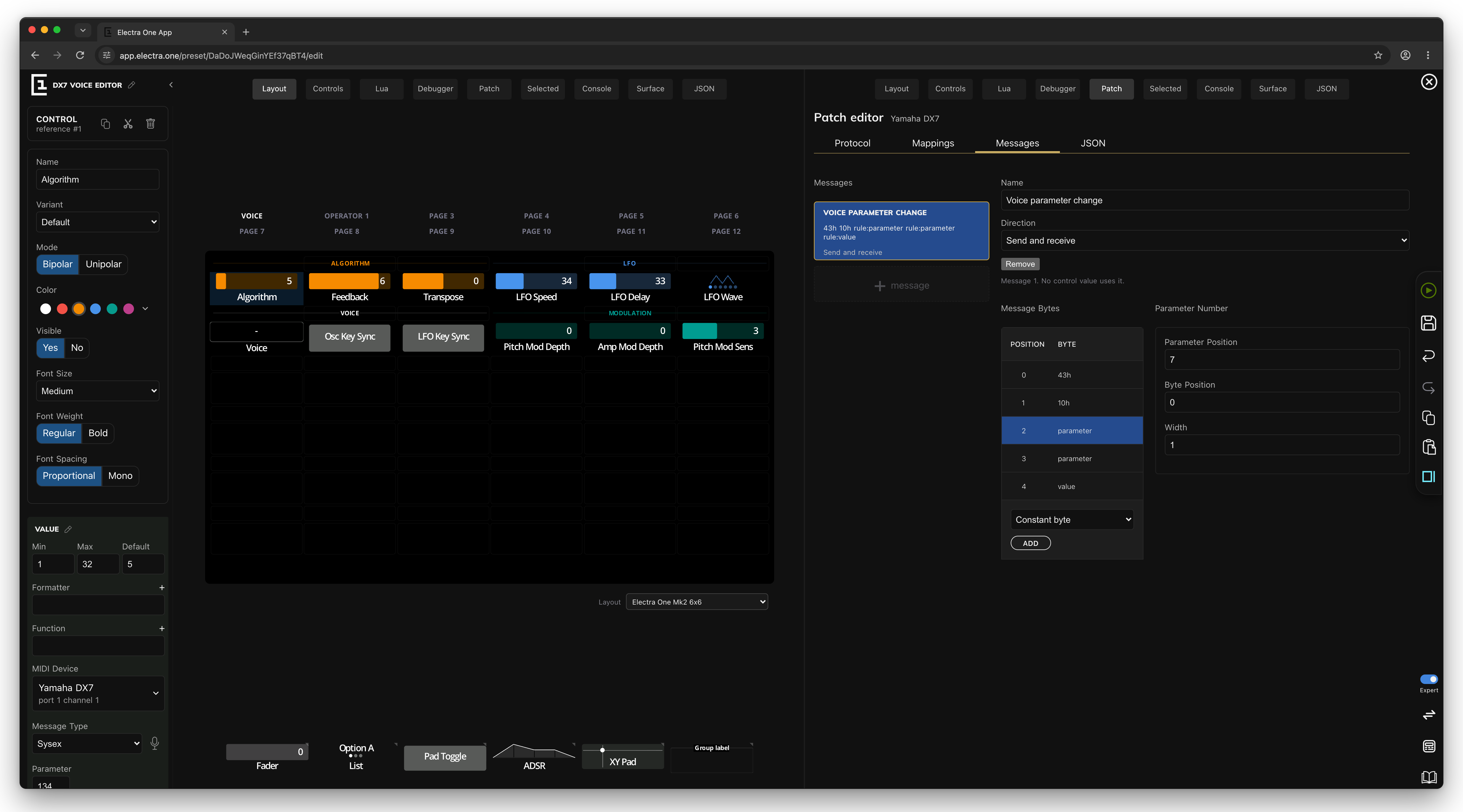
- + message adds a message.
- Name makes it easier to find in the controls' Sysex Data list.
- Direction works as for local templates. A control's Direction on a device message is the message's direction, so it applies to every control that uses it.
- Remove deletes the message. It is disabled while a control uses it; the line under it says how many do.
- Message Bytes is the same byte editor, with all byte types.
The JSON tab
The JSON tab shows the template's bytes as JSON, the form they have in the preset file. You can edit it directly and switch back to the visual editor; both edit the same data. The format is described in Preset JSON.