

Version5.0.0 beta
Router
Electra One is more than a controller. It is also a capable, high-performance MIDI router, with advanced options for processing MIDI traffic: it passes MIDI messages between its connectors, so your computer, your USB instruments and the synthesizers on the MIDI sockets can talk to each other through it. It can also send messages to its own built-in services, such as the remote knobs. This chapter explains how that works and how you decide where messages go.
What the router does
In the Devices chapter you met Electra One's three interfaces, <MIDI IO>, <USB DEVICE> and <USB HOST>, and its two ports. Every MIDI message that arrives on one of them goes to two places at the same time:
- The preset and Electra's services. The preset hears the message, so its controls can follow the instrument. Some messages are meant for Electra itself instead, for example a message that switches presets. Those go to Electra's services and not to the preset.
- The router. The router looks at where the message came from and forwards a copy to every destination you have connected to that source.
Two things follow from this picture. First, forwarding a message never takes it away from the preset or the services: a synthesizer's knob can move a control on Electra One and, through the router, be recorded by your DAW at the same time. Second, the messages a preset sends when you turn its knobs do not pass through the router. They go straight to the preset's devices, on the interfaces those devices use.
Where messages can go
A route connects a source with a destination. Sources are always an interface and a port. Destinations can be an interface and a port too, or one of Electra's system services:
| Destination | What happens there |
|---|---|
<MIDI IO>, <USB DEVICE>, <USB HOST>, Port 1 or Port 2 | the message is sent out, for example to a synthesizer or to your DAW |
| Remote knobs | the message moves a control, as described in Remote knobs |
| MIDI control | the message runs a command you have mapped to it, for example switching pages |
Messages sent to the remote knobs or to MIDI control are meant for Electra itself, so they are not given to the preset.
Besides Port 1 and Port 2, the <USB DEVICE> and <USB HOST> interfaces have a third port, CTRL. Electra One always listens there for a few built-in commands, without any route: bank and program changes switch presets, messages recall snapshots, and notes start captures. These are explained in the Snapshots, Captures and External MIDI Control chapters.
Static routes
The simplest way to use the router is with static routes. A static route says "forward everything that arrives here to there", for example "from <USB HOST> Port 1 to <MIDI IO> Port 1", so a USB keyboard plays the synthesizer on the MIDI sockets. Static routes forward every message unchanged: notes, controllers, clock and SysEx, on all channels. The only exception is Electra One's own SysEx, which is never sent to the MIDI sockets.
Routes to the remote knobs and to MIDI control can listen to all channels or only to the channels you pick, so a single controller can play a synthesizer on one channel and control Electra One on another. Such a route does not forward anything: it tells the remote knobs or MIDI control where to listen. A message they use is not passed to the preset's controls; one that no remote knob or MIDI Control mapping names is passed on to the preset as usual. Any static routes from the same input forward both.
Routes belong to the controller, not to a preset. They stay the same whatever preset you load.
The Router screen on the Mk2
On Electra One Mk2, open ROUTER from the main menu. The screen is a grid: each row is a source, and each column is a destination. A lit square is an active route. Tap a square to select it, and the sidebar on the right shows its settings: tick All channels to turn the route on, or untick it to turn the route off. The last two columns, REMOTE and CTRL, send messages to the remote knobs and to MIDI control. For those you can also pick Individual channels. Your changes are saved when you close the screen.
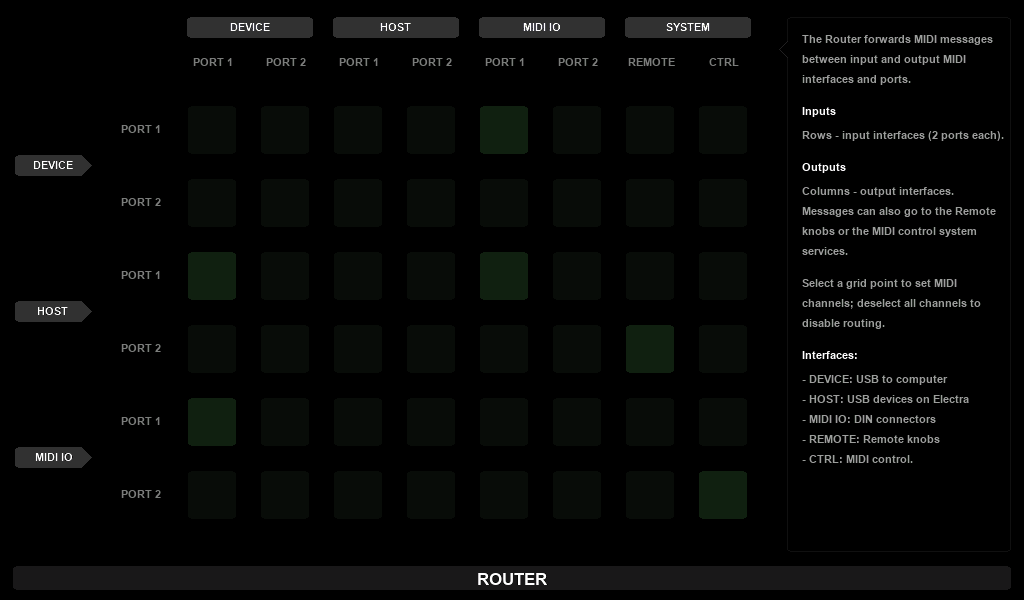
In the picture, your computer plays the synthesizer on <MIDI IO> Port 1 and receives its replies, a USB keyboard plays the synthesizer and records into the computer, a second USB controller moves the remote knobs, and a footswitch on <MIDI IO> Port 2 runs MIDI control commands.
Routes in the Electra One app
On Electra One Mini, and on the Mk2 too, you set routes in the Electra One app. Open CONTROLLER, choose the Configuration tab and then Router. Each row is one route, from a source interface and port to a destination interface and port. Add a route with + ADD ROUTING RULE, remove one with its bin icon, and click APPLY CHANGES to send them to the controller.
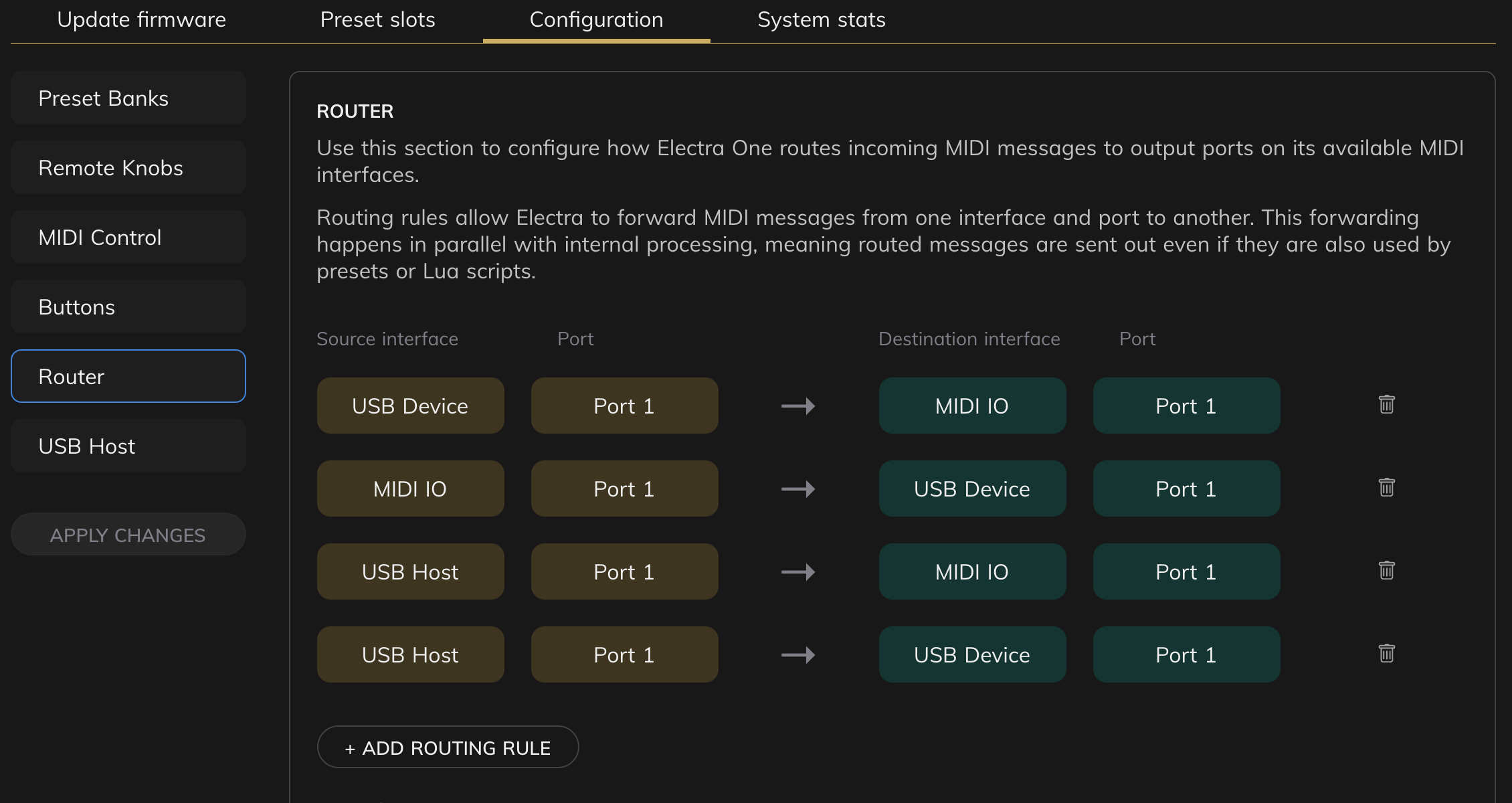
Routes to the remote knobs and to MIDI control are set on the Remote Knobs and MIDI Control tabs next to it.
The Mini has one pair of MIDI sockets, so on the Mini a route to MIDI IO always goes to Port 1.
Router Lua
Static routes forward messages as they are. Sometimes you want more: play a synthesizer that listens on another channel, transpose a keyboard, keep aftertouch away from an old instrument, or send one keyboard to two synthesizers at once. Router Lua does this with a short script.
A preset can include a router script of its own, router.lua. While the preset is active, the script sees each message the moment it arrives and can:
- change it, for example its channel, note or value,
- filter it out,
- send it to one or more destinations, or create new messages.
The script works together with the static routes. A message the script takes care of is not forwarded by the static routes as well. Everything else follows the static routes as usual. And like every forwarded message, the original still reaches the preset.
A preset is active while it is on screen, and a pinned preset stays active after you switch away from it. So the script of a pinned preset keeps running in the background, and it is still running, with everything it had kept, when you switch back to it. Reloading the preset starts the script again from the top.
Why the router script runs on its own
Timing matters for MIDI. A note that arrives a few milliseconds late can be felt when you play. A preset, on the other hand, can be busy: redrawing the screen, running an animation or a large script.
That is why the router script is kept apart from the rest of the preset. It runs on a separate router thread, in a small Lua of its own that has nothing to draw and no controls to update, and Electra One gives it priority over the preset and the display. However much work the preset is doing, the router script is not kept waiting for it. Static routes are just as independent: on the bench they forward a messages between input and output MIDI interfaces in about 0.20 milliseconds.
For the same reason, a router script cannot reach the preset's controls or the screen directly. When the two need to share something, such as a transpose setting chosen on a control, they pass small values to each other using Electra One Data pipes, see Preset Lua Extension.
Using a router script
Router scripts need firmware 5.0 or newer. To use them:
- In the Electra One app, open CONTROLLER, Configuration, Router, and turn on Enable preset router scripts under LUA ROUTER.
- In the preset editor, open the Lua tab and choose Router. Write the script there.
- Send the preset to Electra One. The router script travels with it.
Turning the setting on does not start a script in the preset that is already on screen. Restart the preset using the Restart preset button, switch to another preset and back, or load the preset again, and the script starts. Turning the setting off stops every running script at once.
Sending the preset again from the app loads it again, so a script you changed starts straight away. Uploading only the router.lua file on its own writes the file and leaves the running script alone until the preset is loaded or re-entered.
This script plays the synthesizer on <MIDI IO> Port 1 from a USB keyboard on <USB HOST> Port 1, one octave higher, on channel 2, without aftertouch:
lua
function init()
  router.watch{
    from  = { ports.usbHost1 },
    types = { NOTE_ON, NOTE_OFF, CONTROL_CHANGE, PITCH_BEND,
              CHANNEL_PRESSURE, POLY_PRESSURE },
  }
end

function onMidi(m)
  if m:is(CHANNEL_PRESSURE, POLY_PRESSURE) then
    return false                  -- drop aftertouch
  end
  if m:is(NOTE_ON, NOTE_OFF) then
    if m.note + 12 > 127 then return false end
    m.note = m.note + 12          -- one octave up
  end
  m.channel = 2
  m:to(ports.midiIo1)             -- send it to the synthesizer
  return false                    -- handled: the static routes skip it
end
init tells the router which messages the script wants to see, and onMidi runs for each of them. Clock and SysEx are not in the list, so they keep following the static routes. The Router Lua Extension documentation describes everything a router script can do.