

Version5.0.0 beta
Letting the Instrument Do the Typing
What you will learn
- How to learn many parameters at once from the sidebar, and one message straight into a control you already have.
- Which kinds of MIDI message can be learned, and which cannot.
- How the editor works out a parameter's range, and which byte of a SysEx message carries the value.
- What MIDI learn gets wrong, and how Change type puts it right afterwards.
Introduction
Every control in the first tutorial was typed in by hand: a message type, a parameter number, a range. That is fine with the instrument's documentation open beside you, and no fun at all without it.
There is another way. Tell the controller to listen, turn a knob, and the editor writes the message down for you - the type, the number, the range and, for a synth that speaks SysEx, the whole message with the value byte found and marked. It needs no documentation, no Expert mode and no typing.
It is also not magic, and the second half of this tutorial is about where it stops.
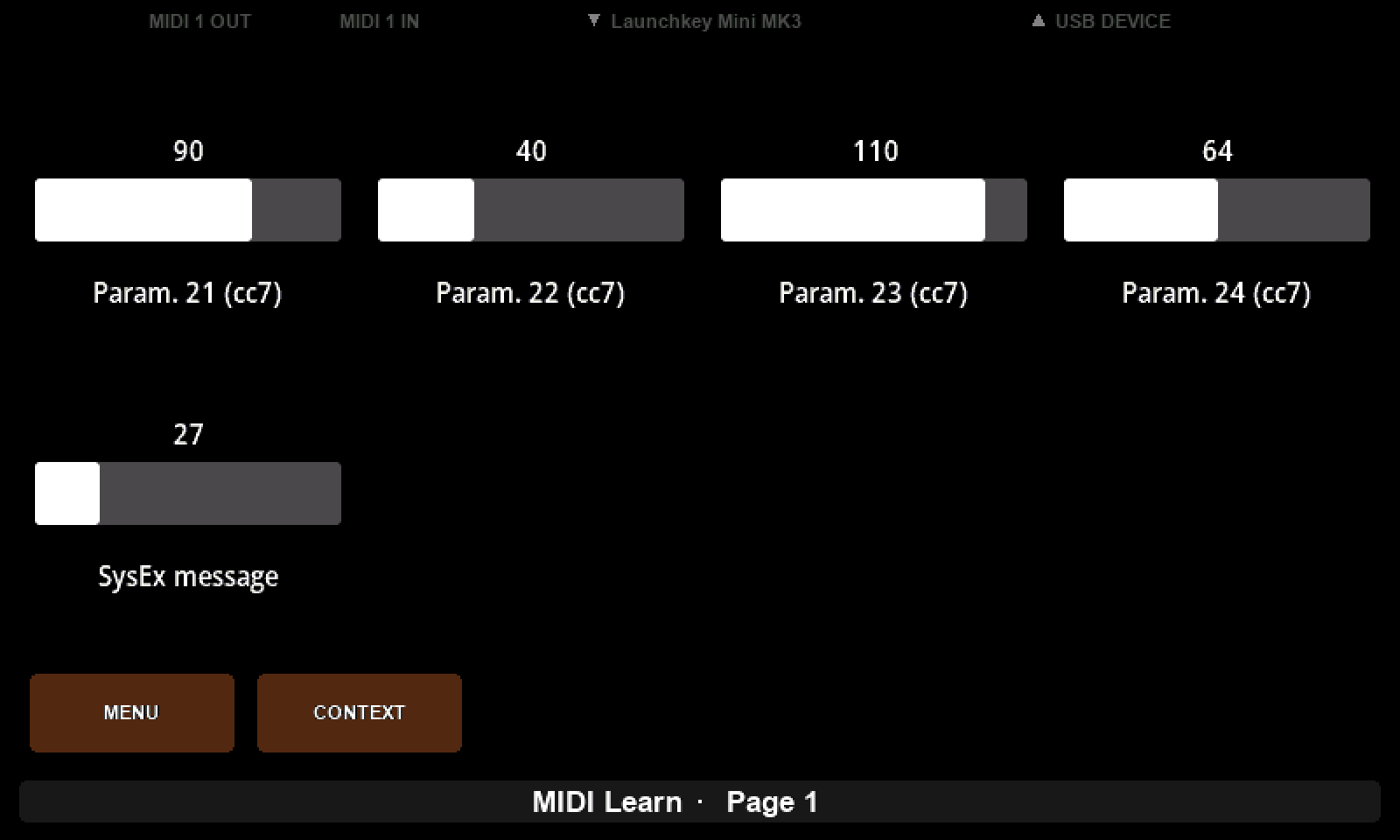
What we will build
A preset called MIDI Learn, built almost entirely by turning knobs on an instrument - and then repaired in the places where turning knobs does not get you all the way there.
Gear required
- An Electra One controller and the preset editor.
- An instrument that sends MIDI. The pictures use a Launchkey Mini on the Mini's USB host port.
- sendmidi, or any tool that sends a raw MIDI message, for the kinds of message a small keyboard cannot produce.
1. The two ways in
Create a preset, name it MIDI Learn, and leave the editor in Basic mode - nothing here needs Expert.
There are two MIDI learns in the editor and they are for different jobs. From the sidebar, with nothing selected, the MIDI Learn button listens for everything and builds a list of what it hears: turn ten knobs, get ten controls to drag onto the page. That is how you start a preset from nothing. From a control, the little microphone beside Message Type listens for one message and writes it into the control you already have, which keeps its name, its colour and its place. That is how you fix a control whose parameter number you guessed wrong.
We will use the first now and the second later. Click MIDI Learn, and the sidebar tells you what it is listening to: Listening on port 1, channel 1. That line matters more than it looks.
2. A handful of knobs
Turn a knob, all the way from one end to the other, and a tile appears.
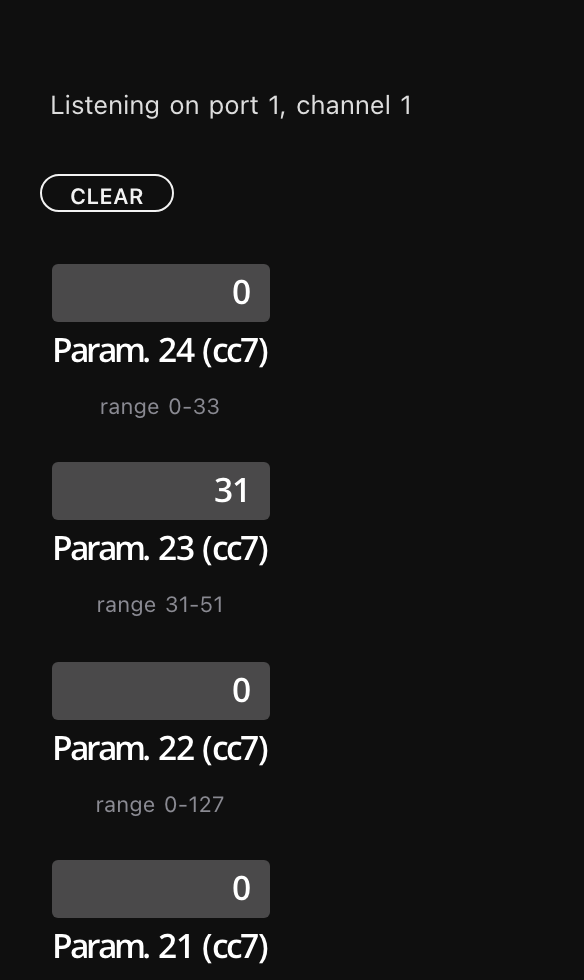
Three things are in that tile. The name is what was heard - controller 24, a plain 7-bit control change - and it is a placeholder rather than a name. The bar shows the value that arrived last. The line underneath is the one to watch: it is how much of the parameter's travel the editor has heard, and it is what the control will be built from.
Sweep four or five more knobs and drag the tiles onto the page one at a time. A tile leaves the list as it lands, so what remains in the sidebar is what you have not placed yet, and CLEAR empties the list without placing anything. That is a working preset, from an instrument you have no documentation for, in about a minute.
MIDI learn keeps listening until you stop it. It ends when you click MIDI Learn again, click anything on the page, press Escape, change the layout or open the device settings - but not when you drop a tile, so you can place controls as they arrive. While it runs the controller does not treat incoming MIDI the way it normally would, so the preset's own controls will not follow the instrument until you stop.
Nothing appears?
The list only shows parameters on the selected device's port and channel. A message from anywhere else says so instead:
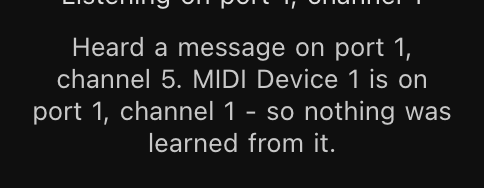
It is the first thing that goes wrong for most people, and the fix is at the top of the sidebar: check the device's port and channel against the ones the instrument is actually sending on. SysEx and Song Position are the exceptions - they have no channel, so they are matched on the port alone.
3. Why the sweep matters
Look again at the line under each tile. After a session of ordinary knob twiddling it will read something like range 31-51, and that is not the parameter's range - it is the part of it you happened to touch.
The editor cannot ask a knob how far it goes. It only knows the values it has heard, so a knob nudged from 31 to 51 has told it the parameter runs from 31 to 51, and the control you drag onto the page will run from 31 to 51 too, with two thirds of the parameter out of reach.
So turn each knob all the way to one end and then all the way to the other. The caption is there to tell you whether you did: a knob you only touched reads only 87 so far - turn it end to end, which is the same advice at the moment it is needed.
The other end of this is a parameter that genuinely does not use the whole range - a coarse tune that runs 52 to 76. A full sweep learns that correctly too, and gives you a control that covers exactly what the instrument accepts and no more, which beats typing 0 and 127 and wondering later why the top of the knob does nothing.
It is a floor and a ceiling, not a measurement
The range only ever widens. Sweep a knob properly, then send that parameter a stray value from somewhere else, and the range grows to include it and stays grown. CLEAR is the only way back.
4. Everything it can hear
A knob is not the only thing an instrument sends, and MIDI learn understands rather more than control changes. A small keyboard cannot easily be made to send all of them, so this is the moment for sendmidi.
bash
D="Electra Controller Electra Port 1"

sendmidi dev "$D" cc 30 64                 # a plain control change
sendmidi dev "$D" cc14 1 4000              # a 14-bit control change
sendmidi dev "$D" cc 99 1 cc 98 20 cc 6 64 # an NRPN
sendmidi dev "$D" on 60 100 off 60 0       # a note
sendmidi dev "$D" pc 5 pc 1 pc 9           # three program changes
sendmidi dev "$D" pb 0 pb 16383            # the pitch bend wheel
sendmidi dev "$D" pp 60 80                 # poly aftertouch
sendmidi dev "$D" ct 80                    # channel aftertouch
sendmidi dev "$D" spp 100                  # a song position
Each becomes a tile - and, the part worth watching, not all of them become the same kind of control.
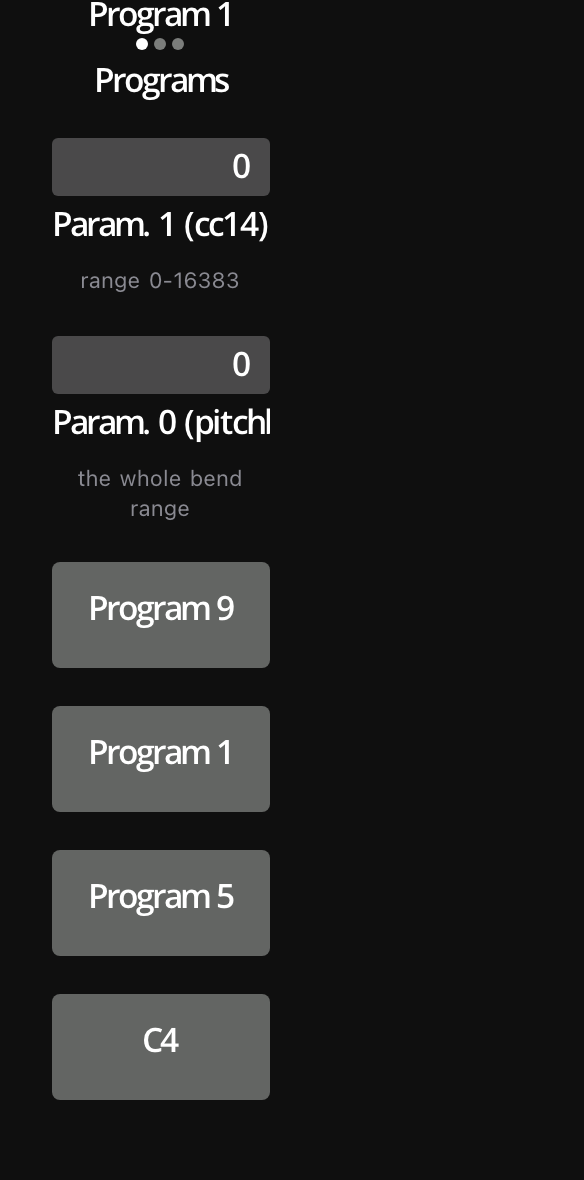
| Sent | Learned as | Becomes |
|---|---|---|
| Control Change | cc7 | a fader |
| a CC and its partner 32 higher | cc14 | one fader over 0-16383 |
| NRPN or RPN | nrpn, rpn | a fader |
| a note | note | a momentary pad, named C4 |
| a program change | program | a momentary pad, Program 5 |
| several program changes | program | a pad each, and a list of all of them |
| the bend wheel | pitchbend | a bipolar fader, -8192 to 8191 |
| aftertouch, poly or channel | atpoly, atchannel | a fader |
| a song position | spp | a fader |
A pad per program is what you want for three favourites on a page; a list is what you want for a bank of them. MIDI learn cannot know which, so it offers both and lets you take the one you need.
Why pitch bend ignores what it heard
Every other control takes the range that actually arrived. A bend wheel springs back to the middle, so what arrives is wherever it was pushed to - and the one value that has to sit in the middle of that control is the one that bends nothing. It takes the whole range instead, every time.
And the things it cannot learn, worth knowing precisely because nothing happens when you send them:
bash
sendmidi dev "$D" clock 120 start stop asNo tile, no notice, no line in the log. Clock, start, stop, continue, active sensing, song select, tune requests and time code are not parameters, so there is nothing to learn from them and nothing to say about them.
5. SysEx, and the byte that moves
Plenty of synths send no control change at all when you turn a knob. They send a SysEx message: a packet with the manufacturer, the model, the parameter's address and its value in it. Writing one by hand means reading the instrument's implementation chart. MIDI learn will do it for you.
It has a harder problem here. A control change says which controller it is; a SysEx message is just bytes, and nothing in it is labelled "value". So the editor finds the value by watching what moves - it keeps the last five messages, lines them up, and looks for a byte that differs between them.
Clear the list and pretend to be a synth whose cutoff sits at address 00 08 00 0A:
bash
sendmidi dev "$D" hex syx 41 10 00 08 00 0A 00
sendmidi dev "$D" hex syx 41 10 00 08 00 0A 20
sendmidi dev "$D" hex syx 41 10 00 08 00 0A 40
sendmidi dev "$D" hex syx 41 10 00 08 00 0A 60
sendmidi dev "$D" hex syx 41 10 00 08 00 0A 7F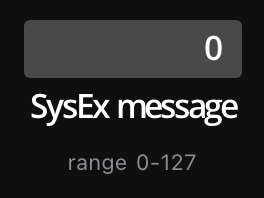
One tile, and its caption fills in as the fifth message lands. Drag it onto the page and the control sends that same message with its own number in that one byte - the header, the address and all. You wrote no template and read no chart.
Where it gives up
Now clear the list and be a less helpful synth, one that puts a checksum at the end as many do:
bash
sendmidi dev "$D" hex syx 41 10 00 08 00 0A 00 76
sendmidi dev "$D" hex syx 41 10 00 08 00 0A 20 56
sendmidi dev "$D" hex syx 41 10 00 08 00 0A 40 36
sendmidi dev "$D" hex syx 41 10 00 08 00 0A 60 16
sendmidi dev "$D" hex syx 41 10 00 08 00 0A 7F 77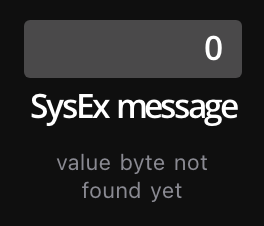
And it will go on saying that. Two bytes move between those messages and the rule is exactly one: the editor cannot tell the value from the checksum - both change, and both change because you turned the knob - so it declines to guess and hands you the message as fixed bytes.
That is not a dead end. Drag it onto the page anyway; the header and the address are already right, and the SysEx editor is where you mark which byte is the value and which is the checksum. The same happens to a value spread over two bytes, and to anything else that moves.
One SysEx parameter at a time
A SysEx message has no parameter number, so MIDI learn cannot tell two knobs apart: all SysEx on a port goes into one tile. Turn one knob, place its control, click CLEAR, then turn the next. Skip the CLEAR and the next knob's messages are compared against the last one's - two bytes differ, the address and the value - and neither knob is learned properly.
6. What it cannot know
MIDI learn hears messages. It does not know what they mean, and everything it gets wrong follows from that.
It does not know what anything is called: every tile is Param. 21 (cc7) until you rename it, which is not laziness - controller 21 is genuinely all the instrument said - but a page of Param. 21 through Param. 28 is not a preset anybody wants to play. It does not know a list when it hears one either, because a knob that steps through four waveforms and a knob that sweeps a filter send the same thing; both arrive as faders. Some types carry no range at all, a program change and a note among them, so none is learned for those. And SysEx is one parameter at a time.
None of that makes the learn less useful. It means the preset it hands you is a first draft: right about the messages, which is the hard part, and wrong about the names and sometimes the shapes, which are the easy ones.
7. Fixing the shapes afterwards
Take one of the faders from step 2 - a knob that really selects between a handful of things rather than sweeping a range. It arrived as a fader because that is all its messages looked like. Select it and click Change type, the last line of the control card.
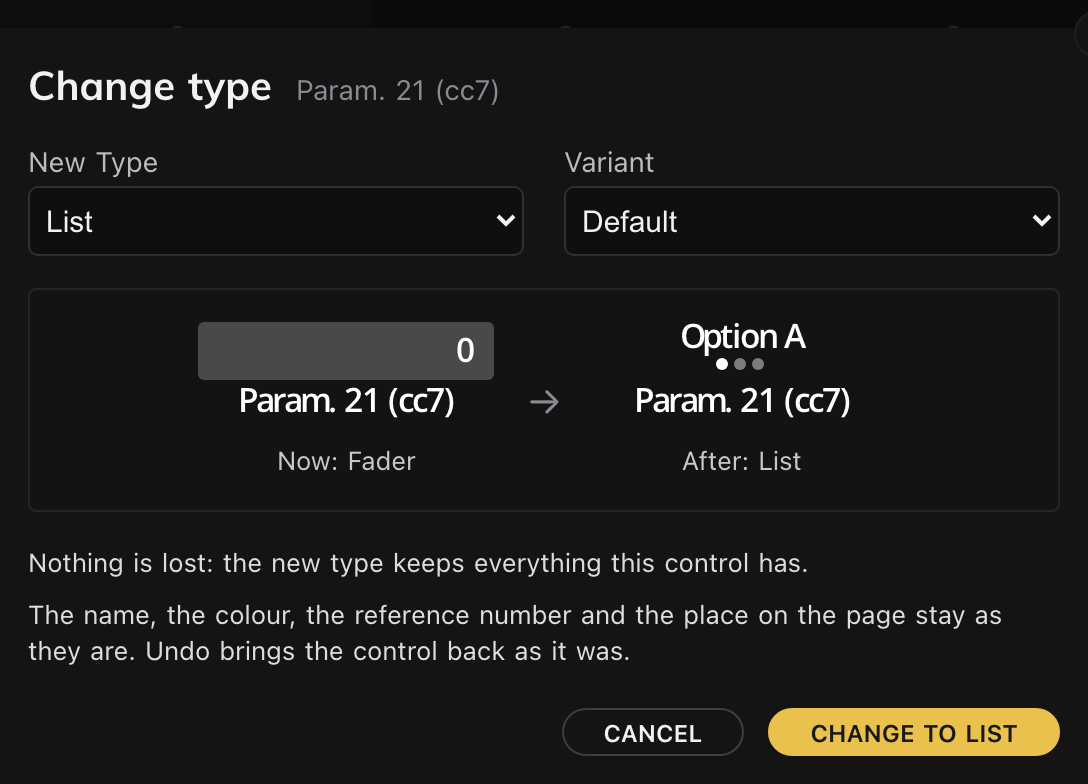
The window draws the control as it is and as it will be, and underneath tells you what the change costs. For a learned fader the answer is usually nothing is lost: the new type keeps everything this control has. That sentence is the whole point of the window: when a change would cost something - a list has no display range, a pad keeps only two values - it says so instead and names what goes. Read it before you click, and if you clicked anyway, Undo brings the control back as it was.
Click Change to list. The name, the colour, the reference number, the device, the place on the page and - most importantly - the message the learn worked out all stay as they were. Only the shape changed. Now give it its items, and give the control a real name while you are there.
The other way round, too
A learned note arrives as a momentary pad, right for a drum and not for a held note. A learned program change arrives as a pad, right for one favourite and not for a bank. Change type moves any of them, and never touches the message underneath.
What to remember
| Two ways in | The sidebar's MIDI Learn collects many parameters at once, each a tile to drag onto the page. The microphone in a control's message card learns one message into the control you already have. |
| Sweep it | The range is what has been heard, not what the parameter is. Turn each knob end to end, and read the line under the tile to check that you did. |
| What it hears | Control changes, 14-bit pairs, NRPN and RPN, notes, program changes, aftertouch, pitch bend, song position and SysEx. Clock, start, stop and the rest are not parameters and are ignored. |
| What it makes | A fader for anything with a range, a momentary pad for a note or a program change, a list once several programs have arrived, a bipolar fader for pitch bend. |
| SysEx | The value is the byte that moves, found by comparing the last five messages - so exactly one byte may move. One parameter at a time, and CLEAR between them. |
| The wrong device | Only the selected device's port and channel are listed. A message from anywhere else says so instead of appearing. |
| Afterwards | Rename everything, and use Change type where the messages could not reveal the shape. |
The habit worth taking away is the order. Learn the messages while the instrument is in front of you, when every knob you turn is a lookup you do not have to do. Fix the names and the shapes later, in the editor, where none of it needs the instrument at all.