

Version5.0.0
System architecture for preset developers
This page describes how the Electra One firmware works internally. It is meant for users who develop presets and Lua scripts. It answers the questions they might be constantly running into:
- In what order do things happen when a knob turns or a MIDI message arrives?
- What leaves the controller first?
- What waits in a queue?
- What functions are called, when, and what order?
Everything on this page turns around one part of the firmware, the Parameter Map: the reactive store that every value change passes through. The threads - the workers inside the firmware - feed it with the data, the queues carry work to it and the callbacks a script functions are called on the way in and on the way out.
How to read the diagrams:
- A teal box or frame is the application thread, where a preset's script runs, and the things it owns.
- A blue box is the MIDI band, the threads above the application thread in priority.
- A dashed pill is a queue between two threads.
- 1A numbered badge gives the order of steps.
The big picture
The firmware is a set of threads that pass work to each other through queues. Almost every path ends at the application thread, which owns:
- the presets
- the Parameter Map
- every preset's Lua
- the pages on the screen
- and the files on the card
The only lower-priority thread is the LCD rendering thread, so graphics stutter does not necessarily indicate application or MIDI timing issues, it most likely means the display thread is being starved. This is a deliberate design decision we made long ago: graphics may slow down when the controller is busy, but MIDI traffic must not. Firmware 5.0.0 enforces this separation even more strictly than previous versions.
MIDI is parsed and routed in the blue band, above everything that can be slow. Values and callbacks cross into the application thread through queues, where the Parameter Map and the preset's script live. As mentioned above, the screen is painted by a separate thread, from a queue of its own.
The picture shows the three MIDI interfaces every model has. The mk3 adds two more ways in and out over its network port, not drawn here: RTP MIDI, which is a fourth MIDI interface and behaves like the other three, and OSC, which the osc library sends and receives from a preset's script.
Three things follow from the picture, and the rest of the page is a closer look at each:
- MIDI never waits for a preset. Parsing, routing and sending happen on threads above the application thread. A script that takes a long time delays the screen and its own callbacks, not the MIDI passing through.
- A preset's script runs on the application thread, one pass a millisecond, with everything else that thread does: reading the knobs, building pages, applying values, running every other preset's script.
- The Parameter Map is where the paths meet. A knob, a MIDI message, a script, a snapshot and a remote surface all write to it, and the MIDI going out, the callbacks and the screen all follow from what it holds.
Threads and priorities
The firmware runs on a real-time kernel with a tick of one millisecond and no time slicing: the highest priority thread that has something to do runs until it waits, and a lower one runs only when everything above it is waiting. A lower number is a higher priority.
| Thread | Priority | What it does | Runs your Lua? |
|---|---|---|---|
| MIDI schedule | 1 | sends messages held by midi.at() on their millisecond, generates the controller's own clock, plays captures | no |
| Output threads | 1 | one per interface - DIN, USB device, USB host - draining their queues onto the wire | no |
| MIDI | 2 | parses every incoming message, tracks clock and held notes, records captures, matches devices, banks values and callbacks for the application thread | no |
| Knob scan | 2 | reads the pots and hardware buttons, one multiplexer address a millisecond | no |
| Router | 3 | runs every loaded router.lua, then the routing matrix | router.lua, in its own state |
| Touch | 6, 7 | reads the knob touch sensors and the touch screen | no |
| Application | 8 | the presets, the Parameter Map, pages and controls, snapshots, the card, and every preset's script | almost everything |
| LCD | 9 | paints the screen, runs transitions and animations | a custom control's paint callback |
| RTP MIDI | 9 | the mk3's network MIDI | no |
What a preset developer takes from the ladder:
- Your script is at priority 8. Every thread above it can interrupt it at any moment, and does: a burst of MIDI, a knob scan, the router. A callback measured at a millisecond of work may take longer on the wall clock because the MIDI band ran in the middle of it.
- Only the painter is below you. A script that runs for a long time is not interrupting MIDI; it is stopping the screen, and stopping every other callback that has to wait its turn on the application thread.
- The router is above the application thread on purpose. That is what lets
router.luaforward a note without waiting for a page to be built. It is also why a router script that does too much holds the whole user interface off - see Preset Lua and router Lua.
The Parameter Map
The Parameter Map is a table of MIDI values, one entry per parameter of each device in the preset: the address is the device id, the parameter type and the parameter number, and the entry holds one 14-bit value. A control value subscribes to the entry its messages, so a parameter shown by three controls has one entry and three subscribers. Each preset has a map of its own, and a pinned preset in the background keeps its map running.
Every change to a value goes through the map, and the map is where the consequences of a change are decided.
Origins, and what is echoed
Each write carries an origin, and the origin is the whole of the feedback-loop protection: there is no other mechanism. A value that arrived over MIDI is stored and shown but never sent back to the instrument that sent it; a value read from a snapshot file is stored silently, and the snapshot code then sends every control's value in one deliberate pass.
| Origin | Who writes with it | MIDI sent? | parameterMap.onChange()? |
|---|---|---|---|
INTERNAL | a knob, the touch screen, a default value, morph, randomize | yes | yes |
MIDI | a message that arrived, a capture playing back | no | yes |
LUA | parameterMap.set(), value:setValue() and their relatives | yes | yes |
MODS | parameterMap.modulate() | yes, without storing the value | no |
FILE | a snapshot being recalled, parameterMap.recall() | no | yes |
REMOTE | a remote control surface mapped to the parameter | yes, not back to the surface | yes |
LINK | a second screen over the Electra Link | yes, not back to that screen | yes |
A write whose value is the same as the one the entry already holds does nothing at all: no message, no callback, no repaint. That deduplication is what stops a script that writes back to a parameter from inside parameterMap.onChange() from looping for ever - the second write finds the value already there.
What happens when a value changes
Here is the exact order for a knob, which is the same order for a touch, a script write and a snapshot. The first two steps happen the moment the map takes the value; the next three happen on the same pass of the application thread, a moment later, when the map's dispatcher hands the change to the controls that show the parameter.
Two things in that order matter to a script:
- The message is already on its way when your Lua runs. Nothing a value function or
parameterMap.onChange()does can change or stop the message the change itself sent. A value that has to be turned into something else before it goes out uses avirtualmessage and sends from its function. - The message goes to a queue, not to the wire. The output thread drains it within a millisecond on USB; on DIN a message takes about a millisecond of wire time, so a burst of changes to DIN leaves at one message a millisecond, in order.
A relative control is the one exception to the picture: it has no value to store, so each step is sent, handed to parameterMap.onChange() and to the value's function and formatter right there, with the step as the value.
Writing from a script
The map offers several ways of writing, and they differ in which of the steps above they take. Pick by what you want to happen, not by name.
| Call | MIDI sent | onChange() | value function | formatter, repaint |
|---|---|---|---|---|
parameterMap.set(), value:setValue() | yes | yes | yes | yes |
parameterMap.apply() - OR in a fragment | yes | yes | yes | yes |
parameterMap.updateValue(), value:updateValue() | no | no | no | yes |
parameterMap.modulate() | yes, the stored value is untouched | no | no | yes |
control:repaint(), value:repaint() | no | no | yes, run at once | yes |
parameterMap.transaction(fn) | nothing inside; nothing after | no | no | once per parameter, when it closes |
set() is a value being changed: it is dispatched exactly as a knob turn is, and a script that sets a parameter it also watches hears its own write back. updateValue() is a value being shown: the instrument said so, the screen follows, and nothing is sent or called. A script that follows an instrument's own changes wants updateValue(); one that drives the instrument wants set().
parameterMap.transaction() holds the map still for the length of a function. Nothing is sent, nothing repaints and no callback runs until it closes, and then the screen catches up in one pass. A patch dump applied by hand is what it is for: a hundred and twenty-eight writes cost one repaint, and none of them is echoed back to the instrument that sent the dump.
Parameter map entries
An entry exists for every parameter some control value addresses, and for every parameter parameterMap.setFunction() was called for. Nothing else creates one, and a write to an address with no entry does nothing - no error, no message, that is done on purpose, by design. A script-driven preset that keeps most of its state in the map rather than on the screen binds those parameters with setFunction() first, which creates the entry and gives the parameter a function to run when it changes, with scalars or watches the map with the parameterMap.onChange().
Background presets
A pinned preset runs in the background and has no controls on the screen. Its map, however, keeps running: values arriving over MIDI are stored, parameterMap.onChange() and the bound functions run, its timer ticks and its midi.* callbacks are called. What it does not do is paint. From this perspective, a pinned preset running in the background puts less load on the controller than the preset currently displayed on the screen. When such a preset comes back to the screen its page is built and the whole map is dispatched once, which is what brings every control up to date without a value having to move.
One pass of the application thread
The application thread does not wait for events. It runs a loop, one pass every millisecond, and each pass drains a fixed amount from each queue, in a fixed order. That order is why the sequences on this page are what they are.
The pass is bounded on purpose: however much is waiting, a pass takes at most 48 parameter updates, 80 dispatched entries, 64 MIDI callbacks, 8 commands. A burst larger than that is spread over the following passes, in order, and nothing is lost while the queues hold. What the budgets buy is a loop that keeps turning at a millisecond under load, which is what a 1 ms Lua timer depends on.
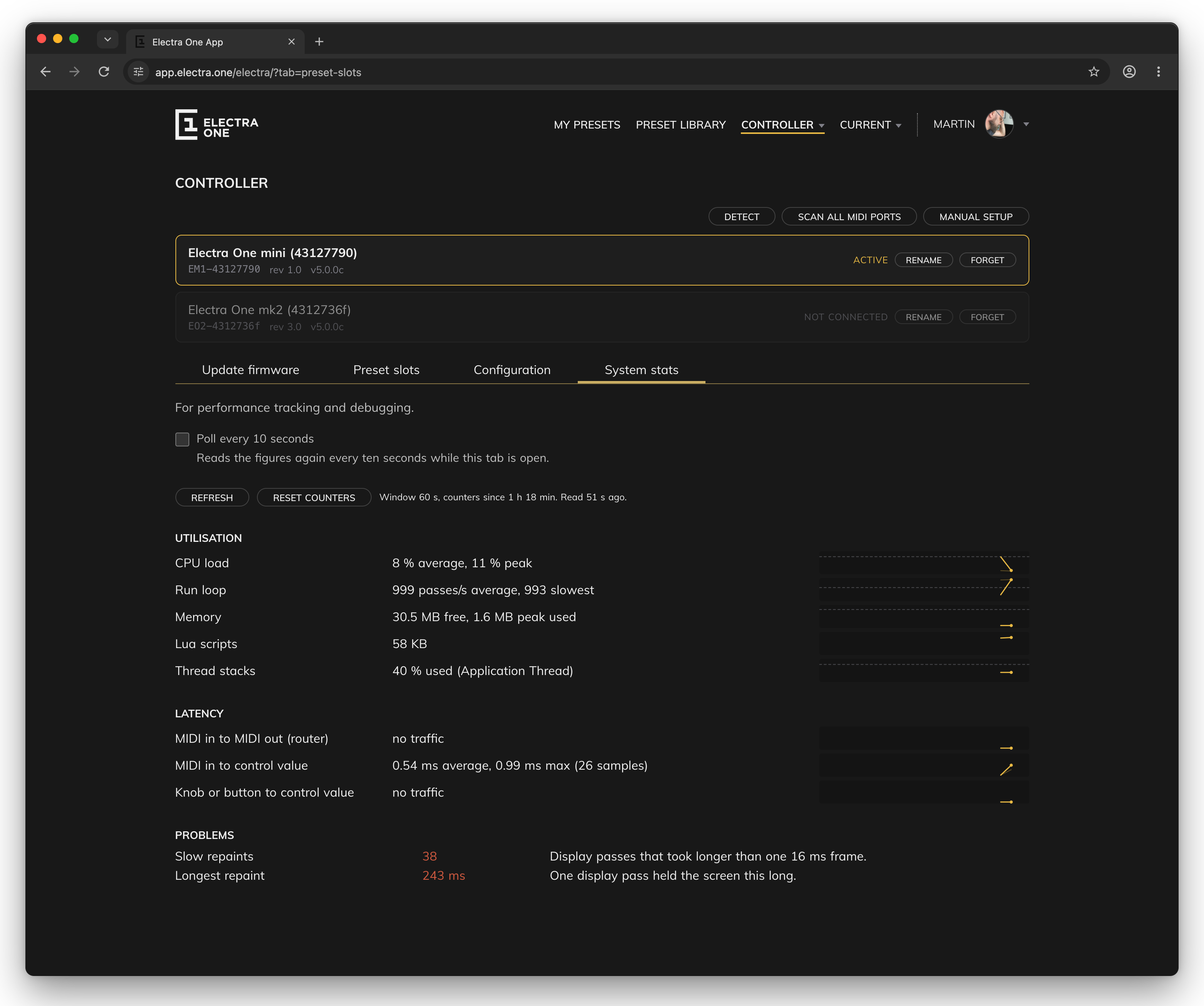
You can watch this on the controller. The System stats tab of the Controller page in the Electra One web application reads the runtime information the controller reports and shows the run loop as passes per second, the average and the slowest second, over the last window. A healthy controller sits near a thousand; a number well below it is the one sign of a starved application thread that MIDI itself cannot show. Next to it are the latencies from a MIDI message and from a knob to the Parameter Map, the memory a preset's Lua is holding, and a list of overruns that are all zero on a controller that is keeping up: timer ticks skipped, MIDI callbacks shed, parameter updates dropped, router packets dropped, slow repaints, and any queue that came close to full. When a preset feels late, look there before looking at the script. The Electra One Account chapter describes the tab row by row.
The queues a preset can fill, and what happens when they are full:
| Queue | Per pass | When full |
|---|---|---|
| parameter updates, MIDI thread to the map | 48 | the newest value per parameter is kept aside and applied once the queue drains; nothing waits |
| map dispatch, changed entries to their controls | 80 | never waits on itself |
MIDI callbacks, midi.on* and transport.on* | 16, then up to 64 within 500 µs | dropped and counted, midi.getDroppedCallbacks() |
| pending SysEx for callbacks | with the callbacks | a block overwritten before its turn is dropped and logged |
| commands, from any thread | 8 | dropped and counted once an overflow store is full too |
midi.at() held messages | all due | a message that finds it full is sent at once |
router events, router.emit() | 8 | dropped, logged every two seconds |
| data pipe values | all | dropped and counted |
| repaint requests | all, on the LCD thread | a component already staged is not staged twice |
A MIDI message arrives
The MIDI thread does a fixed list of things with every message, in the order below, and only prepares work for the application thread; the application thread does the rest a pass later.
The points to hold on to:
- The map is updated before
midi.on*runs for the same message. A callback that readsparameterMap.get()for the parameter the message named sees the new value. The value's function and formatter have run too. - Nothing that arrived is echoed. The value is stored with origin
MIDI, the controls follow, and no message goes back out. A script that wants to pass a message on sends it itself, if it does, review configuration of the Electra One router. - The specific callback runs before the general one.
midi.onControlChange()first, thenmidi.onMessage()for the same message. A SysEx message is copied before the script sees it, so a callback may take its time over the block. - Callbacks are not timed. About half a millisecond after arrival on an idle controller, and tens of milliseconds while a page is being built. A reply that has to land on a beat is handed to
midi.at(). - A message that a capture plays comes back down this same path on the application thread, after it has gone out, with
midiInput.playbackset, so the controls follow a capture the way they follow an instrument. - A patch response is parsed before its callback runs. A dump that matches a response has the values its rules name banked for the map on the MIDI thread, and
patch.onResponse()is held back on the application thread until those values have been applied. Inside the callback,parameterMap.get()answers what the rules put there, and the callback runs ahead ofmidi.onSysex()for the same message.
Preset Lua and router Lua
Electra One has two separate Lua environments, and choosing the wrong one is the most common way for a preset to feel broken. The difference is in which thread runs the script, and therefore in how long a message waits for it.
Router Lua sits in the MIDI path and decides where a message goes, in a fraction of a millisecond. Preset Lua gets a copy of the message through a queue and decides what it means, whenever the application thread gets to it. Parameters go down, events come up, and neither script can see the other's world.
Why the separation?
Where each one sits. A preset's MIDI callbacks are deferred on purpose. If they ran on the MIDI thread, one slow value formatter would stall MIDI for every preset on the controller, so the message is queued and the application thread picks it up when it gets round to it. That protects the MIDI path, and it puts your callback behind whatever the application thread was already doing: a page being built, another preset's timer, a snapshot being saved. The router hook has no such problem, because it is the MIDI path.
What has to happen first. Before preset Lua sees a message, the MIDI thread has parsed the MIDI packet - yes, Electra converts all incoming MIDI messages into USB MIDI style packets - built a message object, offered it to every running preset's devices and queued it. Router Lua is handed the raw packet and reads only the bytes the script asks for.
What each one competes with. The application thread shares its time with painting, touch, the card and preset loading. The router thread only routes.
Measured on an mk2 forwarding a stream of a thousand control changes a second while a page of faders repaints: a message forwarded by the router left about a tenth of a millisecond after it arrived, and never more than half a millisecond; the same message reached the Parameter Map after about two thirds of a millisecond, and up to two milliseconds; a preset callback for it ran after that, and while a page was being built it could run tens of milliseconds later. For a knob on the screen, tens of milliseconds are invisible. For a note passing through to a synthesizer, they are a stumble you can hear.
The rule
Preset Lua is for what a message means. Router Lua is for where it goes. Never build MIDI thru, a merge or a split with midi.sendNoteOn() from preset Lua: the application thread's delay lands exactly when the display is busiest.
The price of the router's speed is isolation. router.lua cannot see the preset at all: no controls, no parameterMap, no pages, no graphics, no files, no pipe. It runs in a Lua state of its own on the router thread. Being above the application thread cuts both ways: a router that does too much work per packet holds the whole user interface off while it works through its backlog, and no queue can fix that.
How the two talk
A performance rig needs both halves: an engine that never stutters, and a page of controls that changes what the engine does. The two scripts do not share variables; they share three queues, each crossing between the router thread and the application thread, the infrastructure for this is called a Data Pipe and it is commonly used for communication between threads and presets.
| Channel | Direction | How | What crosses |
|---|---|---|---|
| Parameters | preset to router | router.set(name, value) in main.lua; router.params and onParam(name, value) in router.lua | up to 16 named numbers or booleans, applied between messages, never in the middle of one |
| Events | router to preset | router.emit(name, value) in router.lua; the global onRouterEvent(name, value) in main.lua | a name and a number, 8 delivered per pass; a full queue drops |
| Ports | router to the preset's MIDI handling | m:to(ports.preset), ports.preset:sendControlChange(); ports.midiControl for a UI command | a whole message, entering the normal incoming path as if it had arrived on a MIDI IO port |
Parameters are the way to wire a control to the engine: a value function on the transpose fader calls router.set("transpose", value - 64), the router reads router.params.transpose as a plain table lookup in onMidi(), and the change takes effect between two messages. Events are the way to show what the engine is doing - a voice count, a clock division - and they run a Lua function on the application thread each, so a router emits when something changes, never once per note. A router that has just started runs its init() on the router thread a moment after main.lua has finished, so inside preset.onReady() the router is not there yet; router.set() raises until it is.
Presets talking to presets: data pipes
A data pipe is a named stream of numbers: one preset acquires it and sends values into it, and any other preset subscribes with a function that is called with each one. It is how a pinned LFO or sequencer preset drives the controls of the preset on the screen without either knowing anything about the other beyond the pipe's name.
Sixteen pipes are allocated for presets running on the controller, a pipe carries numbers only, and a value is delivered on the application thread on a later step of the same pass or the next. A full queue drops the value and counts it, so a sender at a high rate should send what changed rather than every tick.
Loading a preset
When a preset is read into a slot - at power on, on a switch to a slot that is not in memory, on a reload - a fixed sequence runs, all of it on the application thread, with the screen held still until the end.
What the sequence means for a script:
- Values exist before your code does. Every control value has registered its map entry, and the saved map has been recalled, before the main chunk runs.
parameterMap.get()works from the first line. midi.on*callbacks are looked up once, between the main chunk andpreset.onLoad(). One defined later - inonLoad(), in a timer, from the debugger - is never called.parameterMap.onChange()is the exception and may be assigned at any time.preset.onLoad()is before the first pass, so nothing it sets is visible: it is meant to set the global context.preset.onReady()is after it, and is where start-up work belongs - pinning, starting a timer, requesting a patch.- The first pass runs formatters and not value functions. A control's function is for a change, and loading is not one.
- The first paint comes after
onEnter(). Nothing is on the screen while the callbacks run; a slowonReady()shows as a preset that takes long to appear. - Nothing requests patches for you. A preset that wants its instrument's state asks, with
patch.requestAll()or the button. router.luastarts after all of this, on the router thread. InsideonReady()andonEnter()the router is not running yet.
Coming back to a preset already in memory runs preset.onEnter() alone. Leaving one runs preset.onLeave(), and an unpinned preset then stops: its timer is suspended and its MIDI callbacks are taken away, until it comes back. preset.onExit() runs when the Lua state is closed, which is the end of the story for that state.
Making things happen on time
A preset script never runs on its own; it runs when the controller calls it. For anything driven by time there are four tools, and they differ in which thread does the work, which is what decides how precise they are.
| Runs on | Precision | |
|---|---|---|
timer - one periodic timer.onTick() per preset | application thread, at the end of every pass | the period is kept in microseconds and never drifts; delivery is to the millisecond, later while the thread is busy |
schedule - one-shot and repeating functions, note triggers | application thread, right after the timer | the same; a function that finds the thread busy runs as soon as it is free |
transport - callbacks on MIDI clock, start, stop, from a wire or the controller's own clock | application thread, through the callback queue | the beat is exact, the callback is a few milliseconds behind it |
midi.at() - a send held back until a named millisecond | the MIDI schedule thread | the message leaves on the millisecond, whatever the application thread is doing |
The rule worth learning first: work out when something is due, then hand the message to midi.at(). A sequencer that waits for the tick on which a note is due before sending it is already late by however long its own callback took; one that works a tick ahead and gives midi.at() the time is exact. The same goes for a clock: transport.enableClock() runs the controller's clock generator on the schedule thread, and a clock sent from a timer with midi.sendClock() carries the application thread's jitter.
A timer tick that finds the preset's Lua state busy is dropped rather than waited for, and counted by timer.getContendedTicks(); the usual cause is a custom control's paint callback holding the state on the LCD thread. A tick that falls a whole period behind is given up on and counted by timer.getSkippedTicks(), and the next tick's ticks argument says how many periods it stands for. Check the System stats on the Controller page to see skipped items.
Captures
A capture is a Standard MIDI File played by the schedule thread. What it plays goes out through the output queues like any other message, and is then handed back to the presets on the application thread, after it has gone down the wire, as if the destination had answered with it: the controls follow, patch responses in it are parsed, and the midi.on* callbacks run with midiInput.playback set. Playback is never taken for input: it is not routed, not recorded into another capture, not counted as clock, and it does not reach the transport callbacks. Recording takes its copy on the MIDI thread as messages arrive and on whichever thread sends as the controller's own messages leave, and writes the file on the application thread.
Snapshots
Recalling a snapshot reads the file into the map with origin FILE, which stores every value silently, and then sends every control's value in one deliberate pass. So parameterMap.onChange() runs once per changed parameter with origin FILE, and the instrument hears one message per control, never one per file record. Morphing between two snapshots and randomizing write with origin INTERNAL, so each change is sent as it is made. Saving, renaming and moving snapshots are queued and done a moment later on the thread that owns the card, which is why a read taken straight after a write still describes the old state.
The display
The screen belongs to the LCD thread, and only the LCD thread writes to it. The application thread does not paint; it schedules a repaint, and the LCD thread paints on its next pass.
A repaint request names a component - a control, including the custom controls - and a component already waiting is not queued twice, so a value that moves ten times between two frames is painted once. The LCD thread passes every 22 ms, about 45 frames a second; a pass that overruns drops frames rather than queueing them up. From a knob turn to the screen, then: the map takes the value at once, the dispatcher schedules the repaint on the same pass, and the paint follows within a frame.
A custom control's paint callback is the one piece of preset Lua the LCD thread runs, under the same lock as the rest of the preset's script. It waits up to 20 ms for that lock; a script busy in a timer tick or a MIDI callback for longer than that costs the control its frame, and it keeps the picture it had. The reverse holds too: a paint callback that draws for a long time is holding the lock while it does, and the timer ticks that fall due meanwhile are dropped as contended. Keep paint callbacks to drawing, and compute what to draw elsewhere. The graphics functions refuse to run from anywhere else, because a script writing to the display from a timer would corrupt the transfer the LCD thread was in the middle of.
One lock, and what waits for what
Each preset's Lua state, read Lua instance of each preset, is guarded by a lock of its own, so only one piece of a preset's script runs at a time. A timer tick cannot interrupt a MIDI callback half way through, parameterMap.onChange() cannot run in the middle of preset.onReady(), and a script never has to guard its own variables. The lock is per preset: two pinned presets run their scripts independently, each under its own lock, both on the application thread in turn.
| Thread | What it runs in your preset's state | If the state is busy |
|---|---|---|
| Application | the main chunk and the lifecycle callbacks; every midi.* and transport.* callback; parameterMap.onChange() and bound functions; value functions and formatters; control event callbacks; pages.onChange() and the events.* callbacks; patch.onRequest() and patch.onResponse(); data pipe subscribers; onRouterEvent(); the execute-command SysEx | waits |
| Application, at the end of the pass | timer.onTick(), scheduled functions and note triggers | the tick is dropped and counted as contended |
| LCD | a custom control's paint callback | waits 20 ms, then keeps the last frame |
| Router | router.lua, in a state of its own | never touches the preset's state |
The consequence to keep in mind: long work blocks the screen and the preset, not the MIDI passing through. A callback that runs for 50 ms holds the application thread for 50 ms, during which no knob is read, no incoming value reaches the map, no other callback runs, and the LCD thread waits for the lock and gives up. The rules that follow:
- Do a little work often rather than a lot at once. A timer at 50 Hz doing a millisecond of work each tick costs nothing visible; one that does 50 ms every second is seen.
- Never wait inside a callback.
helpers.delay()holds the lock for its whole length;schedule.after()andmidi.at()let the script return. - Structural edits - creating controls, groups and devices,
control:update(), loading or saving a preset - are allowed frompreset.onReady(), a control callback, a command and a patch hook, and refused from a timer or a scheduled function with an error that says so. Build structure inonReady(); change values from a timer. - Reads of the snapshot and capture databases happen on the calling thread. From a value function or a timer that is fine; from a MIDI callback it holds the application thread's MIDI step for the length of the query, and the firmware logs a thread violation.
Errors and limits
Every entry into a script is protected. An error in a callback is written to the log with the name of the function that failed, the callback is abandoned, and the preset keeps running; a syntax error or an error in the main chunk leaves the preset with no script at all, and the bar at the bottom of the screen says so. Nothing a script does can take the controller down, and a recursion that runs out of stack raises an ordinary, catchable error while there is still room to report it.
Two callbacks are watched for time: timer.onTick() and a scheduled function that has not returned after ten seconds is stopped where it is, the timer is disabled or the schedule cleared, and the bar says why. Nothing else is watched - a parameterMap.onChange() or a midi.onMessage() that loops for ever holds the application thread for ever. The way out is the front panel: holding all six main buttons for two seconds stops every preset timer and clears every schedule, read by the knob-scanning thread, which is above the application thread and keeps running when it does not.
Each preset's Lua state has its own heap, and nothing caps it beyond the memory the controller has. controller.memory() reports what a script is using; a preset that stops working as it grows has usually run out, from a table appended to and never trimmed, or a callback that builds a new table every time it runs.
Which callback, which thread, which order
A reference for the whole page, in one table.
| Event | Who notices it | What runs, in order | On |
|---|---|---|---|
| a knob turns, a control is touched | the knob scan and touch threads bank it; the application thread reads it at the top of its pass | the map takes the value · the MIDI message is queued · parameterMap.onChange() · the value's function · its formatter · a repaint | application thread, one pass |
| a MIDI message arrives | the MIDI thread | captures, remote knobs, MIDI control · values banked · callbacks banked · the router | MIDI thread, then the router thread |
| ... and then | the application thread, next pass | the value into the map, no echo · parameterMap.onChange() · function, formatter, repaint · patch.onResponse() · midi.onControlChange() and the rest · midi.onMessage() | application thread |
a script calls parameterMap.set() | the calling thread | as a knob turn, with origin LUA | application thread |
| a capture plays a message | the schedule thread sends it | as a MIDI message that arrived, with playback = true, after it has gone out | application thread |
| a snapshot is recalled | the application thread | every value into the map with origin FILE, silently · parameterMap.onChange() per parameter · every control's value sent once · one repaint pass | application thread |
| the timer falls due | the application thread, at the end of its pass | timer.onTick(ticks), then the scheduled functions that are due | application thread; dropped if the state is busy |
| a clock, start or stop arrives | the MIDI thread banks it | transport.onClock() and the rest, to the one preset that holds them | application thread |
| the router emits an event | the router thread | onRouterEvent(name, value) | application thread, 8 per pass |
| a preset sets a router parameter | the application thread | onParam(name, value) in router.lua, between two messages | router thread |
| another preset sends into a pipe | any thread | the subscriber's function with the value | application thread |
| a page changes | the application thread | pages.onChange(new, old) · events.onPageChange() if subscribed | application thread, the preset on screen |
| a control needs painting | the LCD thread | the custom control's paint callback | LCD thread, under the preset's lock |
| a preset is loaded | the application thread | the file · the main chunk · midi.* registered · preset.onLoad() · the first pass · preset.onReady() · preset.onEnter() · the page · router.lua | application thread, then the router thread |
See also
- Preset Lua Extension - every library, function and callback, with the arguments the firmware hands it.
- Router Lua Extension - the router's sandbox, its message and port objects, and the recipes.
- Router - the routing matrix from the user's side.
- Captures and Snapshots - what the files hold and how the windows use them.