

Version5.0.0 beta
Six Switches in One Byte
What you will learn
- How to write a SysEx message for a control, byte by byte, and watch it go out.
- Why the number on the screen and the number in the message are two different things, and how the controller maps between them.
- How to put several controls into one byte, each owning a few bits of it.
- Why this is the quickest way to build a preset, and where it stops being.
Introduction
A MIDI message like a Control Change has room for one number. System Exclusive has room for as many bytes as an instrument cares to define, and instruments use that room in ways that can surprise you.
This tutorial builds eight controls for a Yamaha DX7, and the interesting one is a byte shared by six of them. The DX7 can switch each of its six operators on and off, and it does not spend six messages on that. It sends one, whose single value byte carries all six switches, a bit each.
You will write that byte yourself, see the editor draw it, and watch it go out. Bits and bytes themselves are the crash course's job - read Decimal and hexadecimal and Bit operations if 1B and "bit 5" are not yet familiar.
Everything here uses inline messages: each control carries its own bytes. That is the quickest way to get a preset working, and the last step is honest about what it costs.
No Expert mode needed
Writing a control's own SysEx message is part of the ordinary editor. Expert mode adds the Patch tab, where a message can be written once for a whole device - that is the next tutorial, and this one is what makes the case for it.
What we will build
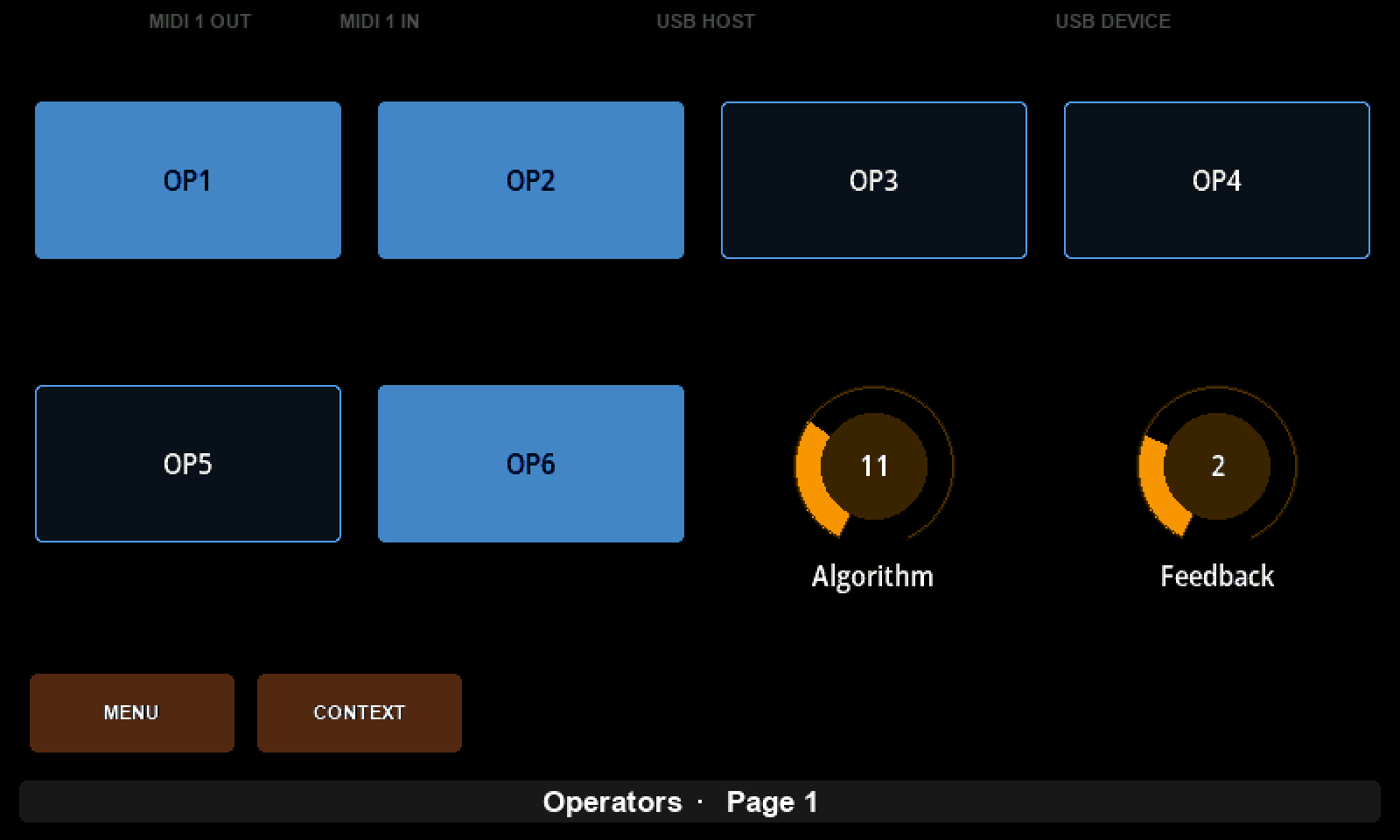
One preset, Operators, one page, eight controls - the operator section of a DX7:
| What | Message | What it teaches |
|---|---|---|
Algorithm dial, 1 to 32 | 43 10 01 06 + value | a message written byte by byte |
Feedback dial, 0 to 7 | 43 10 01 07 + value | a parameter that needs only three bits |
six pads, OP1 to OP6 | 43 10 01 1B + value | six parameters sharing one byte |
The first two are ordinary: one control, one message, one value. The six pads are the reason for the tutorial.
Gear required
- An Electra One controller. The pictures are from a Mini; an Mk2 works the same way.
- The preset editor, with the controller connected.
- The editor's MIDI console, to read the bytes the controller sends.
- No hardware instrument. The DX7 here is Dexed, a free emulation that speaks the synthesizer's own SysEx. Point its DX7 Out at your controller's Port 1 from its PARM dialog. A real DX7 works the same way.
What Dexed will and will not do
Dexed sends DX7 parameter changes when you turn its knobs, but it does not act on ones it receives - it takes whole voices and cartridges and nothing smaller. So the console, not Dexed, is what shows our messages here. Plenty of real instruments are lopsided the same way.
1. A preset, a device and two dials
Start from an empty preset called Operators and give it one device: click an empty part of the page so nothing is selected, then name the device Dexed, with Port 1 and Channel 1.
Add a dial called Algorithm. Give it Min 1 and Max 32, MIDI Min 0 and MIDI Max 31, Message Type Sysex and Parameter 134. Then open EDIT SYSEX DATA and add five bytes: the constants 43, 10, 01 and 06, and a Parameter value byte at the end. Don't type F0 or F7 - the controller wraps the message itself.
Send to Electra, open the Console with IN on your controller's Port 1, and turn the knob:
F0 43 10 01 06 00 F7
F0 43 10 01 06 1F F7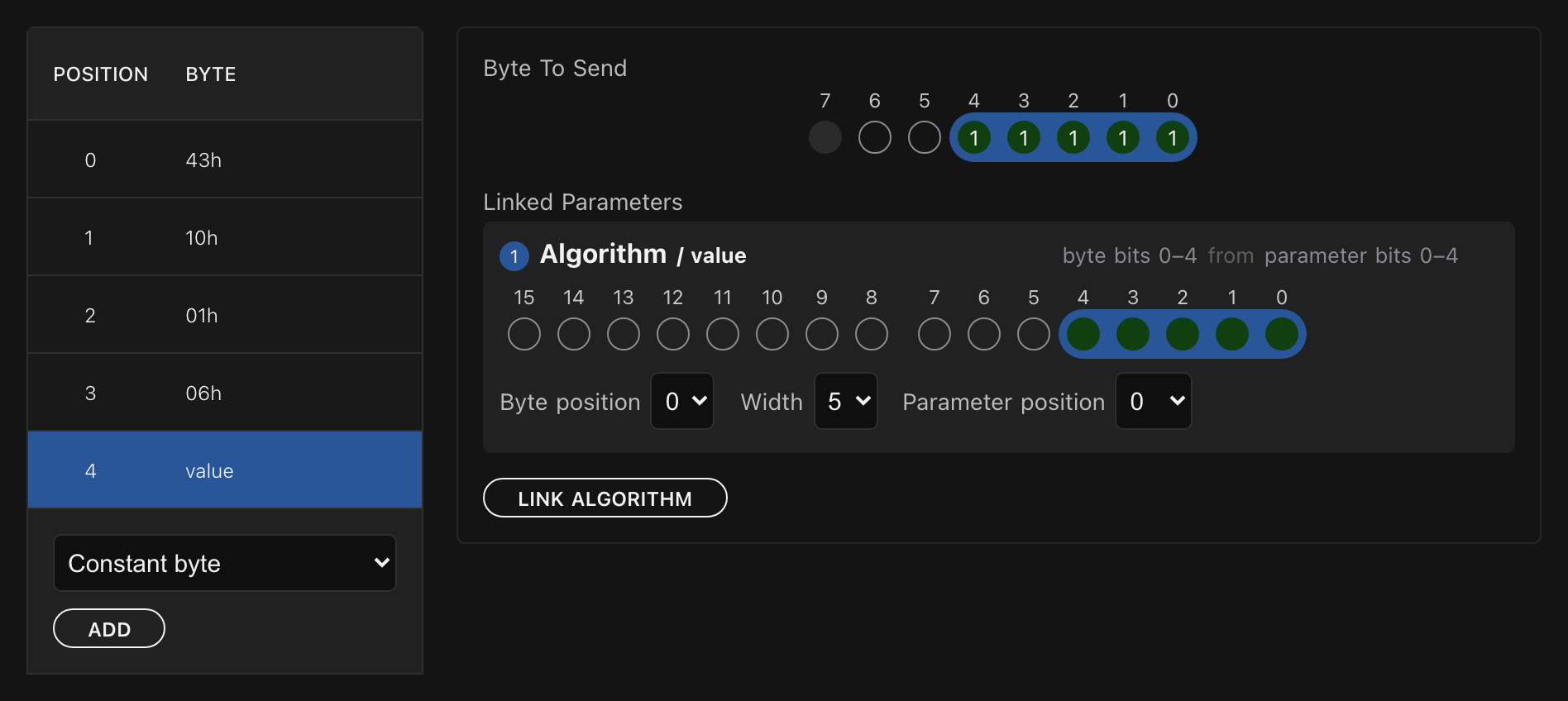
Two numbers for every value
Look again at those four range fields, because they are quietly doing you a favour. The DX7 counts its algorithms from 0; players count from 1. Min and Max are what the knob shows, MIDI Min and MIDI Max are what goes in the byte, and the controller maps between them.
So the screen says Algorithm 6 while the wire carries 05, and nobody has to do that arithmetic - not you writing the preset, and not whoever uses it. The same two pairs turn a 0-to-127 CC into 0 to 100, or into -64 to +63, without a line of Lua.
Now add a second dial, Feedback: Min 0, Max 7, MIDI Min 0, MIDI Max 7, Parameter 135, and the same message with 07 in place of 06.
You needn't type it out again. Open the SysEx editor on the new control and it offers to duplicate from the message you last edited - the bytes arrive ready, and you change the one that differs. It is the fastest way to build a row of controls that speak the same format.
2. A parameter that does not fill its byte
Open Algorithm's value byte and look at Width. It says 7, and the DX7's algorithms only need five bits to count to 31. Set it to 5. Do the same on Feedback, which needs three.
Send again and sweep both. Nothing changes. The bytes are identical.
That is worth understanding rather than shrugging at. Width is a claim on the byte, not a change to the value: it says how many of the seven bits this parameter is entitled to. With one parameter in the byte nothing else wants those bits, so claiming three or seven makes no difference to what goes out.
In the next step six parameters want the same byte, and the claim is the only thing keeping them apart.
3. Six switches in one byte
Add six pads in the remaining slots, OP1 through OP6. Each one is Message Type Sysex, ON value 1, OFF value 0, ModeToggle - a switch that stays where you put it - and a Parameter of its own: 155 for OP1, up to 160 for OP6.
Those numbers are addresses inside the controller, not bytes in the message. They are how the controller tells six pads apart, and the message will say where each of them lands.
Build the template on OP1 only: constants 43, 10, 01, 1B, then a Parameter value byte. 01 1B is the DX7's operator on/off, and everything interesting now happens inside that last byte.
Putting six parameters in one byte
Select the value byte. It already has one rule, for OP1, seven bits wide - the whole byte. Three numbers describe it:
| Field | What it means |
|---|---|
| Byte position | which bit of the outgoing byte the field starts at |
| Width | how many bits it gets |
| Parameter position | which bit of the control's value to take |
Two bit numberings sit side by side there, and that is what trips people: the word drawn on the rule card is the control's value, and Byte position is where it lands in the message.
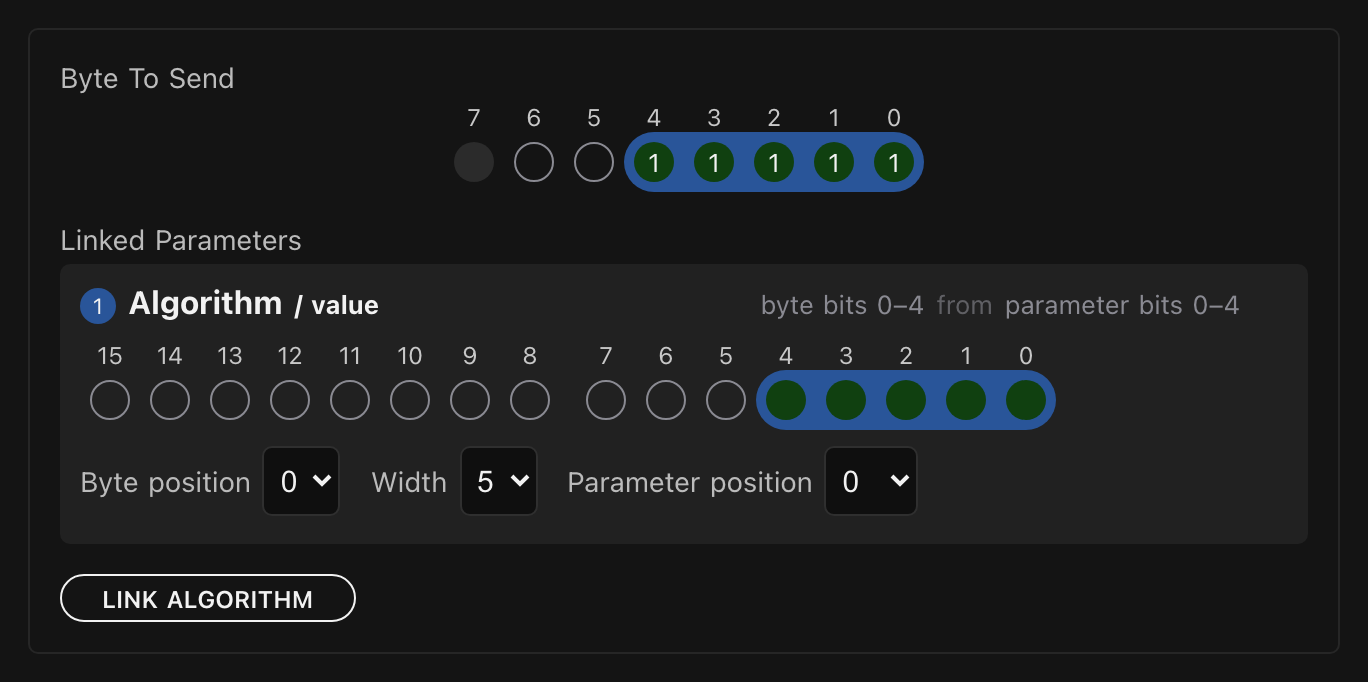
Narrow OP1 first. Set its Width to 1 and its Byte position to 5, leaving Parameter position at 0 - a pad's value is 0 or 1, so bit 0 is the whole story. This matters before anything else: a new rule is dropped into the widest run of free bits, and while OP1 claims all seven there is no free run to drop one into.
Then, five times over:
- Click the next pad in the Preset Values list on the right. The button relabels itself - LINK OP2, then LINK OP3, and so on. Selecting a pad changes nothing on its own; it aims the button.
- Click that button. A new rule card appears, numbered.
- On the new card set Width to
1first, then Byte position.
Width before byte position, because moving a field to a high bit trims its width to the room left and you would only have to set it again.
The byte positions run 4, 3, 2, 1, 0 for OP2 down to OP6, which is the order the DX7 uses:
bit   6   5   4   3   2   1   0
          OP1 OP2 OP3 OP4 OP5 OP6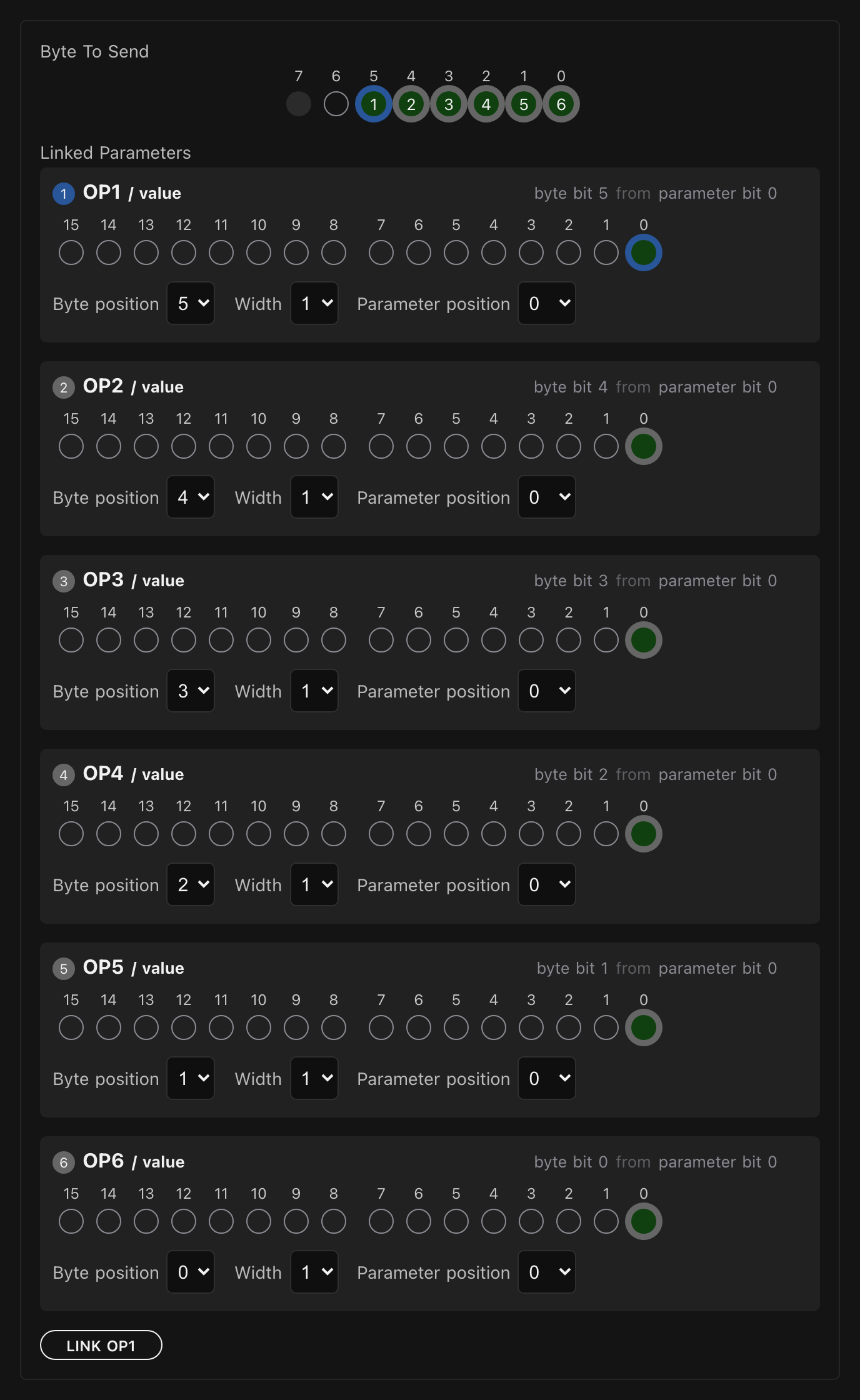
4. Reading the picture
The Byte to send strip above the rules is the byte itself, and every bit carries the number of the rule that claims it. When all six are in it reads 1 2 3 4 5 6 across bits 5 down to 0, with bit 6 empty because the DX7 does not use it and bit 7 greyed out because a SysEx data byte never has one.

Each rule card says the same thing in words - byte bit 3 from parameter bit 0 - which is the quickest way to check a rule without counting circles. And clicking a pad in Preset Values lights up the bit it owns, so you can walk the list and confirm you have them the right way round.
The strip also warns you about the two ways this goes wrong. Two rules on one bit are not refused: the controller ORs them together, which is almost never what anybody meant. A rule running past bit 6 is not sent at all. Both are said in words under the byte, naming the rules involved.
Copying the byte to the other five
OP1 sends the message, but so must the other five pads, and each needs the same template. Open each one's SysEx editor and take the duplicate from offer.
All six rules come across untouched. That is worth checking once on the first copy: the rules should still read OP1 to OP6 at bits 5 down to 0, not two rules naming OP2.
5. Watching it on the wire
Send to Electra, open the console, and press the pads on one at a time and then off again:
F0 43 10 01 1B 20 F7     ← OP1 on
F0 43 10 01 1B 30 F7     ← and OP2
F0 43 10 01 1B 38 F7     ← and OP3
F0 43 10 01 1B 3C F7
F0 43 10 01 1B 3E F7
F0 43 10 01 1B 3F F7     ← all six
F0 43 10 01 1B 3E F7     ← OP6 off again
F0 43 10 01 1B 00 F7     ← and the rest
The byte fills up a bit at a time and drains back the same way, and one thing in there is easy to read past: every message carries all six switches, not just the one you pressed. Press OP3 and the byte still reports what OP1 and OP2 are doing.
It has to. The instrument reads the whole byte, so a message that mentioned only OP3 would be telling it the other five are off. The controller keeps the current value of every parameter and rebuilds the byte from all six each time one of them changes - which is also why all six pads need all six rules.
6. Easy, until it is not
Stand back and look at what you built. Eight controls, each carrying its own message, and every one of them works. Nothing is shared, so nothing can break anything else: change Feedback and Algorithm cannot notice. For a preset of this size that is not a compromise, it is the right answer, and it is how most presets start.
Now look at the cost, which is all in that one byte.
You wrote it six times. OP1 sends the message, and so must the other five, so the same six rules live in six controls. Duplicate from made the copying quick, but they are still six copies. If the DX7 had wanted 1C rather than 1B, that is six corrections, and the preset works imperfectly until you have made all of them.
None of it can listen. Set any of the six to Send and receive and a message arriving from the instrument has six candidate controls and nothing to choose between them - so the controller does not guess, and nothing moves. A DX7 telling you it has switched operator 3 off cannot reach this preset.
The rules name a fixed parameter. Every rule points at a control by its absolute number, so the byte is welded to the six pads it was written for. It cannot be handed to a seventh, and the numbers cannot be rearranged without editing all six copies.
None of that is a flaw in what you did. It is the shape of an inline message: it belongs to one control, so anything shared has to be repeated. The next tutorial writes the message once, on the device, with a placeholder where the parameter number goes - and in doing so gets the copies down to one, makes the message able to listen, and lets one template serve all 155 of the DX7's parameters instead of six.
Read it next: One Message, Many Controls.
What to remember
- A control's SysEx message is written byte by byte: constants for the bytes that never change, and a Parameter value byte where its value goes.
F0andF7are added for you. - Min and Max are the screen; MIDI Min and MIDI Max are the wire. The controller maps between them, so a DX7 algorithm can count from 1 while the message counts from 0.
- A value byte can carry several parameters. Each gets a rule with a Byte position, a Width and a Parameter position - where it lands in the message, how many bits it gets, and which bits of the control's value to take.
- Width is a claim on the byte. With one parameter it changes nothing; with several it is what keeps them apart.
- Every control sending a shared byte needs all of its rules, because the instrument reads the whole byte and the controller rebuilds it from every parameter in it.
- An inline message belongs to one control, so anything shared is repeated, and a message shared by several controls cannot receive.