

Version5.0.0 beta
Asking the Instrument What It Is Playing
What you will learn
- What a patch request is, and why a preset needs one even when every control already works.
- How a response header picks the instrument's answer out of everything else on the wire.
- How a rule takes a byte, or just a few bits of one, and puts it into a control.
- How to give the preset a pad that asks, so the request is one press away.
Introduction
The previous tutorial made one message serve a whole synthesizer, and made it listen: turn a knob on the DX7 and the control that belongs to it follows. That keeps the controller in step while you work.
It does nothing for the moment you start. Load a different sound on the instrument and the instrument says nothing about it. Every dial on the page still shows the sound before last, and the first knob you touch overwrites a value you could not see.
A patch request is the other half of the job. One short message goes out - tell me what you are playing - and the instrument answers with its entire sound in a single message. That answer is called a patch dump, and it is usually a long one: our DX7 replies with 163 bytes. The controller reads it and fills in every control at once.
The two mechanisms are worth keeping apart in your head. A device message carries one parameter and travels in both directions, whenever a knob moves. A patch request carries the whole sound, travels one way, and happens when something asks. A preset that does both is never out of step with the instrument, in either direction.
If SysEx is new to you
Everything here is System Exclusive, the part of MIDI where each manufacturer invents its own messages - and request-and-answer is one of its oldest habits. That chapter of the crash course explains the idea from scratch, and Bits & Bytes explains the hexadecimal these messages are written in. This tutorial assumes both.
Expert mode
The patch editor is on the Patch tab, which is only shown in Expert mode. Patch Requests and Responses is the reference for everything in it.
What we will build
We start from the finished preset of the previous tutorial and add four things to it. First a request, three bytes long, which is the message that asks. Then a response header, five bytes, which is how the controller recognises the answer when it comes back. Then eight rules, which say where in that answer each of our controls lives. And finally a pad, so the request can be sent from the controller itself rather than from the editor.
Not one control changes. The eight dials are exactly as you left them; everything new belongs to the device.
Gear required
An Electra One controller - the pictures are from a Mini, and an Mk2 works the same way. The preset editor in Expert mode, with the controller connected. And some way of sending a DX7 voice dump at the controller: any SysEx librarian will do.
If you have no DX7 voices to hand, this tutorial comes with one - dx7-tutorial-voice.syx, a single voice called TUTORIAL 1. It is what every picture below was made with, so your screen and these pictures will agree byte for byte.
Dexed will not answer a request
Dexed, the DX7 emulation the last two tutorials used, sends parameter changes but does not reply to a dump request.
That turns out not to matter, for a reason that is one of the more useful things in this tutorial: a dump is read whenever it arrives, whether or not anything asked for it. So the request goes out to a synthesizer that ignores it, and the dump comes from a librarian instead, and the controls fill in just the same. Plenty of real instruments are deaf in exactly this direction.
1. Start from the finished preset
Download the Dexed project, click IMPORT PROJECT in the editor and choose the file. It is the preset the previous tutorial built: six operator level dials, an Algorithm, a Feedback, one SysEx message on the device that all eight share, and the small Lua function that works out the channel byte as it sends.
Open it, switch to Expert, and click Send to Electra.
2. What the manual says
Everything starts at the back of the instrument's manual, in the MIDI implementation. Two messages matter. The DX7 is asked for its current sound with
F0 43 2n 00 F7and answers with
F0 43 0n 00 01 1B ...155 bytes... checksum F7n is the MIDI channel minus one - the same nibble as the 1n of the parameter change in the last tutorial - and 00 says we want one voice rather than a whole cartridge. In the answer, 01 1B is how many data bytes follow. A SysEx data byte only holds seven bits, so it counts no higher than 127 and a bigger number needs two bytes: 1 × 128 + 27 = 155. That is the sound - 155 numbers, one per parameter.
And now the gift, which is why the DX7 is such a good instrument to learn this on. Its parameter numbers are the positions of the bytes in the dump. Operator 1's output level is parameter 121, and it is byte 121. The algorithm is 134 in both places. The numbers you typed into eight controls in the last tutorial are the numbers you are about to go looking for in the dump.
Not every manufacturer is this tidy; many number their parameters one way and lay out their dumps another, and then you read both tables. But where they do line up, half the work has been done for you.
3. The request
Click an empty part of the page so nothing is selected, choose Dexed in the device box, and open the Patch tab and its Protocol sub-tab. A new device already has a Default request with a Default response underneath.
Click the request to select it. Its bytes appear in Request Bytes: add three Constant bytes, 43, 20 and 00, and rename it Voice request.
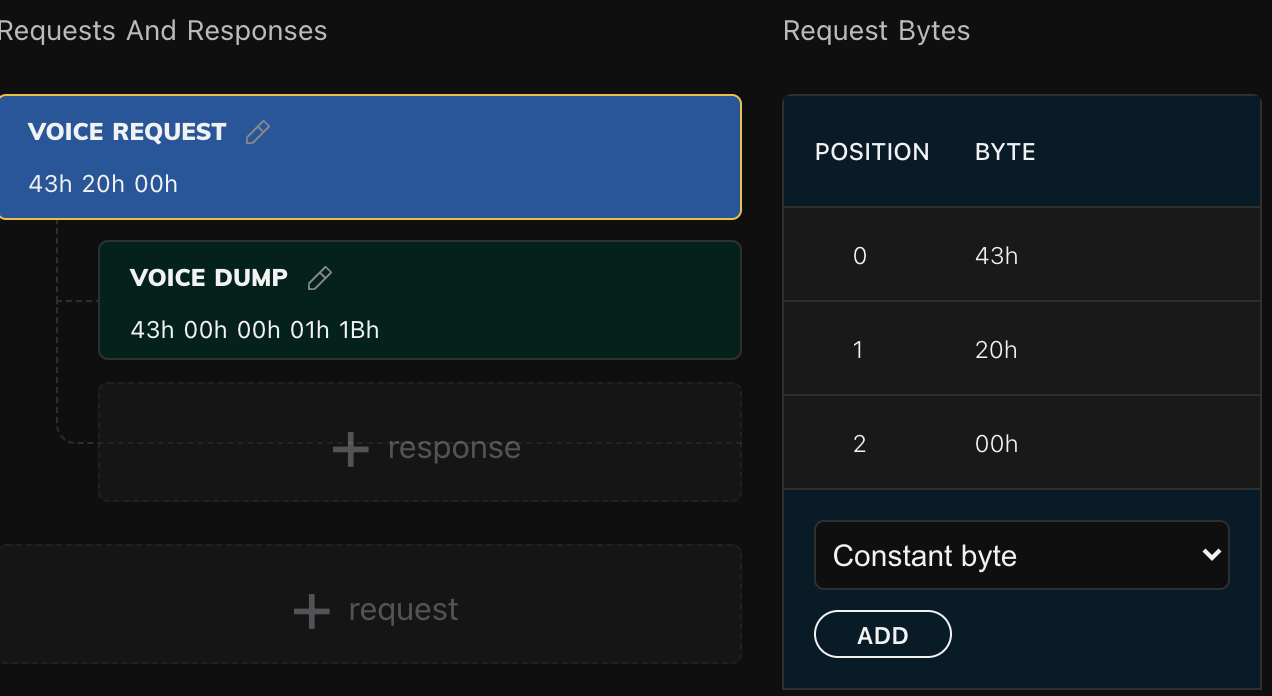
As everywhere in the editor, you leave out F0 and F7 - the controller wraps the message itself. What goes on the wire is F0 43 20 00 F7.
The 20 is worth a second look. It is a constant, and it therefore hard-codes channel 1, exactly as the 10 of the parameter change did until a Lua byte replaced it in the last tutorial. The same getChannelByte trick works here with 0x20 in place of 0x10, and the preset already carries the function. It is left as a plain constant in these pictures only to keep the tutorial about the other thing.
4. The response header
Now the answer. Click the response underneath the request, add five Constant bytes in Response Bytes - 43, 00, 00, 01, 1B - set Response Id to 1, and rename it Voice dump.
A header is the beginning of the message, and the controller uses it as a fingerprint: every SysEx message that arrives is compared against it, and one that starts with those bytes is this response. So a header should contain the part of the answer that never varies, and nothing else. Here that is the manufacturer, 0n meaning "here is a dump" on channel 1, 00 for one voice, and the two bytes that say 155. Everything after them is the sound itself, different every time, which is exactly why the header stops there.
It has to be long enough to be unambiguous, too. Four bytes would also have matched a 32-voice cartridge dump, which begins 43 00 09 20. The fifth byte is what makes this header mean one voice and nothing else. A header takes no F7, because it is a prefix rather than a whole message.
Response Id is for Lua and nothing else: the controller hands it to patch.onResponse so a script can tell one kind of dump from another.
Then Send to Electra.
5. Catching a dump
Rules are far easier to build from a real dump than from a manual, and the editor will show you one byte by byte. Open the Mappings tab - Request and Response at the top should show the two you just made - and click the microphone to Enable MidiLearn. The controller now hands every SysEx message it receives straight to the editor instead of acting on it.
Click REQUEST PATCH, then send a voice dump at the controller from your librarian.
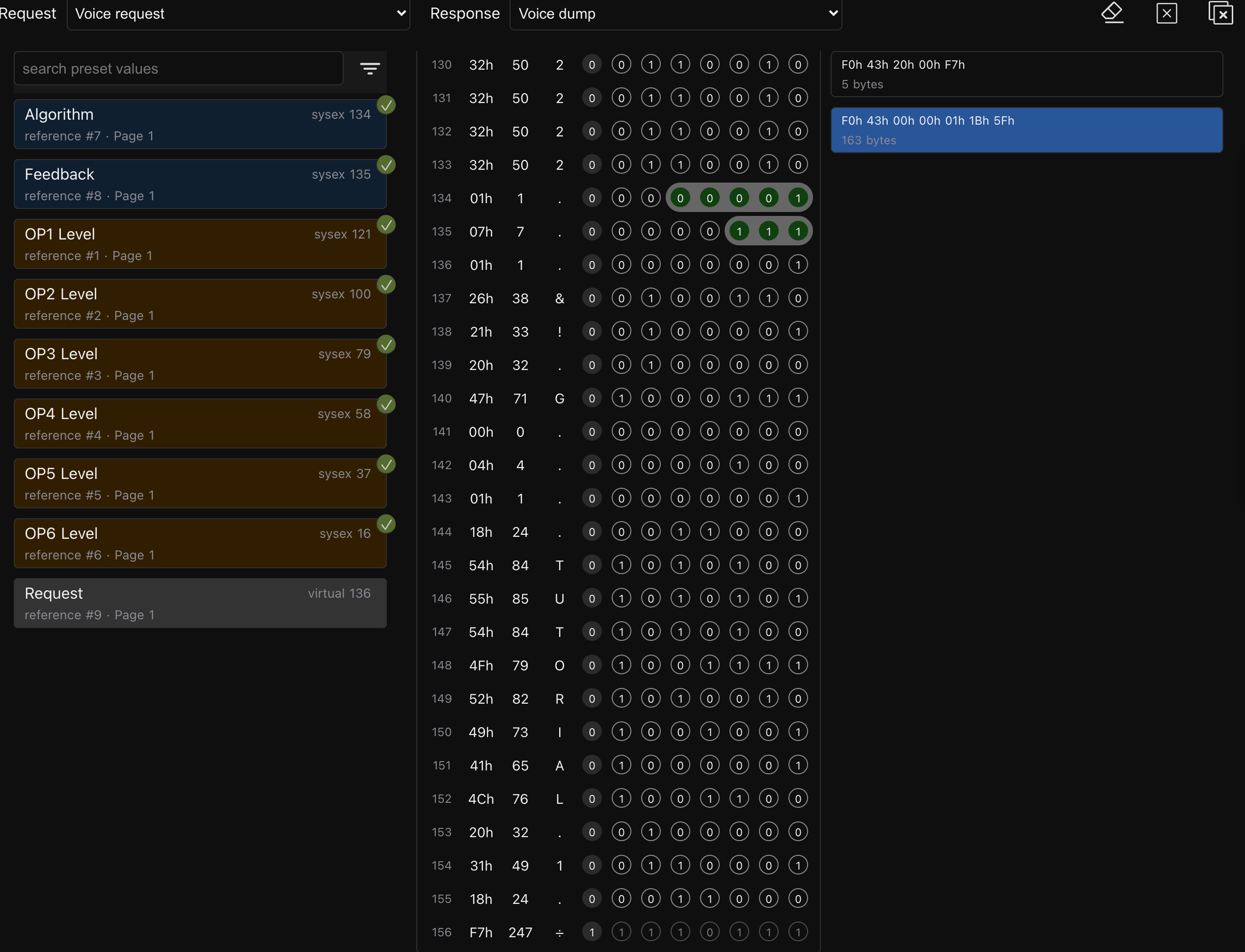
Two things land in the captured list on the right. The five-byte F0 43 20 00 F7 is our own request going out - the editor captures everything it sees, including what the controller sends - and the 163-byte message is the dump: six header bytes, 155 data bytes, a checksum and F7.
Click the dump and the middle column fills up. The header sits on top, down to the line end of header; then come the data bytes, numbered from 0, each shown in hexadecimal, in decimal, as a character, and as its eight bits.
Before writing a single rule, scroll to bytes 145 to 154 and read the character column downwards. Those ten bytes are the voice's name, and here they spell TUTORIAL 1, the space drawn as a dot. It is a small thing that proves a large one: if the name is legible, you are counting bytes the same way the manufacturer did, and every other byte is where the manual says it is.
Byte 155 is the checksum and 156 is the closing F7. The data really does stop at 154, which matters in a moment.
6. Bytes into controls
Now join the two halves together. The list on the left holds the preset's values; the middle column holds the dump. A rule is a line drawn between them.
Click OP1 Level in the list, find byte 121 in the middle column, and click its bits 0 to 6, one at a time. Bits next to each other join into a single rule as you go.
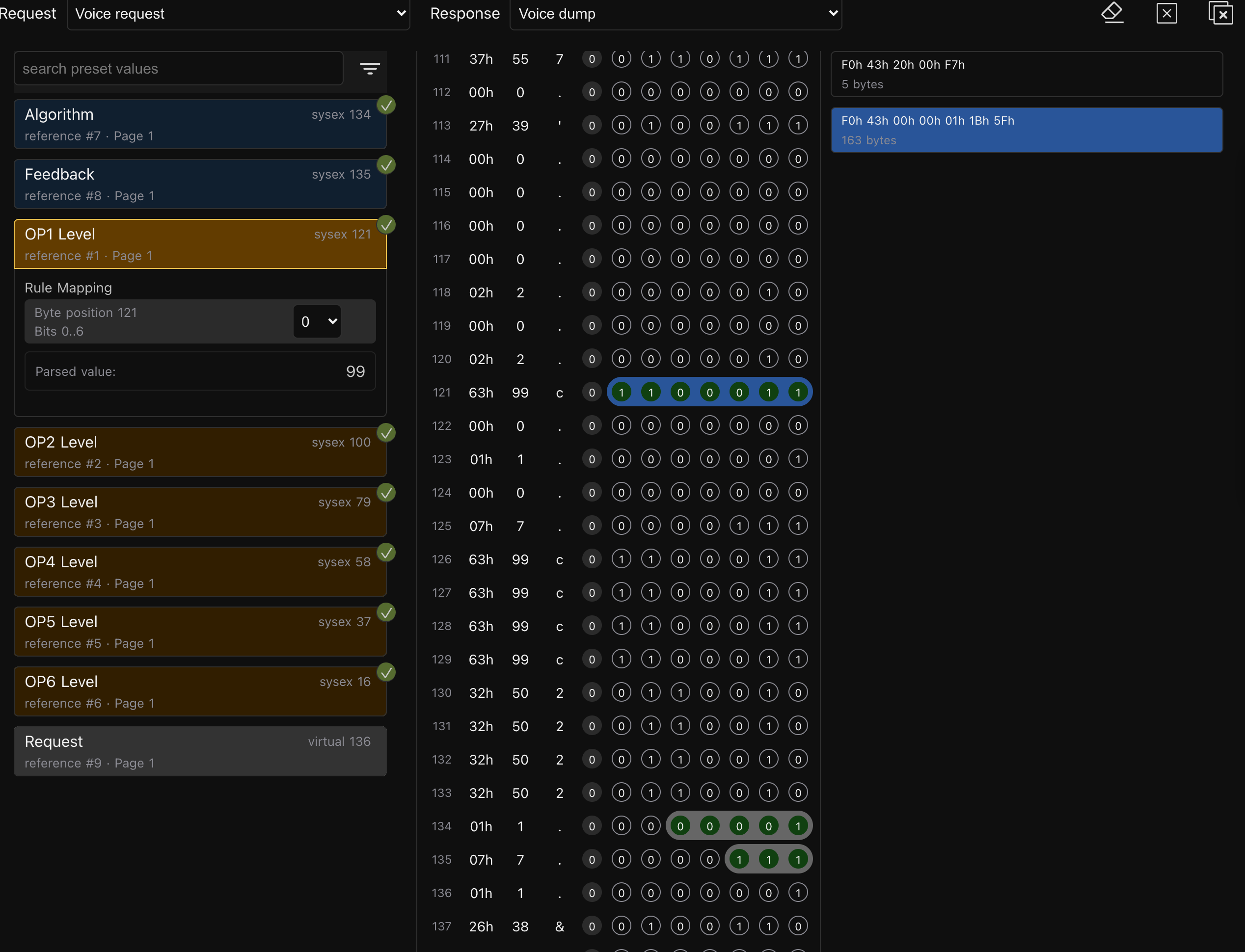
Rule Mapping underneath the value now reads Byte position 121, Bits 0..6, and Parsed value shows what that rule reads out of the dump on screen: 99. Byte 121 is 63h, which is 99 in decimal, which is a DX7 operator at full output. A tick appears beside the value in the list to say it is now read from a dump.
Parsed value is the reason for building rules from a captured dump rather than from the manual. You are never guessing: every click is checked against a real message before the controller ever sees it.
The other five operator levels are the same piece of work at bytes 100, 79, 58, 37 and 16. Then two that are not whole bytes: Algorithm is bits 0 to 4 of byte 134, and Feedback is bits 0 to 2 of byte 135. Small parameters share a byte rather than waste one each, so you take only the bits that belong to you - the receiving half of the packing that Six Switches in One Byte did by hand on the way out. A rule can read at most seven bits of one byte, which is all a SysEx data byte has to give.
A rule that is wrong, but not yet visibly wrong
Click bits 0 to 3 of byte 134 instead of 0 to 4 and nothing looks amiss. Parsed value is still right, because the voice on screen happens to use a low algorithm number, and four bits are plenty for it.
Four bits count to 15. The day a voice using algorithm 17 or higher comes back, the dial lands sixteen too low - and it will look like the instrument's fault. Check a rule's width against the parameter's whole range, not against the one value in front of you.
7. Watching it arrive
Click the microphone again to turn MIDI learn off. This matters: while it is on, the controller gives dumps to the editor instead of applying them, so nothing will move however good your rules are. Then Send to Electra, and send a different voice from the librarian.
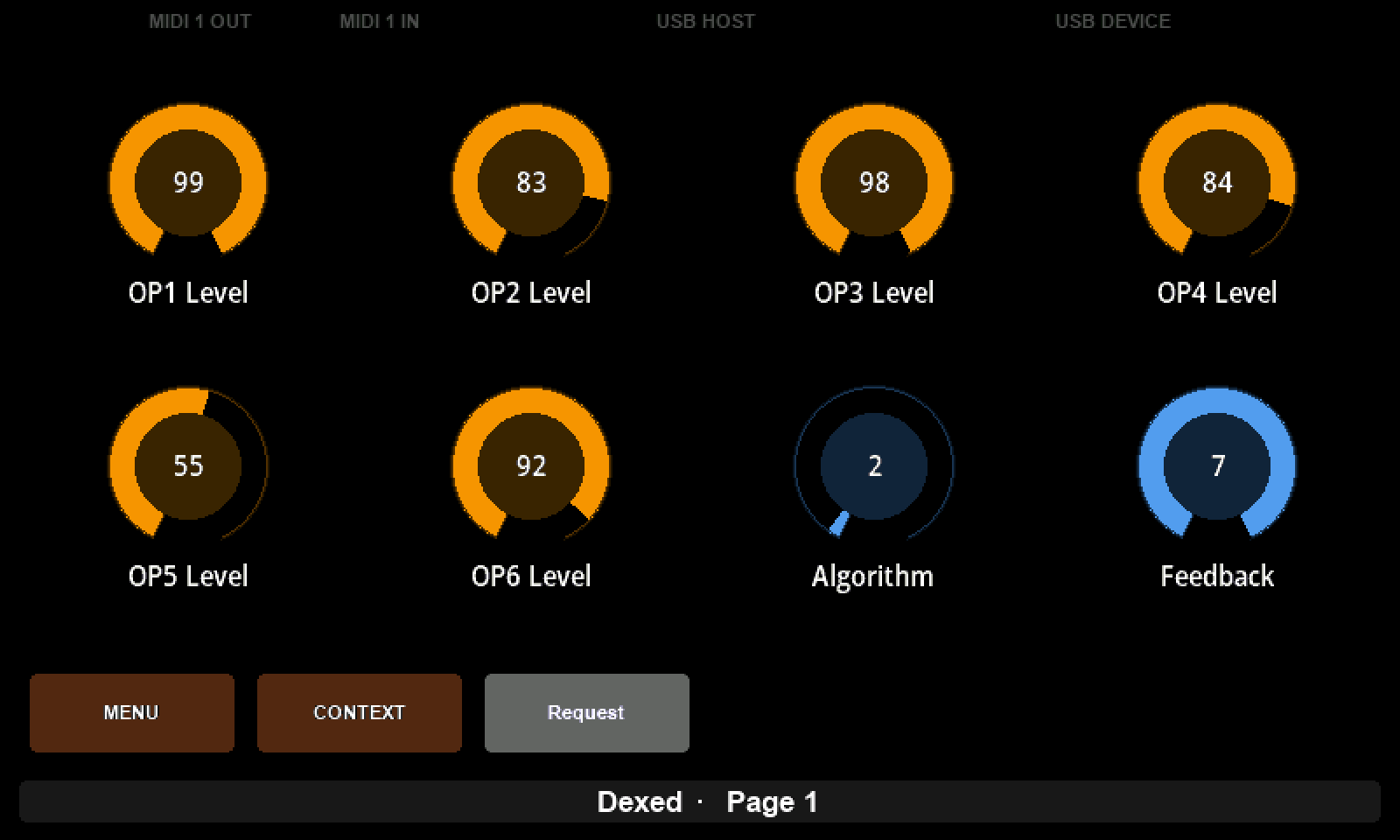
The six operator levels land on 99, 83, 98, 84, 55 and 92, the algorithm on 2 and the feedback on 7 - which is TUTORIAL 1, read out of the bytes you clicked. Eight dials, one message, and no request involved at all: the dump simply arrived and was read. An instrument that sends its voice whenever you select one therefore keeps the controller in step without ever being asked, which is why Dexed's silence has cost us nothing.
Notice what does not happen. The values came from the instrument, so the controller does not send them back to it; the console stays empty while the dials move.
8. A pad that asks
The request works, but only from the editor, and a preset should not need a computer to be useful.
On the Layout tab, drag a Pad into the first slot of the bottom row. That row belongs to the Mini's four hardware buttons, and it takes only pads and lists. Call it Request, and set its Message Type to Virtual - which means the pad sends no MIDI of its own, because the work is done by a command rather than by a message.
Then give it the command. Under Events, ADD EVENT → Knob switch · Press → ADD, and on the event that appears, ADD ACTION → Command → Request patch.
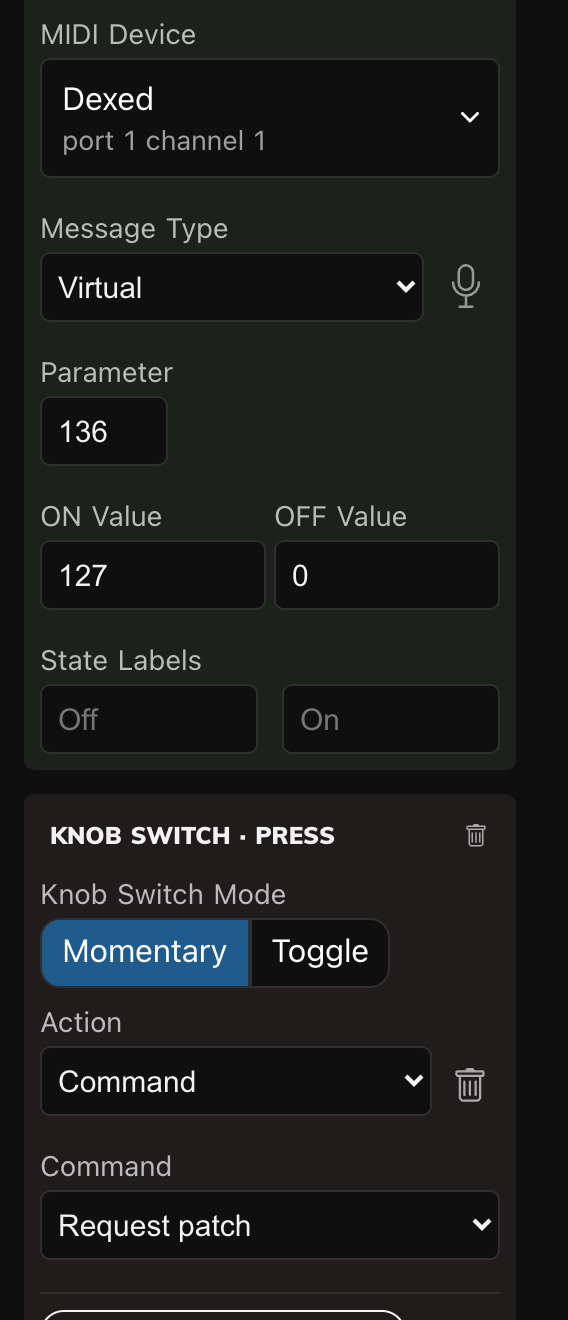
Send to Electra and press the hardware button under the pad. F0 43 20 00 F7 appears in the console: the same bytes the editor's button sends, now under your thumb. Events are the subject of How Events Put More on One Page, and this is the simplest useful one there is.
One thing to know: a Knob switch event replaces whatever pressing a control normally does, so this pad no longer toggles on and off. For a trigger, that is exactly right.
9. What the rules cannot reach
A rule writes a number into a control, so numbers are all it can carry. The ten characters of the voice name are not a number, and neither is anything else you might want to do with a dump beyond setting values.
That is what Lua is for. Once the rules have been applied the controller calls patch.onResponse, handing it the device, the response id and the whole message, and a script can read whatever it likes out of it - most often the name, to show which sound is loaded. The Patch section of the Lua reference has the details, and the checksum sitting at byte 155 is explained in the crash course, though the controller does not check it.
There is also something simply not in the dump at all. If you built the six operator pads of Six Switches in One Byte, no rule will ever fill them: operator on/off is parameter 155, and the dump stops at 154. Parameters 0 to 154 are precisely the dump, and 155 is the first one that is not. Instruments leave things out of their dumps - anything they treat as a setting rather than as part of the sound - and the manual is the only way to know which.
What to remember
- A request is sent only when something asks for it: the Request patch command, a pad, the editor's button, or Lua. Loading a preset does not send one.
- A response is read whenever it arrives, requested or not, from any interface the device is wired to.
- A header should hold only the bytes that never vary, and enough of them to tell this dump from every other message the instrument sends.
- Build rules from a captured dump. Parsed value checks each one against a real message as you make it.
- Check a rule's width against the parameter's range, not against the value in front of you.
- MIDI learn must be off for a dump to reach the controls. While it is on, dumps go to the editor instead.
- Mapped values are set to 0 first and then filled in by the rules, and the checksum is not checked.
- Values that arrive this way are not sent back out.