

Version5.0.0 beta
Ten Bytes That Spell a Name
What you will learn
- How to read text out of a patch dump, where no mapping rule can reach.
- What an override is: the text a control shows in place of its value.
- How a text box works, and the keyboard the controller opens for it.
- How to write the edited name back into the synthesizer.
Introduction
Patch Request and Response ended one parameter short. Every dial on the page was filled from the dump, and the one thing a person actually reads - the name of the sound - was left on the floor. A rule writes a number into a control, and a name is not a number.
This tutorial picks it up. Bytes 145 to 154 of a DX7 voice dump are its name, one ASCII character each. Lua can read them, a text box can show them, the controller's own keyboard can edit them, and ten parameter changes can put the result back into the instrument.
It is worth doing for more than the DX7. Instruments are full of text that no knob can reach: patch names, performance and combi names, sequence and pattern names, the labels on user wavetables. All of it arrives as bytes in a dump and goes back as bytes in a message, and the three moves in this tutorial - read, show, send - are the same three every time. Only the offsets change.
Expert mode, and some Lua
Everything here is script. If you have not written a formatter yet, Making a Number Say What It Means is the gentler introduction to the same Lua editor.
What we will build
We start from the finished preset of the previous tutorial - eight dials, a patch request, a response with eight rules and a Request pad on button 1 - and add a text box, a pad and about thirty lines of Lua.
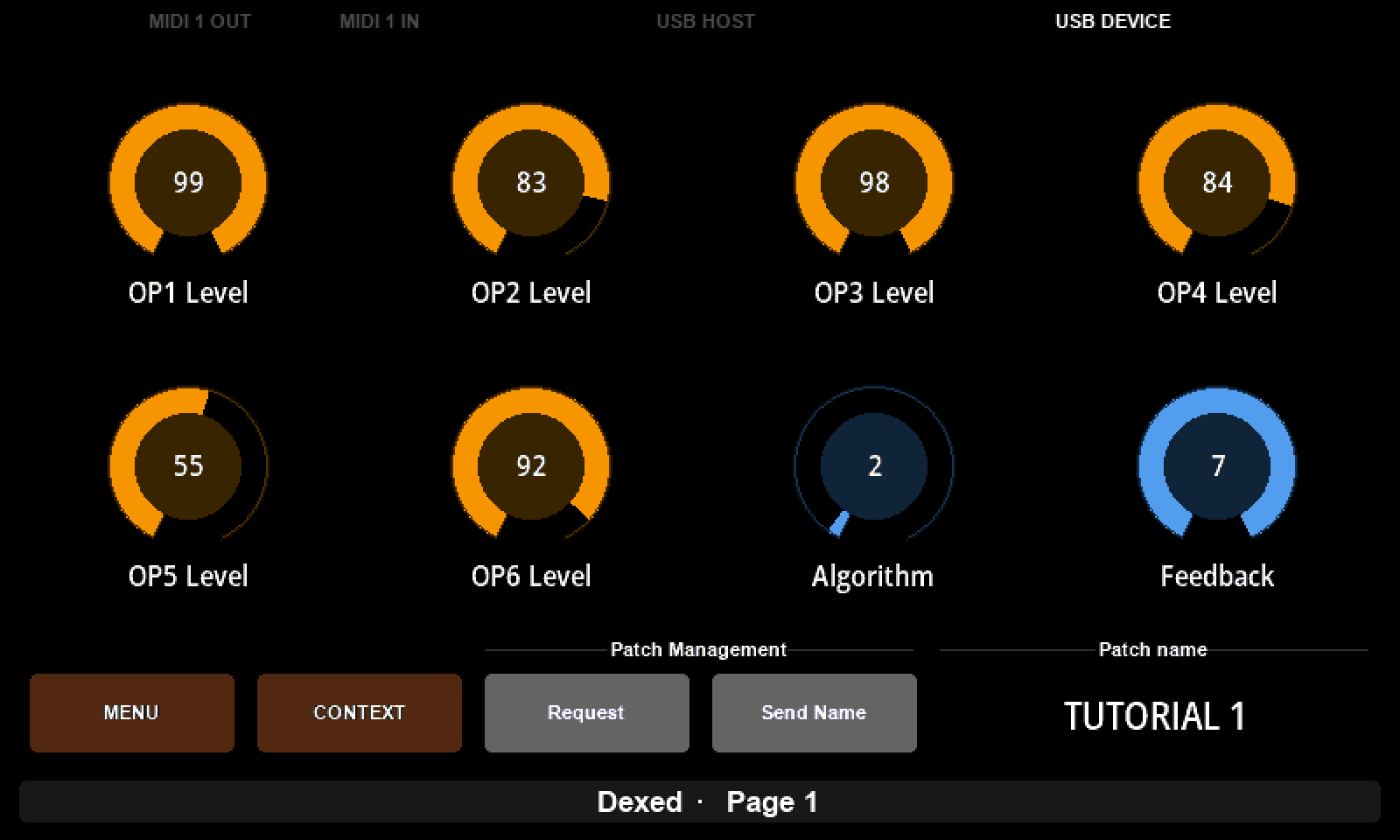
The Mini's MENU and CONTEXT are buttons of their own, so the four page buttons are all still free: Request keeps button 1, Send Name takes button 2, and the Patch name box covers buttons 3 and 4.
Gear required
An Electra One controller - the pictures are from a Mini - and the preset editor in Expert mode. A SysEx librarian to push a voice dump at the controller, and the tutorial voice if you have none of your own.
Dexed will not show the result
As the last two tutorials found, Dexed ignores DX7 parameter changes. The name will go out perfectly well formed, and the console will show it, but nothing on screen will change. A real DX7 renames its edit buffer as the messages arrive.
1. Start from the finished preset
Download the Dexed project, click IMPORT PROJECT in the editor and choose the file. Open it, switch to Expert, and click Send to Electra.
It is the preset the last tutorial finished with: the device, the Voice parameter message, the Lua channel byte, the Voice request and the Voice dump response with its eight rules.
2. A text box across two buttons
Drag a Text box into the third slot of the bottom row, and a Pad into the second.
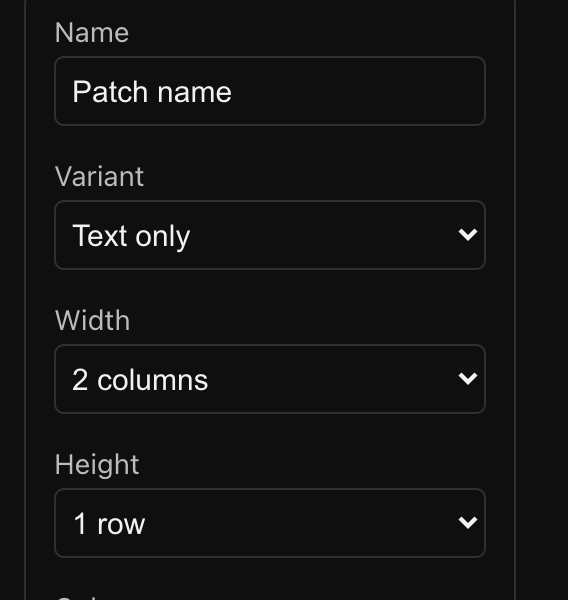
Name the box Patch name. Set Variant to Text only, which draws the text alone without the frame and label a box normally carries - right for a wide readout. Set Width to 2 columns so it covers buttons 3 and 4. Its Message Type is Virtual: the box sends nothing, it only shows. Give it a Placeholder as well, no voice, which is what it displays before any dump has arrived.
Call the pad Send Name and set it to Virtual too. Its work will be done by a script.
Two group labels finish the row: Patch Management over the two pads, and Patch name over the box. They cost no slot and they make the row read as two things rather than four.
3. Reading the name out of the dump
Open the Lua tab. The preset already has getChannelByte from two tutorials ago; everything below is added to it.
The controller hands the whole dump to patch.onResponse, after the rules have run. Lua counts from 1, so with F0 and five header bytes in front of it, data byte 145 is position 152 of the message.
lua
PATCH_NAME = 10
NAME_START = 152
NAME_LENGTH = 10

function readVoiceName(sysexBlock, first, length)
    local characters = {}

    for i = 0, length - 1 do
        characters[#characters + 1] = string.char(sysexBlock:peek(first + i))
    end

    return table.concat(characters)
end

function patch.onResponse(device, responseId, sysexBlock)
    if responseId == 1 then
        local name = readVoiceName(sysexBlock, NAME_START, NAME_LENGTH)
        controls.get(PATCH_NAME):setOverride(name)
        print("voice loaded: " .. name)
    end
end
peek reads one byte without moving anything, string.char turns a number into the character it stands for, and table.concat glues the ten of them together.
setOverride is the other half, and the idea worth taking away: an override is text displayed in place of a value. The control still has its value underneath - here a virtual one that never changes - and the text simply covers it. It is how a control shows something a number cannot say.
PATCH_NAME = 10 is the box's reference, the #10 beside its name in the sidebar list. Check yours before sending.
Send to Electra, push a voice at the controller, and the box stops saying no voice. It says TUTORIAL 1.
4. Editing it on the controller
Press button 3 and the controller opens a keyboard.
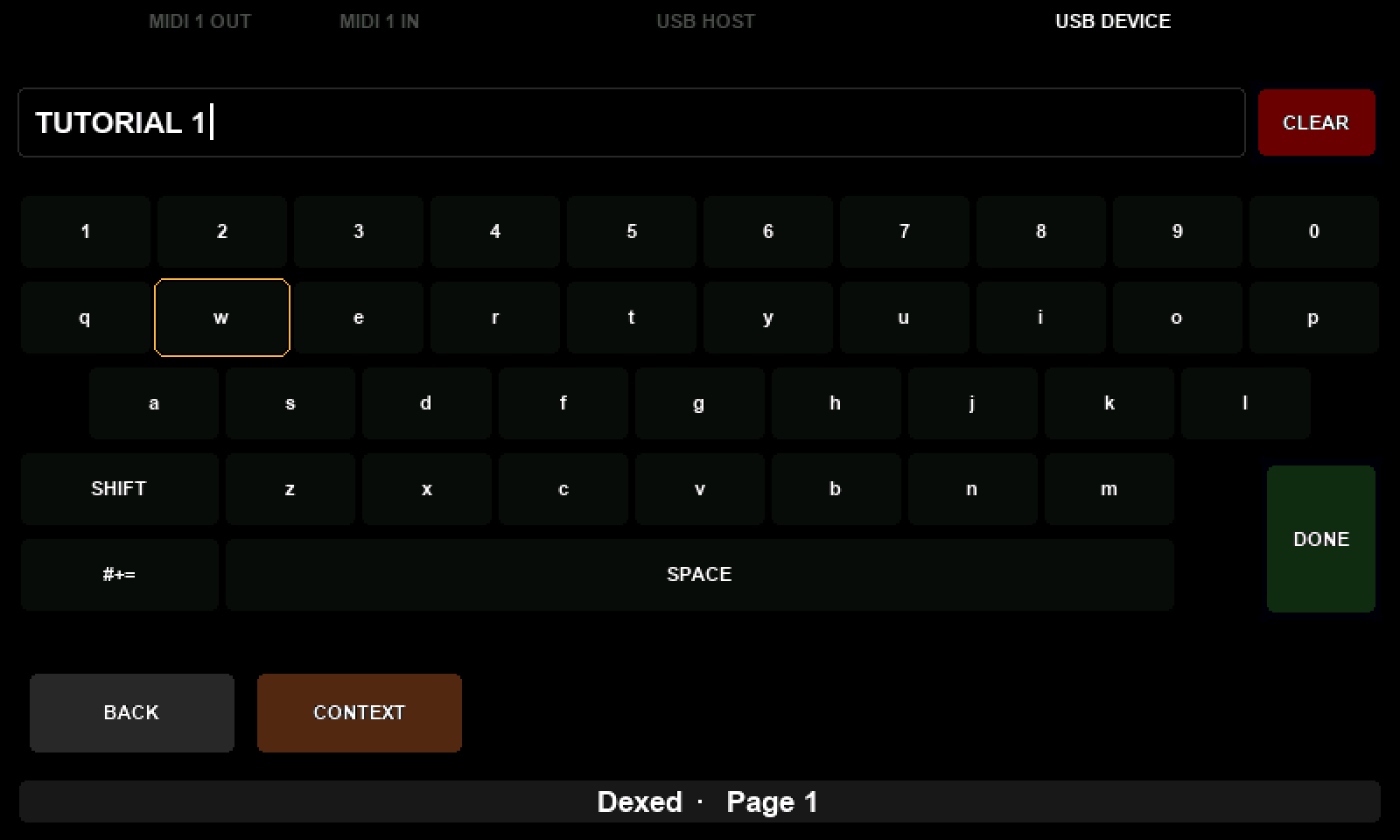
On the Mini, turn KNOB 8 to move the cursor over the keys and press KNOB 8 to type the one under it. SHIFT gives capitals, #+= symbols, CLEAR deletes. To keep what you typed, move the cursor onto DONE and press KNOB 8 there.
Any other button discards it
Pressing any other knob or button closes the keyboard without changing the text. If an edit seems not to have stuck, that is almost always why.
What DONE writes is the same override the script set in step 3. A name read from a dump and a name typed by hand are one string in one place, which is what makes the next step possible at all: the script does not need to know where the name came from.
The other side of that coin is worth knowing too. Request a patch, or let another dump arrive, and patch.onResponse overwrites whatever you typed. The instrument gets the last word, as it should.
5. Writing it back
The DX7 keeps the ten characters as voice parameters 145 to 154, and a parameter change sets each one. They are above 127, so the number splits over two bytes exactly as Algorithm did in One Message, Many Controls: the group byte carries the eighth bit, and 145 becomes 01 11.
lua
function sendPatchName()
    local device = devices.get(1)
    local name = controls.get(PATCH_NAME):getOverride()

    for i = 1, NAME_LENGTH do
        local character = string.byte(name, i) or 32
        midi.sendSysex(device:getPort(),
            { 0x43, getChannelByte(device), 0x01, 0x10 + i, character })
    end

    print("name sent: " .. name)
end
Ten short messages, one per character. string.byte gives the ASCII code of the character at a position, and or 32 fills a space where the name has run out - a DX7 name is always ten characters, whatever the user typed.
Two details are borrowed rather than invented. getChannelByte is the Lua byte from two tutorials ago, so the channel still follows the device's setting; and device:getPort() means the messages leave by whichever port the device is on. Nothing here is hard-coded that the device already knows.
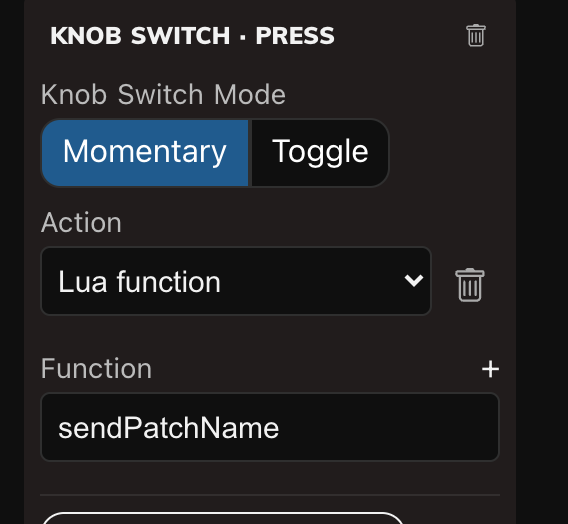
Now hang it on the pad. Select Send Name, and under Events: ADD EVENT → Knob switch · Press → ADD, then ADD ACTION → Lua function → sendPatchName.
6. What goes on the wire
Send to Electra, edit the name, open the Console with IN on Port 1 and press button 2:
F0 43 10 01 11 54 F7     ← 'T', parameter 145
F0 43 10 01 12 55 F7     ← 'U', parameter 146
F0 43 10 01 13 54 F7     ← 'T', parameter 147
…and so on to 1A, parameter 154. 01 is the group byte with the eighth bit in it and 11 is 145 − 128, which is the same arithmetic the operator levels and the algorithm have been using since the device message was written.
A real DX7 renames its edit buffer as these arrive. Ask for the patch again and the name comes back in the dump, in the ten bytes you just wrote.
7. The same three moves, elsewhere
Nothing above is about names in particular. A dump is bytes; some of them happen to be text; Lua is what reaches the ones a rule cannot.
The pattern transfers whole. Read the bytes out of the response with peek, at whatever offset the manual gives. Show them with setOverride on a text box. Send them back as whatever message the instrument documents for that field. Only three numbers change between instruments: where the text starts, how long it is, and what message writes it.
That covers performance and combination names, sequence and pattern names, the labels on user wavetables and samples - anything an instrument stores as characters and most editors leave out because a knob cannot show it.
What to remember
- Rules carry numbers; Lua carries everything else.
patch.onResponseis handed the whole message, after the rules have run. - An override is text shown in place of a value.
setOverridewrites it, the keyboard writes the same one,getOverridereads it back. - A text box is a control with nothing to send and something to show. Its message type is Virtual, and Text only drops the frame.
- On the Mini, the keyboard is committed with
DONE. Anything else discards the edit. - An arriving dump overwrites what you typed, because the instrument is the one being described.
- A name is only bytes: ten parameters, one character each.