

Version5.0.0 beta
One Message, Many Controls
What you will learn
- The difference between a SysEx template written on a control and one written on the device, and why the second is what an instrument editor is really made of.
- How one template serves a whole synthesizer, by carrying the parameter number as well as the value.
- How to make that template listen, so the instrument moves your controls.
- The two traps: a constant where a setting belongs, and a shared message that cannot say which control it is about.
Introduction
A SysEx template is a MIDI message with a hole in it. You write down the bytes your instrument expects, leave a placeholder where the value goes, and the control fills that in every time you turn the knob. For one control it is exactly the right tool.
Now count the controls in a real instrument editor. A Yamaha DX7 has 155 voice parameters, and every one of them is changed by the same message:
F0 43 1n gg pp dd F7Only gg and pp, which together are the parameter number, tell them apart. Writing that message 155 times is dull but survivable. Discovering on control 140 that you had one byte wrong all along, and having to correct 155 copies of it, is not.
A device message is that template written once, on the device rather than on a control, with a second hole in it: one for the value and one for the parameter number. A control that uses it says nothing about bytes at all. It says "I am parameter 121", and the message does the rest.
That is the saving, and it is the smaller half. The larger half is that a shared template can listen. When the synthesizer sends the same message back, because somebody moved a slider on it, one template catches it, reads the parameter number to find out which control it was about, and moves that control. One message, 155 controls, in both directions.
Expert mode
Device messages live on the Patch tab, which is only shown in Expert mode. If SysEx templates are new to you, read SysEx Templates first: this tutorial assumes you can read a template and add a byte to it.
What we will build
One preset, Dexed, one page, and the operator section of a DX7:
| What | What it teaches |
|---|---|
OP1 Level and OP2 Level, each with a template of its own | what a local template costs |
| a device message both of them use | one template, many controls |
four more levels, an Algorithm and a Feedback | a parameter number too big for one byte |
| a Lua byte where the channel was a constant | a byte the preset works out as it sends |
| the message set to Send and receive | the instrument moving our controls |
Eight controls, eight different DX7 parameters, one template of five bytes.
Gear required
- An Electra One controller. The pictures are from a Mini; an Mk2 works the same way.
- The preset editor, with the controller connected, in Expert mode.
- The editor's MIDI console, to read the bytes the controller sends.
- No hardware instrument. The DX7 here is Dexed, a free emulation that speaks the synthesizer's own SysEx. A real DX7, or whatever instrument you are describing, works the same way.
What Dexed will and will not do
Dexed sends DX7 parameter changes when you turn its knobs, which is what the receiving step needs and the half that is hard to fake. It does not act on parameter changes it receives - it takes whole voices and cartridges and nothing smaller - so for the sending half we read the bytes in the console instead of watching Dexed follow them.
Plenty of real instruments are lopsided in the same way, which is exactly why a template has a direction of its own.
1. A preset, a device, and Expert mode
Start from an empty preset called Dexed and put the toolbox toggle at the bottom of the sidebar into Expert.
Then give the preset a device. Click an empty part of the page so nothing is selected, and the sidebar shows the preset's devices. Name it Dexed, with Port 1 and Channel 1. The name is the instrument at the other end of the cable, not the format it speaks: ours is a DX7 emulation, so every byte in this tutorial is a byte a real DX7 would send.
Keep an eye on that Channel field. It will turn out to do nothing at all, for a reason worth knowing, and step 5 is about climbing out of that.
2. One control, one template
Put a dial on the page, call it OP1 Level, and give it Min 0 and Max 99 with MIDI Min 0 and MIDI Max 99 - the range a DX7 operator's output level has, with the number on screen the same as the number in the message.
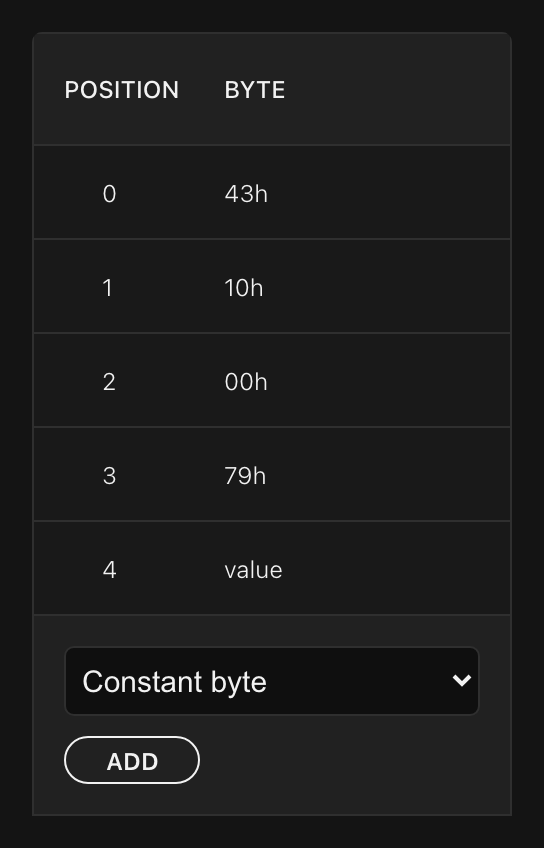
Set Message Type to Sysex and Parameter to 121, which is what the DX7 calls operator 1's output level. Then open EDIT SYSEX DATA and write the message out, one byte at a time: the constants 43 for Yamaha, 10 for a parameter change on channel 1, 00 for the parameter group and 79 for parameter 121 in hexadecimal, and finally a Parameter value byte, which is where the knob's value goes. Leave Direction on Send only, and don't type F0 or F7 - the controller wraps the message itself.
Send to Electra, open the Console with IN on your controller's Port 1, and turn the knob:
F0 43 10 00 79 01 F7
F0 43 10 00 79 02 F7
That is a DX7 parameter change, and a real DX7 would move its operator 1 output level to match.
Now copy the control, call the copy OP2 Level, set its Parameter to 100, and change one byte of its template: 79 becomes 64. Turn both knobs and the console shows the cost of doing it this way:
F0 43 10 00 79 2D F7     ← OP1 Level, parameter 121
F0 43 10 00 64 33 F7     ← OP2 Level, parameter 100
Four of the five bytes are identical, and the DX7 has 153 more parameters that want the same four. Worse, you have written the number 121 twice - once in the Parameter field and once as the constant 79, the same number in another base - and nothing keeps the two in step.
Both problems have one cause. The message is stored on the control, so everything in it has to be repeated by every control that sends it.
3. Moving the message to the device
Clear the selection, open the Patch tab and its Messages sub-tab. This is the device's own library of templates, and it is empty.
Click + message and name it Voice parameter. Give it the same bytes as before with one difference: where you typed the constants 00 and 79, add two Parameter number bytes instead. A Parameter number byte inserts the Parameter of whichever control is using the message - the field that did nothing at all a moment ago. For now leave the first at its default and give the second the default too; we will come back to the first in the next step.
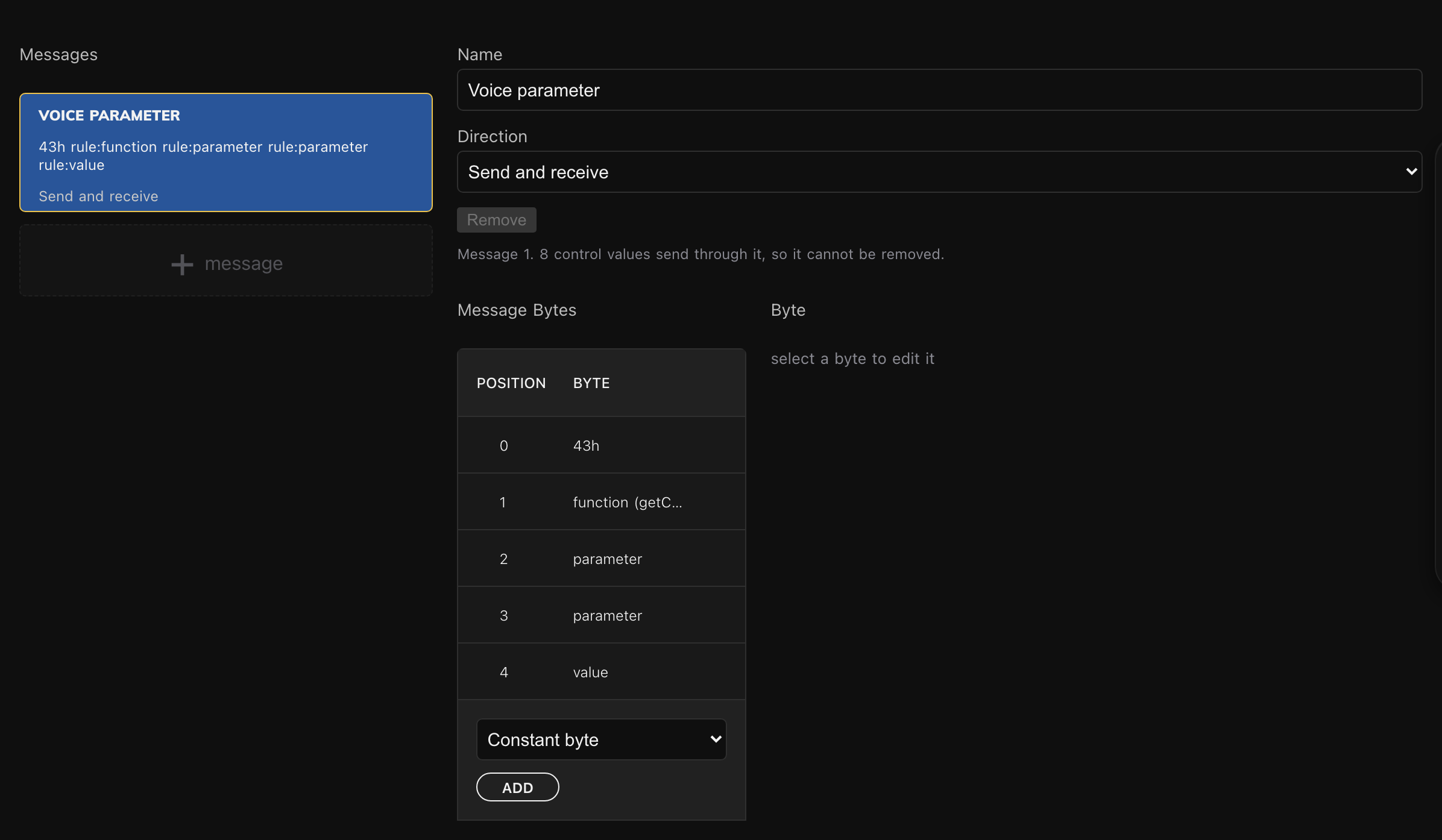
The last byte needs no setting up either. In a device message a Parameter value byte always carries the value of the control using it, so the editor does not even offer you the list of parameters it offers in a local template. There is only one answer it could be.
Now point the controls at it. Select OP1 Level and change Sysex Data from Local Sysex message to Voice parameter. The EDIT SYSEX DATA button disappears: the bytes belong to the device now, not to this control. Do the same for OP2 Level.
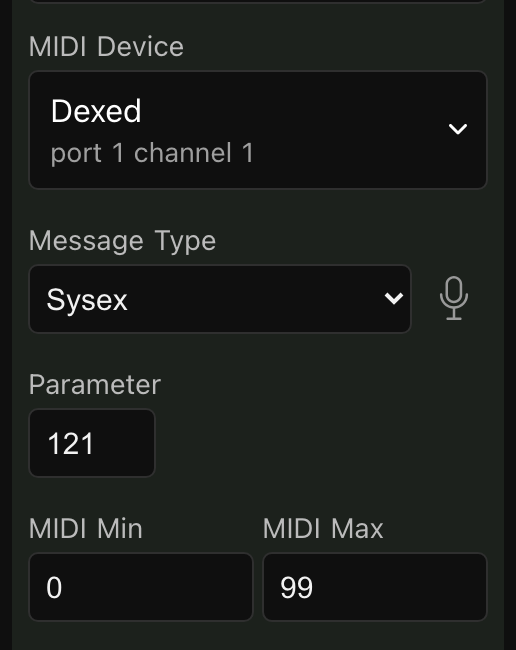
That is all a control has to say now - its type, its parameter number and which message to use. Send to Electra, turn both knobs, and the console shows exactly the same bytes as before, from half as much preset.
Add the other four operator levels while you are here: parameters 16, 37, 58 and 79 for operators 6 to 3. Each is a dial, a name, a range of 0 to 99 and a number. There are no bytes left to type.
The local template is not kept
Switching Sysex Data to a device message discards the control's own template. It is not stored anywhere, and switching back gives you an empty one rather than the bytes you had. Only Undo will bring them back. It costs nothing here, but it is worth knowing before you convert a control whose template was hard-won.
4. A parameter number that will not fit
Add two more dials and the arithmetic breaks. Algorithm runs from 1 to 32 on screen and 0 to 31 in the message, and it is parameter 134. Feedback runs 0 to 7 both ways, and it is parameter 135. Both use Voice parameter, and neither needs a byte typed.
Send, turn the Algorithm knob, and watch:
F0 43 10 00 06 01 F7 ← Algorithm, which is parameter 134The parameter byte says 06. It should say 134.
A SysEx data byte holds seven bits, so it counts to 127 and no further. Our parameter byte takes the lowest seven bits of the number and throws the eighth away: 134 is 1000 0110, and the seven bits that fit are 000 0110, which is 6.
The dangerous part is what happens next. Parameter 6 is not a gap in the DX7's numbering - it is operator 6's EG level 3. Turning the Algorithm knob does not fail. It quietly rewrites the envelope of operator 6, because what reached the instrument was a perfectly well formed message asking for exactly that.
This is why the real message has two bytes for the parameter number, and why the DX7's manual calls the first one a parameter group: the eighth bit lives there. So select the first Parameter number byte and tell it to carry just that one bit - Parameter position 7, Width 1, Byte position 0.
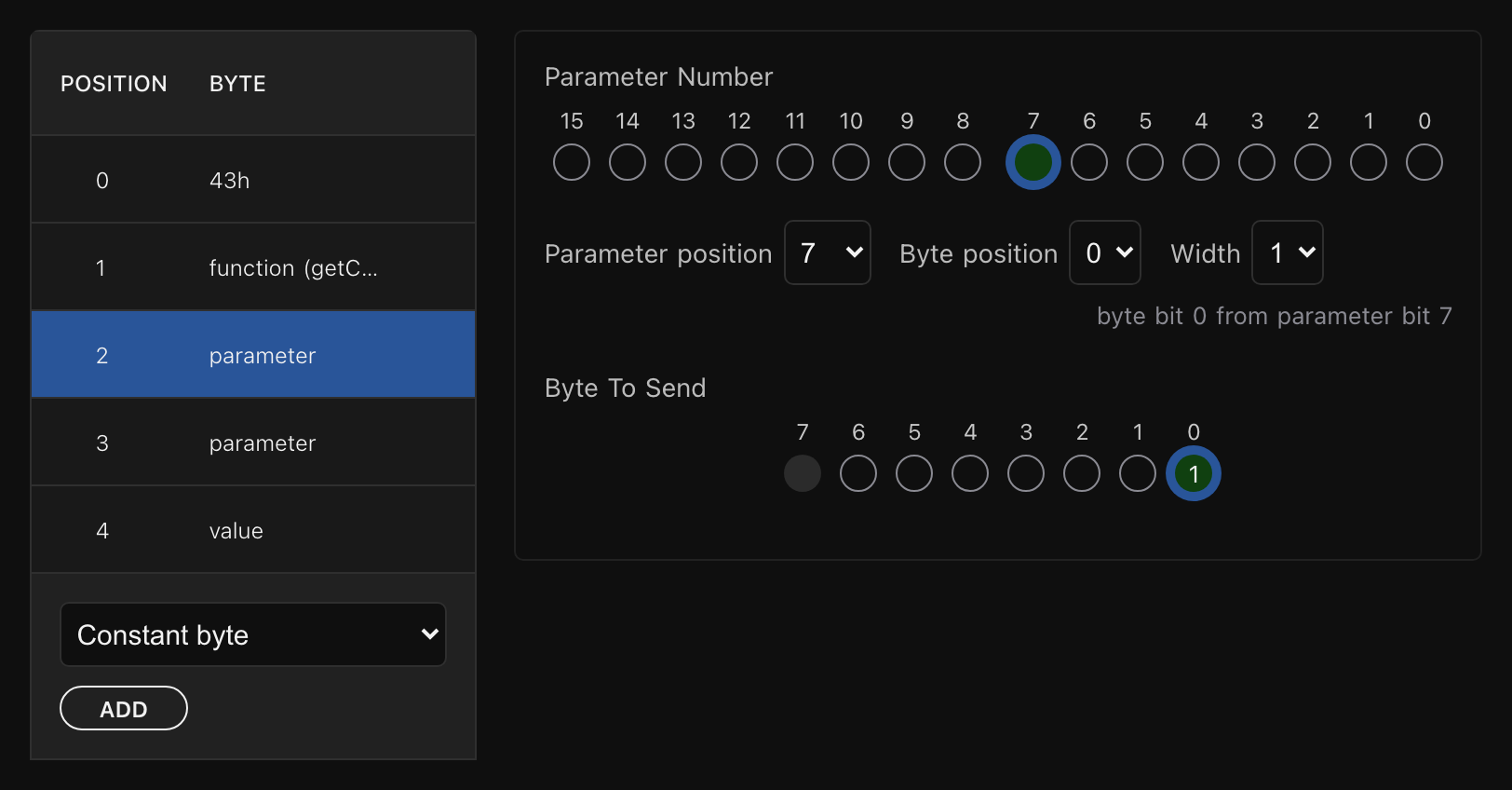
The picture is worth more than the three numbers. The top row is the parameter number, sixteen bits wide, with the one bit this byte carries lit. The bottom row is the byte that will be sent, with that bit in place. Underneath, in words: byte bit 0 from parameter bit 7.
Send again and turn every knob on the page:
F0 43 10 00 79 3F F7     ← OP1 Level, 121: bit 7 is 0, so the group byte is 00
F0 43 10 01 06 1F F7     ← Algorithm, 134: bit 7 is 1, so the group byte is 01
F0 43 10 01 07 05 F7     ← Feedback, 135
The six operator levels are unchanged, because their numbers are all below 128 and their eighth bit is zero. The two that were broken are fixed. One edit, in one place, and the whole page is correct - where the same fix across eight local templates would have been eight edits, and across a DX7 editor, 155.
5. The channel byte
Every control now follows the device's Parameter number. The device's Channel is another matter.
Set the device's Channel to 3, send, and turn a knob. The console still says 43 10. You changed the channel and not one byte moved.
SysEx carries no MIDI channel of its own, so the synthesizer puts one inside the message: that second byte is 1n, where n is the channel minus one. 10 is channel 1 and 12 is channel 3. We typed 10 as a constant, and a constant is a constant however the device around it is configured.
Nothing tells you, either. The Channel field is right there, filled in, apparently meaning something, and the messages go out perfectly well formed. They simply reach the wrong instrument, or none.
A byte does not have to be a constant. It can be a Lua function, called each time the message is rendered and asked for a number. Open the Lua tab and add four lines:
lua
function getChannelByte(device)
    return (0x10 + (device:getChannel() - 1))
end
The function is handed the device the message is going to, so it can ask what channel that device is on. Back on the Messages tab, replace the constant 10 with a Lua function byte named getChannelByte.
Send and turn a knob: the console says 43 12, which is channel 3. Set the device's Channel back to 1, send again, and it says 43 10 - with no edit to the message at all. The Channel field means something at last, for all eight controls at once.
A function byte is a wildcard on the way in
Electra One cannot run a Lua function backwards, so when a template is matched against an incoming message a function byte matches any byte. That is usually what you want: the same byte computes the right channel going out and accepts whatever channel comes back.
A patch response header behaves differently - there the function is called and its answer compared, because a header's job is to tell one dump from another.
Many instruments need this byte under another name. Roland calls it a device id, Waldorf and Access a device number. Where you only need to receive, an Any byte does the same job by matching whatever arrives.
6. Making the message listen
Everything so far could have been done with eight local templates and a lot of typing. This step could not.
Our instrument sends its own parameter changes: move a slider on a DX7 and it puts the same message on the wire that it accepts. Dexed does too. Open its PARM dialog, set DX7 Out to your controller's Port 1 and DX7 Channel to 1.
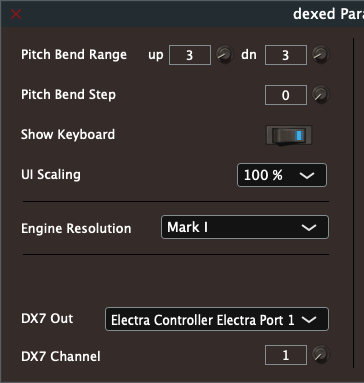
Then turn the message around. On the Messages tab, set Direction to Send and receive and send to Electra. Now turn knobs in Dexed - operator 1's Level, operator 2's, and the Algorithm - and watch the controller:
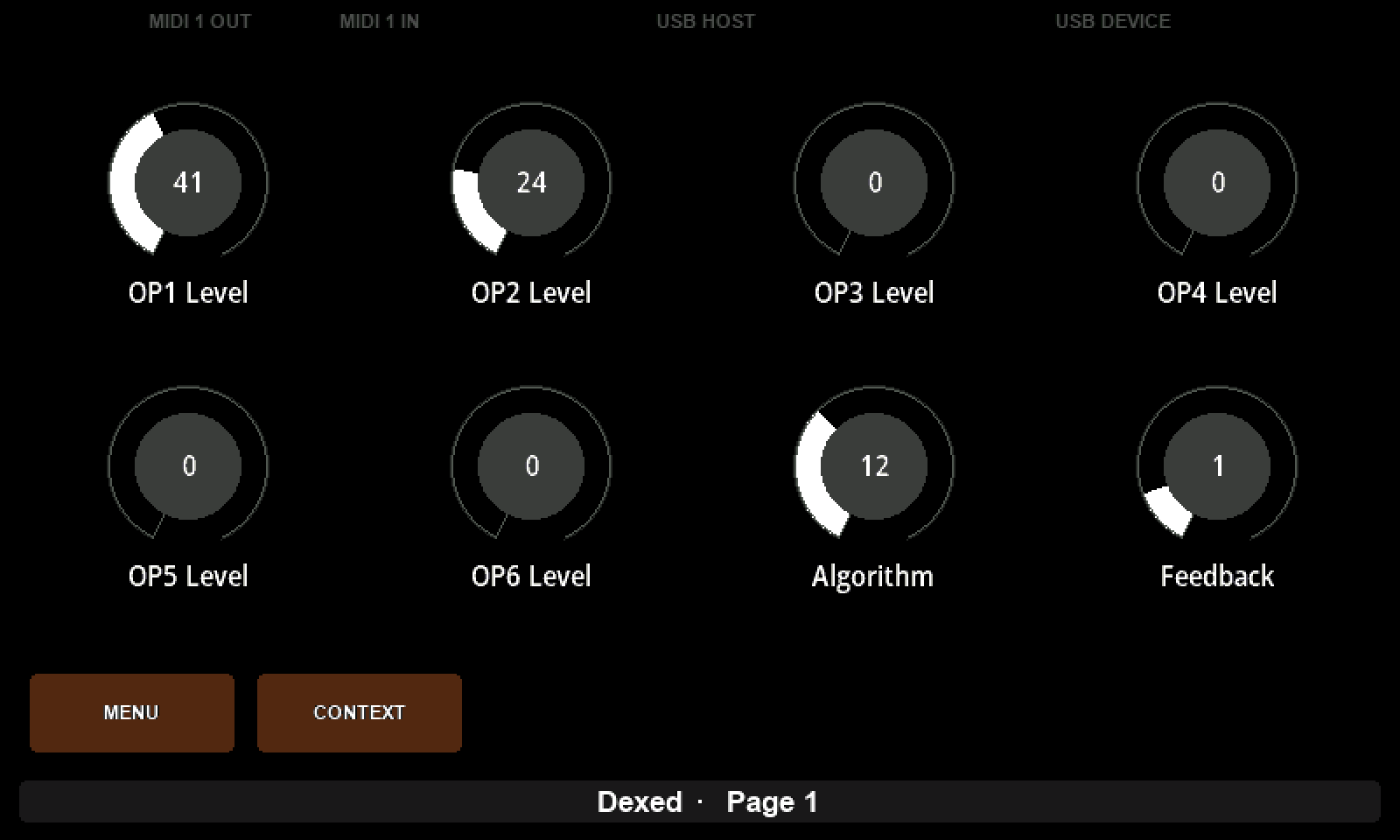
Three knobs in Dexed, three different controls on the Electra, one template. Nothing in the preset says which message means which control; the parameter bytes say it, and the controller reads them back out.
The Algorithm is the proof. It arrives as 43 10 01 06 0B, and the controller has to put 01 and 06 back together into 134 before it knows which control the message is about. The same two bytes that split the number on the way out reassemble it on the way in.
For a message to match, every constant byte has to be equal, the message has to be exactly as long as the template and no longer than 64 bytes, and it has to arrive on an interface the device is wired to. Parameter number and value bytes are read back out; Any, Checksum and Lua function bytes match whatever is there, so a checksum is never verified and a script is never run backwards.
A match writes the value straight into the controller's parameter map, which is what makes every control bound to that parameter follow at once - a watching group included. It is not sent back out: the value came from the instrument, and echoing it would be a loop. The console stays empty while the controls move.
Why the console shows nothing from Dexed
The console watches MIDI inputs - what the computer receives. Your controller's Port 1 as an input is what the Electra sends to the computer. Dexed writes to the destination of that name, and no application gets a view of what another application sends to a destination. A dedicated monitor such as MIDI Monitor sees it because it installs a driver that taps output to destinations, which a web page cannot do.
7. What a shared message cannot do
Try breaking it. Replace both Parameter number bytes with constants - 00 and 79 - so the message reads 43, the function byte, 00, 79 and the value. Those are exactly the bytes operator 1's level change arrives with, so the message still matches; it simply no longer says which parameter it is about. Every control still uses it. Send, and turn operator 1's Level in Dexed.
Nothing moves. Not OP2 Level, which is fair enough, and not OP1 Level either - whose parameter those constants name, and which is the only control the message could sensibly be about.
That follows from one question: when a message matches, which control is it for? The controller answers in three steps. The value byte's rule may name a parameter outright; failing that, a Parameter number byte in the message says which one it is; failing that, it falls back to the parameter number of the control using the template, which only works when the controls using it agree. Ours hold eight different numbers, so there is no answer, and rather than guess the controller leaves the template out of its matching altogether.
It does not warn you, and the message still sends perfectly. Sending never needed to know which control a message was for, because the control is the one doing the sending. Only receiving does. So a shared template with a constant where the parameter belongs is a preset that works until the day you set it to Send and receive and wonder why nothing comes back.
Put the two Parameter number bytes back, and it works again.
What to remember
- A device message is a SysEx template written once on the device and used by many controls. A control that uses one says only which parameter it is.
- A Parameter number byte turns that number into bytes, and two of them split a number too big for one byte the way the manufacturer does.
- The same template works backwards. Set to Send and receive, it catches every parameter change the instrument sends and delivers each to the right control.
- Receiving needs the parameter in the message. A shared template without a Parameter number byte is never matched, silently. Sending is unaffected, which is why the problem waits until you need it.
- A constant is a constant. A channel or device id typed as one ignores the device's settings; a Lua function byte reads them as it sends, and matches anything on the way in.
- Direction belongs to the message, so it applies to every control using it - and a template holding an Any byte cannot be sent at all.
- Switching a control to a device message discards its own template.