

Version5.0.0
Configuration
The configuration window is where the virtual controller is connected to the rest of your computer. It has two sections: MIDI ports, which makes the computer's MIDI ports into the controller's sockets, and Panel MIDI, which lets a MIDI controller on your desk play the virtual knobs and buttons. The second is described in its own chapter, Panel MIDI.
This window is a feature of the virtual controller. The firmware's own Settings window, with the buttons, the remote knobs and MIDI control, is reached through the menu as on the hardware and is described in the Mk2 and Mini guides.
Opening the window
There are two ways to open it:
- press
Cwhile the controller window is active, - click Configuration at the right end of the status line.
C closes it again.
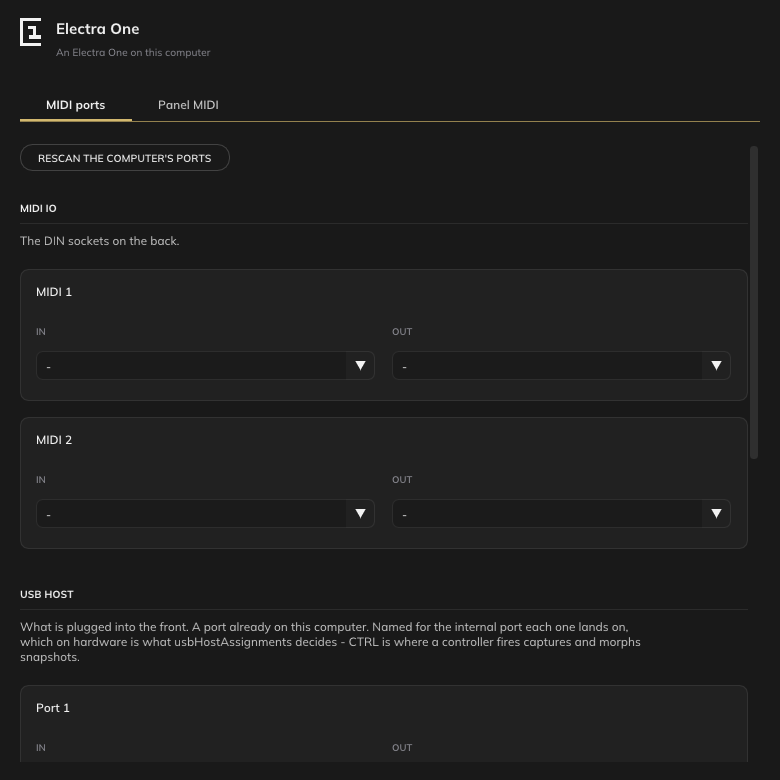
MIDI IO
The DIN sockets on the back of the instrument. The mk2 has two, MIDI 1 and MIDI 2, the Mini has one. Each has an In and an Out field, and each field is a list of the MIDI ports your computer has.
Whatever you choose becomes the socket: what arrives at that port arrives at the controller as if it came in through the DIN socket, and what the controller sends to the socket goes out of that port. A device assigned to MIDI 1 OUT in a preset sends to the port chosen as MIDI 1 Out.
Any MIDI port on the computer can stand in for a socket: a USB MIDI interface with a synthesizer on it, a virtual bus such as the IAC Driver on macOS, or a port of a software instrument. - leaves the socket unconnected.
USB host
The USB host ports at the front of the instrument, where a USB MIDI keyboard or controller is plugged in. There is a card for each port, with the same In and Out fields.
A controller that is already a port on your computer is attached here, and the firmware sees it exactly as it sees a controller plugged into the hardware's USB host socket: the USB Host Assignments of the controller's configuration decide which internal port a device lands on, Port 1, Port 2 or CTRL, and the cards are named for those. CTRL is where a controller fires captures and morphs snapshots, as it is on the hardware.
USB device
The ports the instrument offers to the computer when it is plugged in over USB. These are not chosen; they are created when the virtual controller starts, and the section lists them:
| Port | What it is |
|---|---|
Port 1 | the first USB MIDI port of the controller |
Port 2 | the second |
CTRL | the port the editor talks to the controller on |
Their names on the computer carry the controller's name first, Electra mk2 Port 1 and so on, or Electra Port 1 when started with no name. This is where a DAW or the editor connects: open these ports in the other program, as you would open the hardware's.
Rescan
The lists of ports are read when the window opens. If you plug something in while the window is open, Rescan the computer's ports reads them again.
Where the choices are kept
Everything chosen in this window is written, when the controller is closed, to a text file beside the model's card folder, mk2-host-settings.txt or mini-host-settings.txt in the .electra-one folder in your home folder, and read back at the next start. The ports are attached again as they were, so the work of finding the right ones is done once.
The file has one setting to a line and is meant to be readable:
port io 0 in IAC Driver Bus 1
port host 1 out nanoKONTROL2
surface Launch Control XL
pot 0 cc 74 channel 1 mode relative encoding twosComplement steps 1
button 3 note 36 channel 1
You can edit it by hand while the controller is not running. A port named in the file that is not on the computer at start is left unconnected, and a line the controller does not understand is skipped.
Each model keeps its own file, so the virtual mk2 and the virtual Mini can be attached to different ports and played by different controllers.